
What SolPump Terminal is and who it's for
Many people know SolPump through solpump.io, an on-chain casino running on Solana, and its $SOLPUMP token. The trading terminal came later: the team launched SolPump Terminal at trade.solpump.io on May 19, 2026. You use it straight in the browser, on both desktop and mobile.
At launch, SolPump focused on three things: a bot that enters trades on its own off any channel's calls, real-time stats for each channel, and copy trading. In September and October 2026, the terminal added automatic TP/SL, a drag-and-drop layout, a wallet leaderboard, X account tracking and a few other features. The terminal is Solana only.
On the menu you'll find Terminal (the trading page for each token), Scanner, Memepool, Wallets, Trackers, Autobots, plus Watchlist, Rewards and a Casino button that takes you over to the casino.
In our view it suits best people who already have a few call channels or wallets to follow; the verdict section near the end of the article goes into more detail on who should and shouldn't use it.
Autobots: let the bot buy on calls for you
Autobots is the terminal's biggest distinguishing feature and the main reason to pick it. You choose a signal source, set your buy and sell rules, and switch the bot on; from then on, whenever that source mentions a token, the bot enters on its own following your rules, without waiting for you to click.
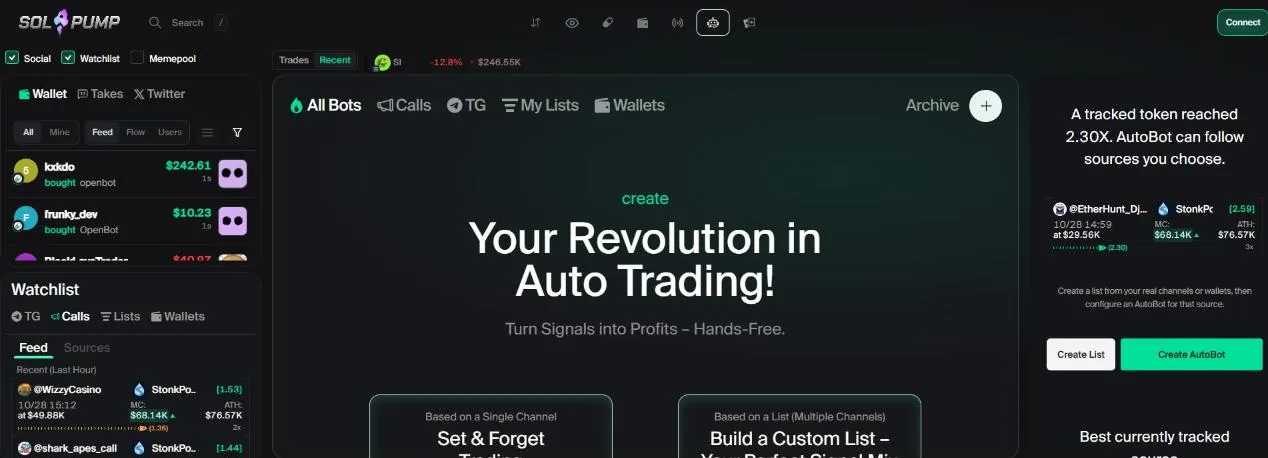
- The source is a channel or a personFollow a channel, or a specific caller. The Connect your Telegram button pulls the Telegram channels you've joined straight into the source list.
- Group sources into ListsPut several channels and wallets in one list, weed out the channels that call badly so only good signals remain, then hand the whole list to a single bot.
- When to buy, and how muchBuy as soon as the call drops, or wait for the price to pull back by a percentage you set; the amount per trade is up to you.
- Source scoringPerformance Ranking scores each channel and caller by win rate and profit, so you know which source is performing best right now.
Each bot has its own page listing pending orders, filled orders, logs and PnL. Stop halts the bot, Start runs it again; stopped bots go to Archive.
Find wallets worth following in Wallets, then let the bot copy them
To copy trade profitably, you first need a wallet worth copying. Wallets is on the menu and is also a tab of Scanner: this table ranks wallets by PnL and win rate, with several timeframes to choose from. Open a wallet and you see what it's holding, what it has bought and sold, where its funds came from and where it has sent them.
SolPump pre-labels a few wallet groups such as KOL, FOMO, Pump.fun. Click Follow to follow a wallet; activity from all the wallets you follow is collected into one dedicated feed. The terminal also has a real-time trade stream and a money-flow chart showing which tokens are pulling in money.
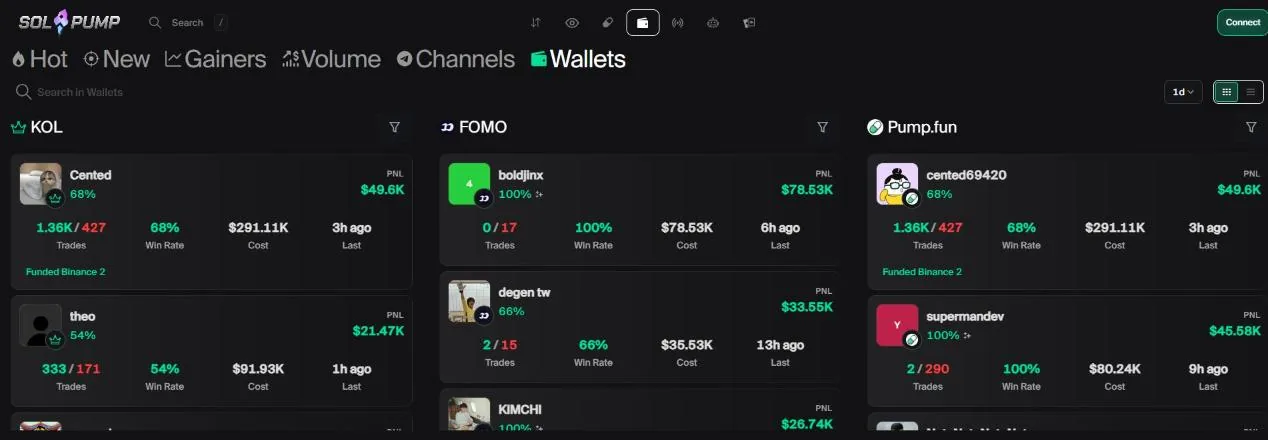
Once you've picked a wallet, go to Autobots, open Copy Top Wallets, paste the wallet address and set how the bot buys and how it sells.
- How much per buyThere are three ways to size it: a fixed amount for every trade; the source wallet's trade size multiplied by a ratio; or a percentage of your current balance.
- Whether to follow sellsIf you turn on sell copying, there are two modes: the bot sells the same percentage the source wallet dumps; or the bot sells a percentage you set of the position it's holding. Enter 0: the bot skips that sell, and from then on copies no more sells for this position.
- Automatic exitsEvery position the bot opens can have a take profit level and a stop loss level preset, including a trailing stop loss.
If copy trading is your main way of trading, also see the copy trade bots we rank.
Scanner and Memepool: filter tokens from the moment they launch
People hunting new tokens will start at Scanner. Its six table tabs are Hot, New, Gainers, Volume, Channels, Wallets; every table can be re-sorted by token age, volume, liquidity or price gain.
The Pump.fun tab in Scanner is Memepool, where tokens are split into three columns by lifecycle. Newly Created holds freshly created tokens. About to Graduate holds tokens whose bonding curve is nearly full. Graduated holds tokens that have moved to a DEX pool. Tokens come from launchpads such as Pump.fun, PumpSwap and Raydium LaunchLab.
Each column has its own filter funnel: market cap, the share held by the top 10 wallets, dev wallet, sniper count, follower count on X, plus a few other criteria.
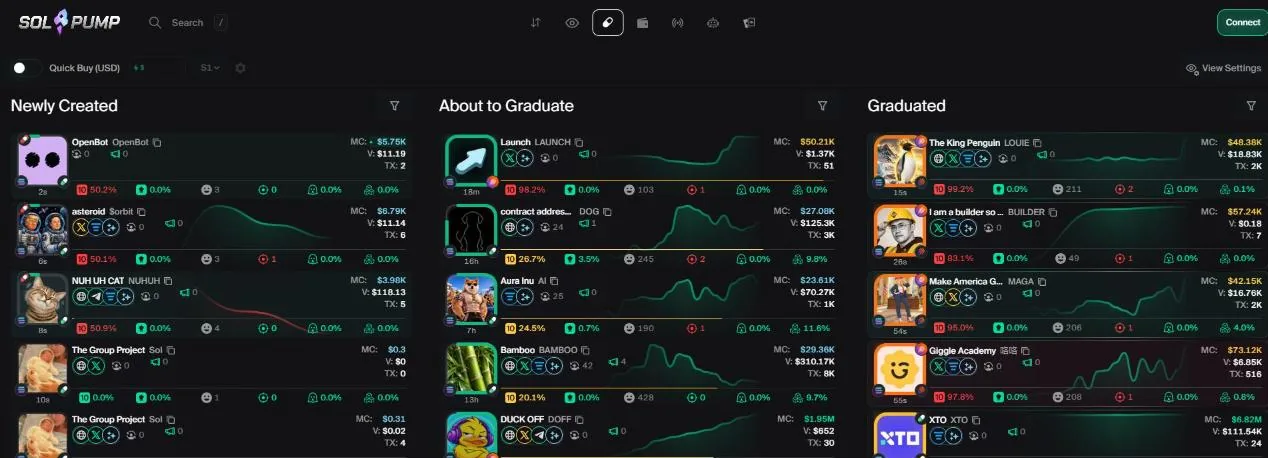
Since October 2026, you decide what the token card shows: which metrics, which buttons, which warning flags (sniper, bundler, insider, whether the token has paid for DEX Screener), then drag and drop to reorder. The card has a quick buy button built in. Any dev or X account you don't want to see again can go on the block list.
Signals from X and Takes
SolPump Terminal has its own X feed. You search for authors, follow them, then read new posts from those accounts right inside the terminal; the feed can be filtered by token, by keyword, or both. On a token's page, the terminal also shows tokens that share an X community or the same creator with the token you're viewing.
Takes are opinions written by traders, about the market in general or about one specific token. You read Takes in the general feed, on each token, or right on the chart. When an account you follow posts a new Take, the terminal notifies you.
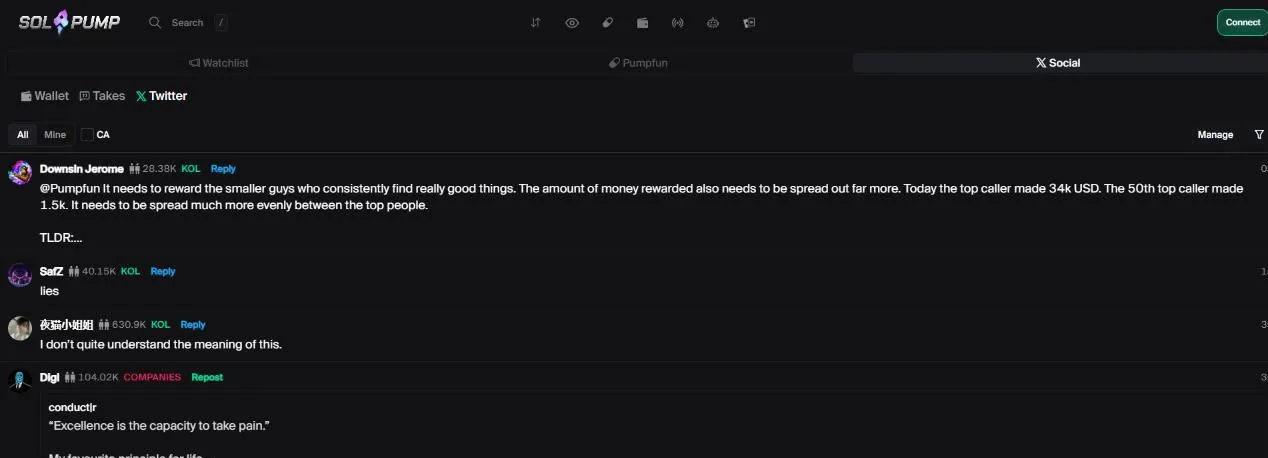
Because channel calls and X posts sit on the same Watchlist page, you can cross-check quickly before letting Autobots keep following a source.
Token page, limit orders and take profit / stop loss
Click any token and you land on its Terminal page. The middle is a candlestick chart; around it are the trade history, holder and trader lists, the number of sniper, bundle and insider wallets, and the share of supply the dev wallet still holds.
The safety check panel answers: can more of the token still be minted (Mintable), can holders' wallets be frozen (Freezable), has the pool been burned, does the token show signs of a honeypot, and what are the buy and sell taxes.
The chart marks every buy and sell; you can filter the markers by order size or keep only the trades from your own wallet. Traders' Takes also show on the chart. The order panel beside it has two modes, Market and Limit, plus a row of quick buy and sell buttons.
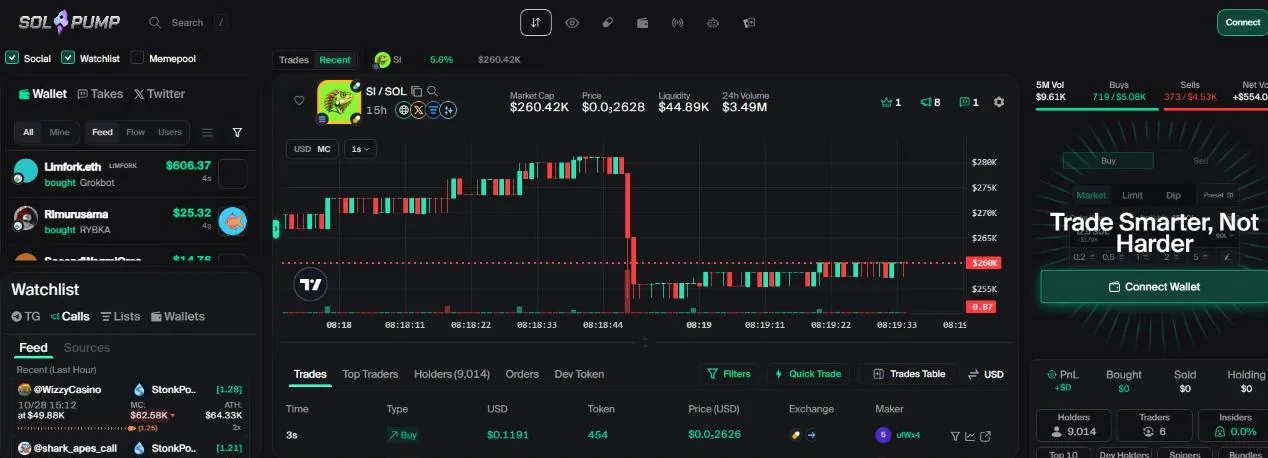
- Limit ordersBuy when the price pulls back by the percentage you choose, or when market cap hits a preset level.
- Take profit and stop lossAttach Take Profit and Stop Loss to a position, including Trailing Stop Loss: the stop level moves up on its own as the price makes a new high. The levels show as lines on the chart; drag a line to change the level.
- PresetsPreset buttons for buy amounts and sell percentages, with as many rows of buttons as you like, and values shown in SOL or USD as you prefer. Gas and slippage are also adjusted here.
- Bribe against sandwichingBribe is a tip paid to validators, and in return your order is sent via an anti-sandwich route. The terminal suggests a priority fee and bribe level based on how congested the network is at that moment.
- Routing through multiple poolsSince October 2026, the terminal automatically finds routes through several pools in sequence when that gives a better fill price. Also from that update, the terminal supports tokens with unusual trading pairs, such as NVIDIA/PEPE.
Trackers, Watchlist and monitoring tools
Anyone used to opening a dozen tabs will find Trackers handy: a blank page where you assemble tools into tiles, including Watchlist, PumpFun, Terminal and Scanner, then drag to rearrange, resize, pin and save the layout.
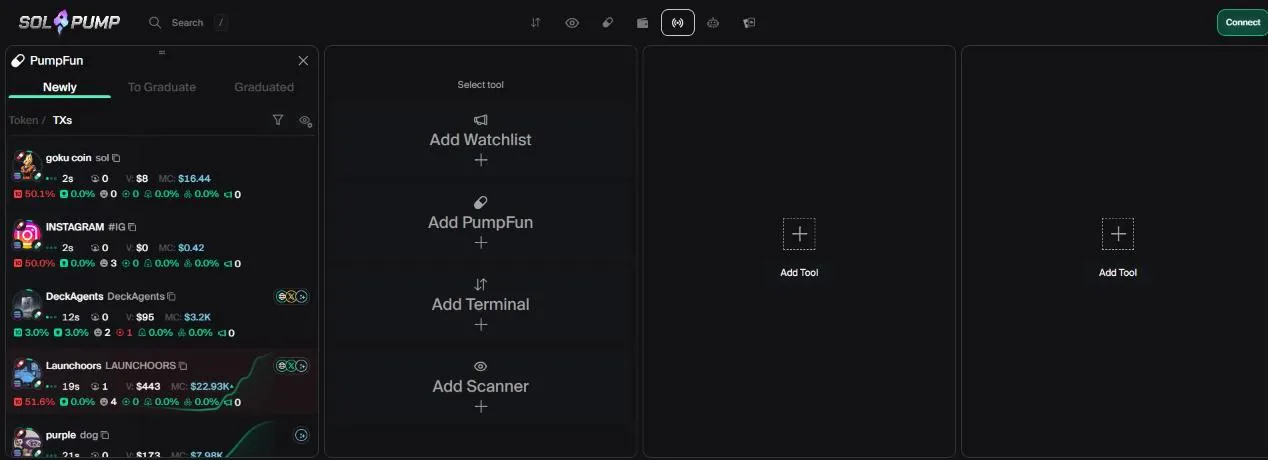
- WatchlistNew calls from the Telegram channels you follow and from your own lists show up the moment they arrive, along with the tokens you've bookmarked.
- Alert sounds by typeAlert sounds are split into five types: calls, wallets, bots, orders and social; each can be switched on separately.
- LighthouseA market overview on one page: activity level, volume, tokens that just graduated, and the average market cap at graduation for each launchpad over the last 24 hours.
- P&LA profit and loss table for 30 days, 7 days and 24 hours, broken down by platform. The figures are net of trading fees, and can be exported as an image to share.
Fees per order, cashback and the referral program
SolPump's official announcements don't mention the fee rate. The figure we recorded is 1% per order, on both buys and sells; check the fee shown in the order panel before you hit buy. Every order also carries the Solana network fee and a priority fee; with anti-MEV on, a bribe is added on top.
The Rewards page gives you back part of the fee on every order as cashback, and adds $SOLPUMP tokens based on volume; both are credited to your SolPump account. The rebate rate for each tier only shows once you've connected a wallet, so you have to go to this page to find out.
Referral program: you set a code (which is also your username) and send the link to friends. Accounts climb through the tiers Normie, Newcomer, then Bronze, Silver, Gold, Platinum and Diamond. SolPump hasn't published the referral commission rate.
To put this fee next to other bots, see our bot comparison table.
Safety: the trading wallet, fake sites and the Casino button
On Oct 28, 2026, when we re-checked, there was no confirmation of any hack at SolPump. Even so, there are a few things you should keep in mind:
- Right address, right channelsThe only trading address is trade.solpump.io. Official accounts: X @Spumpio and the Telegram group Solpump Community.
- Login needs no transactionWhen you connect, the only thing your wallet has to sign is a verification message; no transaction is created. If a site makes you sign a transfer under the pretext of logging in, it's a scam.
- The terminal's own trading walletThe terminal creates a separate wallet to sign orders itself while your bots run. Don't leave much money there: deposit just enough for the orders you plan to run, and move profit back to your main wallet as it comes in. This wallet lets you export the private key.
- Casino right on the menuThe Casino button opens SolPump's casino, and money can move between the two. That's gambling, not token trading: don't let your trading funds drift over there.
Our verdict: strengths, weaknesses and who it's for
Suits Solana memecoin traders who already have a few call channels or trusted wallets, want the bot to enter trades for them, and are willing to check each source's win rate. Doesn't suit people who need multiple chains, people who want fees and commissions published clearly, newcomers planning to let a bot follow unknown channels with big money, and anyone prone to slipping into gambling.
- Call-driven automationAutobots follows channels, callers, lists or wallets, plus the Performance Ranking table to pick sources by numbers instead of gut feeling.
- All the tools in one web appScanner, Memepool, wallet rankings, X, Takes and the order panel in one terminal, which opens in a browser on phone or desktop.
- Plenty of risk indicatorsMintable, Freezable, honeypot and tax checks; sniper, bundler and insider flags on the token card; block lists for devs and X accounts.
- PnL after feesThe P&L table has trading fees already deducted, so on small orders you know whether you're really in profit. Cashback and volume-based $SOLPUMP offset part of the fee.
- Fees not officially published1% each way is the rate we recorded. Tier rebate rates only show after you connect a wallet, and the referral commission has no published figure.
- Solana onlyYou can't trade on any other chain.
- A casino next to the trade buttonIt takes one click to reach Casino, and money can move back and forth: a real risk for anyone prone to getting carried away.
- Short track recordLive since May 19, 2026, with many features added in September and October 2026. Our Oct 28, 2026 check found no confirmed hack, but the track record is still short.
- Always behind the signal sourceA call-following bot buys after the caller, and a bot copying a heavily trading wallet racks up fees. Going in big without a test run is an easy way to lose heavily.
If you're weighing several browser-based terminals, our web bot ranking is the place to keep comparing.
Try SolPump Terminal in three steps
- Open the SolPump Terminal pageClick our link below. Going this way, you don't pay any extra fee.trade.solpump.io
- Connect your wallet and sign to verifyClick Connect, pick your Solana wallet, for example Phantom, then sign the verification message; this step is free. The terminal then creates a separate trading wallet for you to deposit SOL into.
- Test with a small amountDeposit a small amount of SOL. Buy a token you found in Scanner, or build an Autobot that runs on a small sum, and remember to set a stop loss before you switch it on.
Through our referral link, at no extra cost.
Open SolPumpScreenshots taken on November 16, 2026; the interface may change. Not investment advice: memecoins are high-risk, only use money you can afford to lose.