
What GMGN does and where it runs
GMGN combines two things in one memecoin terminal: on-chain data to vet tokens and wallets, and tools to place orders, copy other wallets' trades and snipe fresh launches. From filtering tokens and checking the contract to hitting buy, it can all be done right on gmgn.ai.
GMGN runs on Solana, Ethereum, Tron, Base, BNB Chain and several other chains, but copy trade, SnipeX and API orders are only available on a few of them; we note this in each section.
- Web version gmgn.aiHas everything described below, from Trenches to perps. Log in with Telegram and confirm through GMGN's official bot.
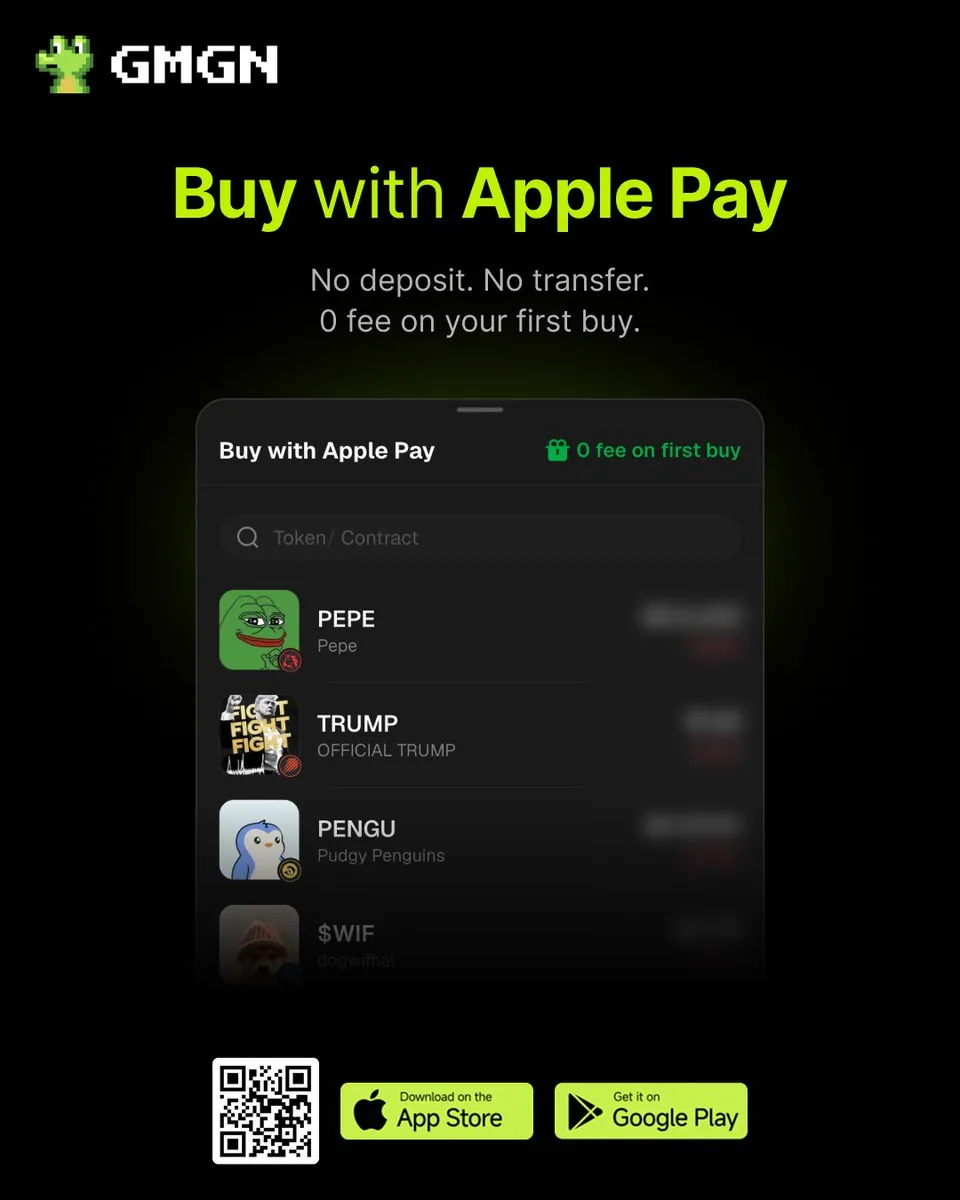
- iOS and Android appDownload from Google Play or the App Store; the app has charts, quick buy/sell buttons and smart money wallet alerts. Since Oct 26, 2026, app users can pay with Apple Pay when buying memecoins, with no need to fund a wallet first, and the first purchase is free.
- Telegram botA trading bot just for Tron, Base, Solana, BNB Chain and Ethereum, plus a separate bot for wallet alerts.
GMGN suits people who trade memecoins every day and like checking the data themselves; if all you need is a lightweight copy bot, you'll find a lot of it superfluous.
Finding tokens: fresh launches in Trenches, money flow in Trending
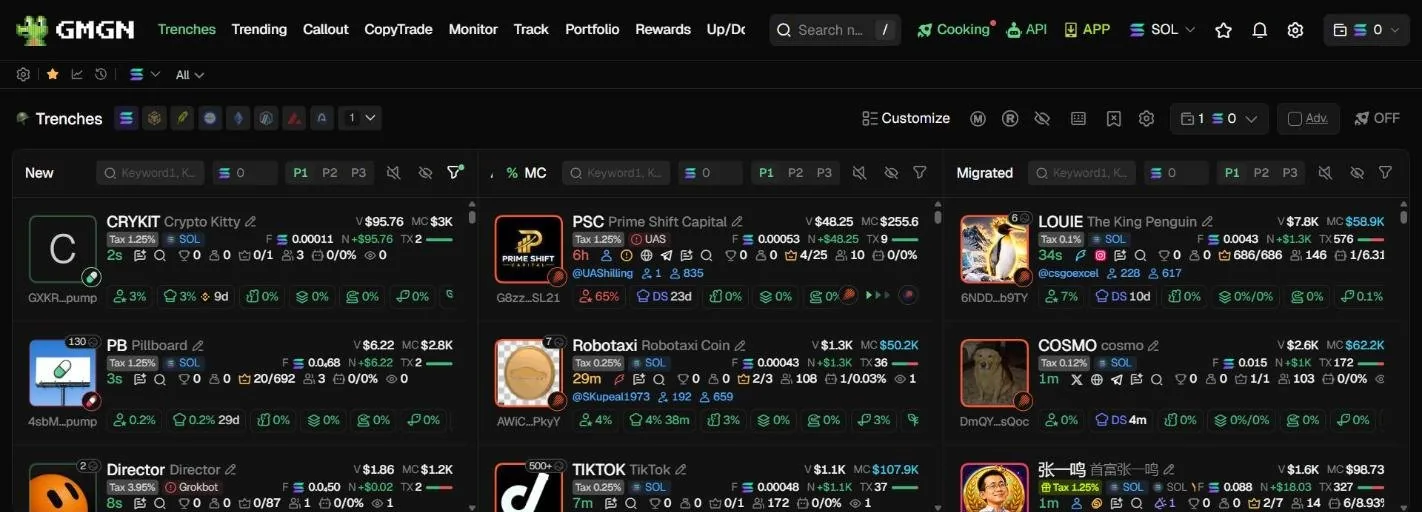
The moment you open gmgn.ai you land on Trenches, where new tokens are sorted by lifecycle stage. New is tokens just created on a launchpad such as Pump.fun; Almost bonded is tokens whose bonding curve is nearly full; Migrated is tokens that have moved to a DEX pool.
Each card shows volume, market cap, holder count, token age, social links, tax, plus risk metrics for the dev (how much they still hold), insiders, snipers and bundlers (wallets that bundle transactions). Since Nov 19, 2026, GMGN also detects bundled wallets and transactions within milliseconds using its Proxima tool and flags them in real time; GMGN says this feature is only on GMGN. At the top of each column there's a keyword box, a detailed filter panel and a field for the SOL amount: when you spot a token you like, buy straight from the card without opening the detail page.
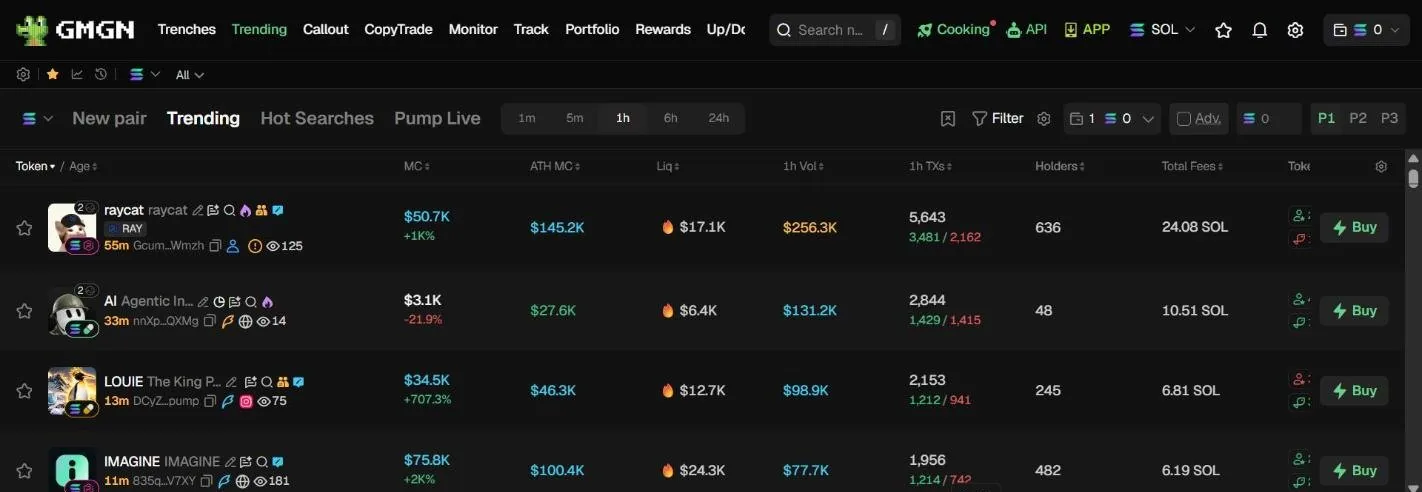
To see where money is flowing, check Trending: tokens ranked by activity over 24 hours, 6 hours, 1 hour, 5 minutes or 1 minute, with market cap, all-time high (ATH) market cap, volume, liquidity, holder count, buy count, sell count and total trading fees. Next to it are the tabs New pair (newly created pairs), Hot Searches (most searched) and Pump Live (tokens livestreaming on Pump.fun).
Trenches suits people who want to get in really early and can stomach high risk; Trending suits people who only follow tokens that already have real money flowing in.
Before you buy: check the contract and see who's accumulating
Click a token and its own page opens: a candlestick chart in the middle (you can open several charts side by side), tabs for holders, top traders, trade history, the group of earliest wallets, and whether the wallets you follow have bought or sold this token.
The first thing we look at is Token Audit. This panel scans the contract for things like: whether mint authority (the ability to print more tokens) is revoked, whether there's a blacklist that can block sellers, how much of the liquidity pool has been burned, and whether the top 10 holders combined hold under 30%. GMGN itself says this is for reference only; use it to rule tokens out quickly, then verify elsewhere.
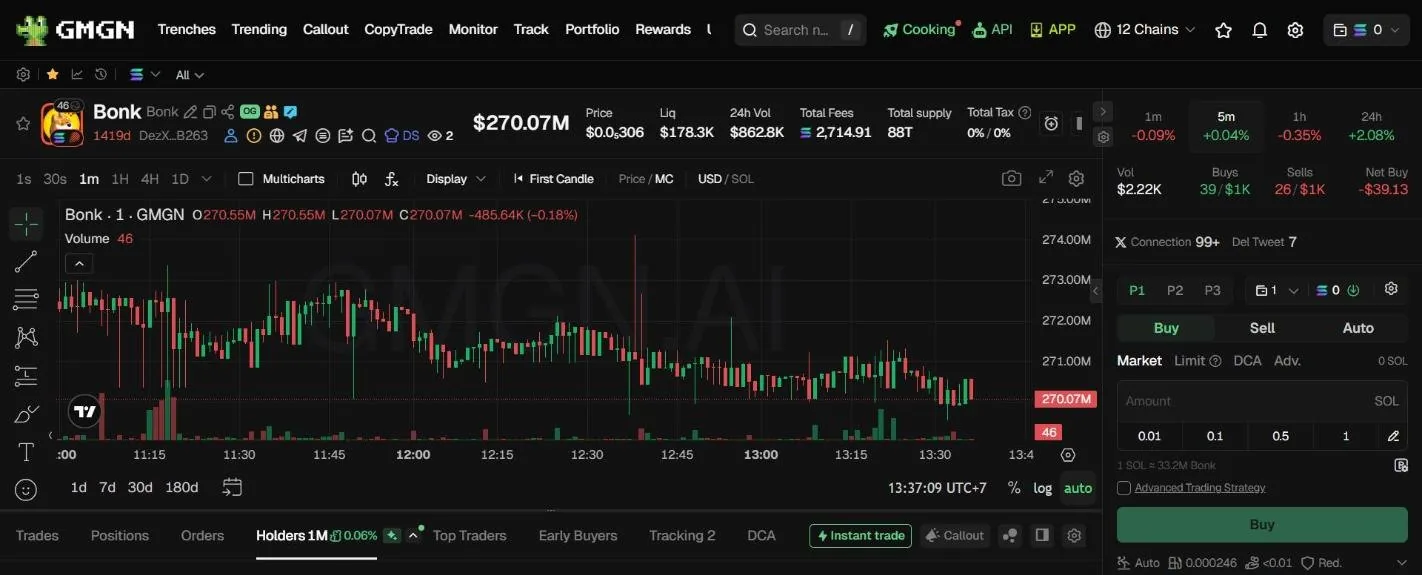
A clean contract isn't enough; you also need to know who's buying. GMGN tags wallets: Smart Money (usually profitable traders), KOL (verified X accounts), sniper (buys in the first few blocks), insider, fresh wallet… Since Nov 20, 2026, token pages also have a Team Tag for the team or community behind a token; teams that want a tag can apply to GMGN.
Monitor combines the activity of those wallet groups: how many smart money wallets are accumulating a token, how much money has flowed in over the past 24 hours in total, and how much each wallet has added or dumped. To follow one specific wallet, add it to Track: as soon as that wallet trades, GMGN alerts you, on the web or through the Telegram bot.
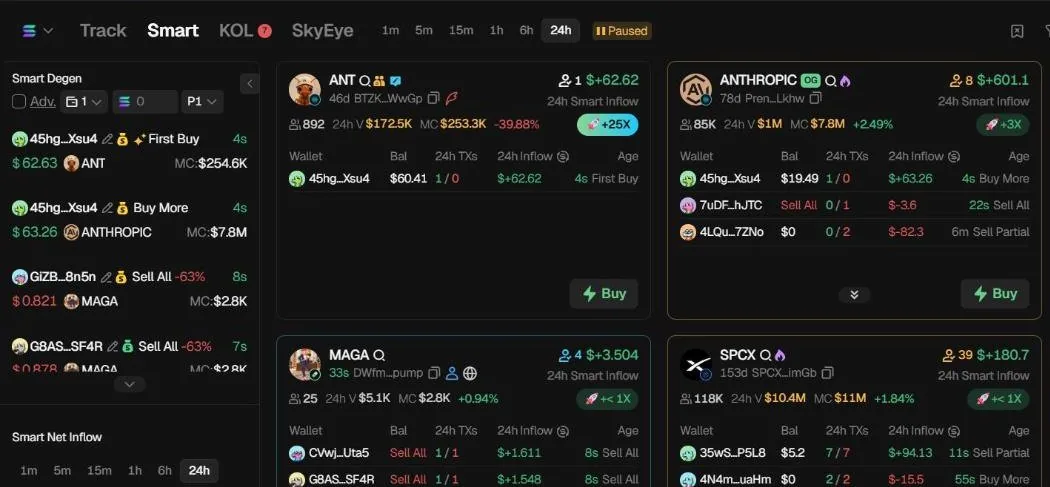
Wallet tags are only hints: a wallet that was profitable before can still lose, so several wallets entering the same token is more trustworthy than a single one.
KOL calls: Callout and X Tracker
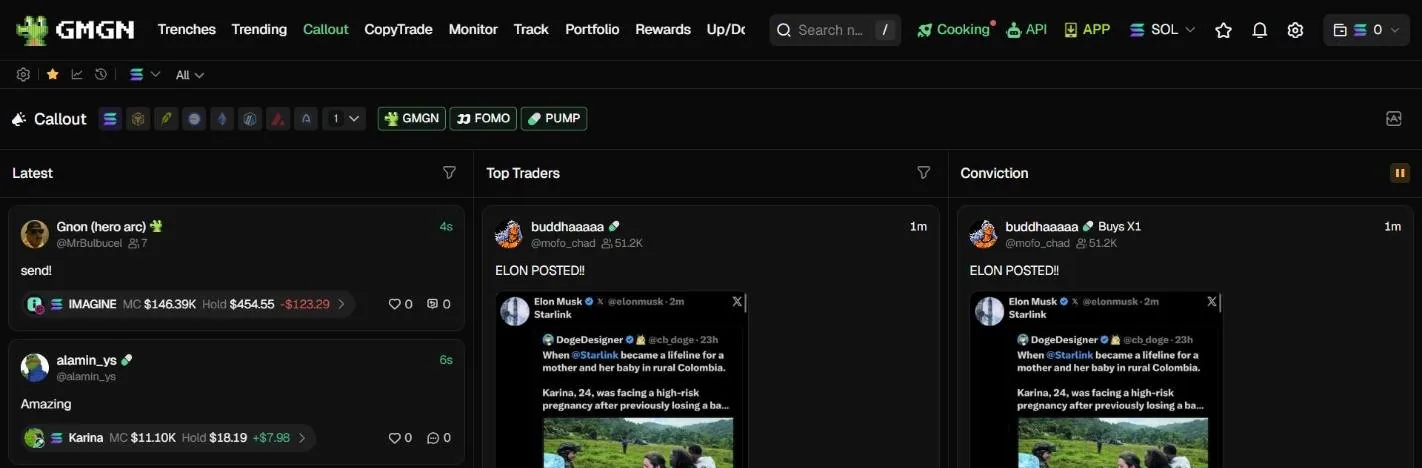
Callout collects calls posted by KOLs and traders on GMGN into three columns: Latest is new calls, Top Traders is calls from people with strong trading results, and Conviction is calls where the caller bought in multiple times themselves (shown as Buys X2, X6…).
Every post comes with the token mentioned, its market cap, how much the poster still holds in the token and whether they're up or down: you can see at a glance who put real money in and who's just shilling. We think this is the most valuable part of Callout. The filter lets you pick the chain and launchpad (Pump, Fomo, GMGN).
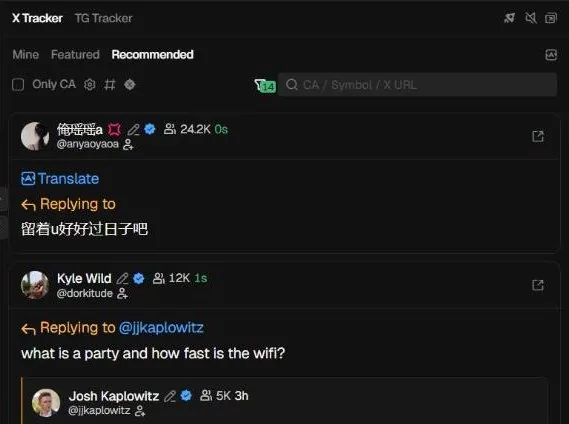
X Tracker watches more than 2,000 KOLs and traders on X in real time: retweets, replies, quotes, new posts, even when they edit their bio. Turn on Only CA and only posts containing a token address remain, with a lightning-bolt button next to each address for a quick buy.
X Tracker tells you what KOLs are saying on X; Callout shows whether the caller is actually holding the token. The two are best read together.
Placing orders, anti-MEV and managing multiple wallets
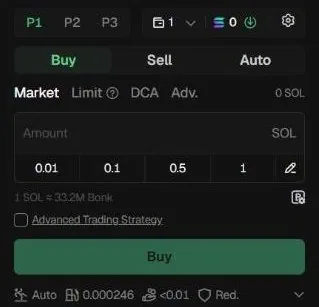
The order panel has three tabs, Buy, Sell and Auto, and the order types Market, Limit and DCA. Besides market orders there are:
- Price-triggered ordersLimit fills when the price hits the buy or sell level you set.
- Scaled buyingDCA splits a purchase into several buys.
- Buy with exit levelsThe Auto tab sets TP/SL right on the buy order, including a trailing stop loss and trailing take profit that move up with each new price high.
- Sandwich protectionTurn on anti-MEV and your order takes a private route so sandwich bots can't squeeze it; the priority fee must be at least 0.002 SOL.
- Multiple wallets at onceGMGN lets you quickly generate up to 10 Solana wallets, and you can import up to 10 existing ones. One order can run across several wallets at the same time. To consolidate or distribute SOL between wallets, you must enable 2FA.
Once you have a position, track it in Portfolio: remaining balance, volume, realized profit, unrealized PnL over 1 day, 7 days or 30 days, and a daily PnL calendar. A row of quick buttons lets you transfer, swap, deposit, withdraw, buy, consolidate funds into one wallet or distribute them across several. Below are the tokens you hold, trade history, pending orders, a button to share your wallet and one to import more wallets.
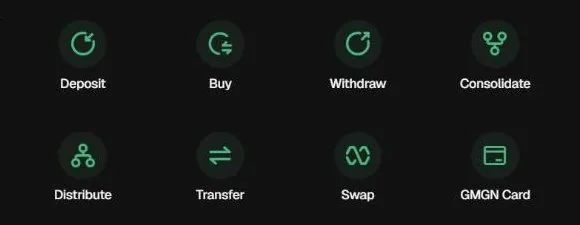
Beginners should stick to one wallet until they get the hang of it.
Automation: copy trading, SnipeX and Migrated Snipe
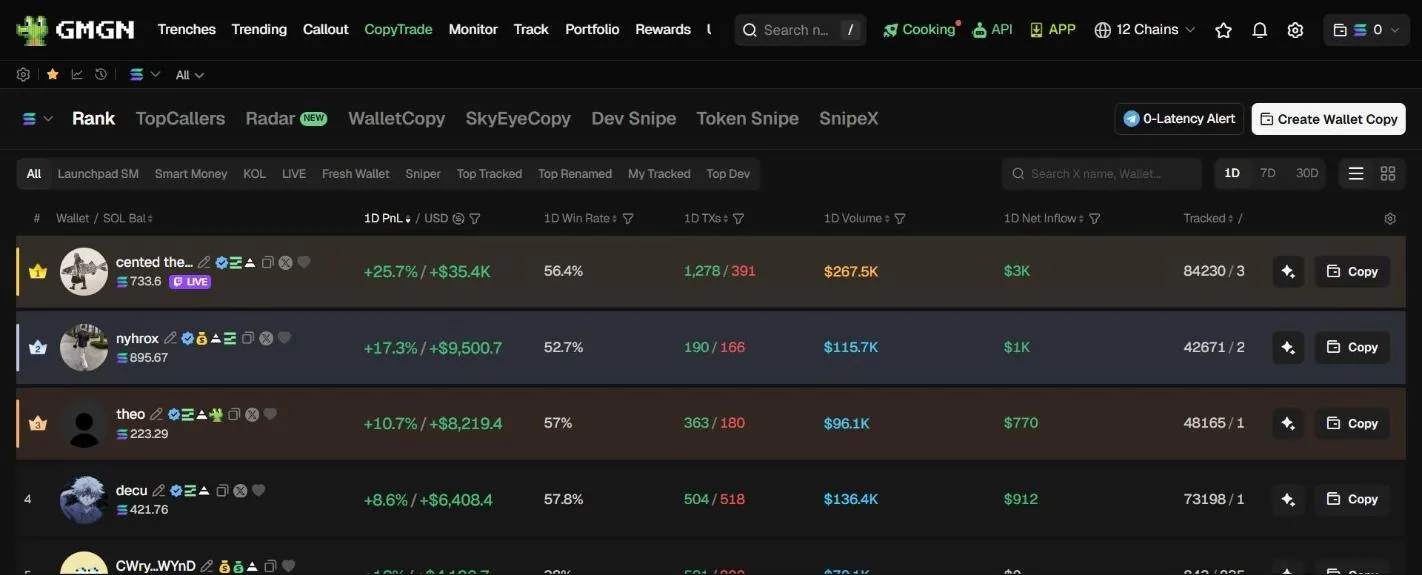
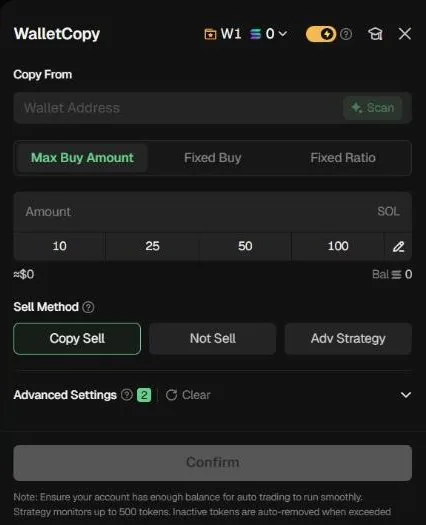
Copy trading starts at CopyTrade: wallets are ranked by win rate, PnL, volume and number of trades over 1 day, 7 days or 30 days, and you can filter separately for KOL, Sniper, Smart Money, top dev and new wallets. Click Copy at the end of a row to open the settings panel.
- How much to buyFixed Buy spends the same amount of SOL on every order. Fixed Ratio buys at a ratio of the source wallet's order size. Max Buy Amount mirrors the source wallet but caps at the ceiling you set.
- How to sellCopy Sell sells the exact percentage the source wallet sells. Not Sell makes the task buy-only, and you handle selling yourself. Adv Strategy splits take profit and stop loss into multiple levels.
- Which tokens get boughtThresholds for token age, liquidity, market cap and percentage of LP burned; buy each token only once; or only accept tokens from platforms you specify, such as Moonshot, Bonk, Pump.fun.
SnipeX connects X to buy orders: you pick an X account, and as soon as that person posts the contract address (CA) of a new token and the token passes the filters you set (token age, liquidity, market cap…), GMGN buys immediately. SnipeX is currently Solana only, each task runs for 7 days, each user can have at most 10 tasks, and the web version requires whitelist access.
Migrated Snipe buys the moment a token migrates to a DEX; set it up on the token page, in the Orders tab.
The copy trading side covers all the basic buy, sell and filter options; the only pity is that the web and app docs disagree on chains, so check carefully before copying outside Solana. To compare against bots built specifically for copying, see our list of copy trade bots.
Beyond memecoin trading: token creation, perps and Up/Down markets
Click Cooking in the menu bar to launch your own memecoin: pick an image (upload, choose from the library, ASCII art or AI image), fill in the name, ticker, X link and website, then choose a launchpad (for example Pump.fun) and click Cooking. The wallet you pick as the dev wallet must buy at least 0.1 SOL of the token itself.
You can create a token directly from a post in X Tracker, or rebuild an existing token. GMGN charges 1% (shown on the Cooking panel), on top of the token creation fee the launchpad charges separately.
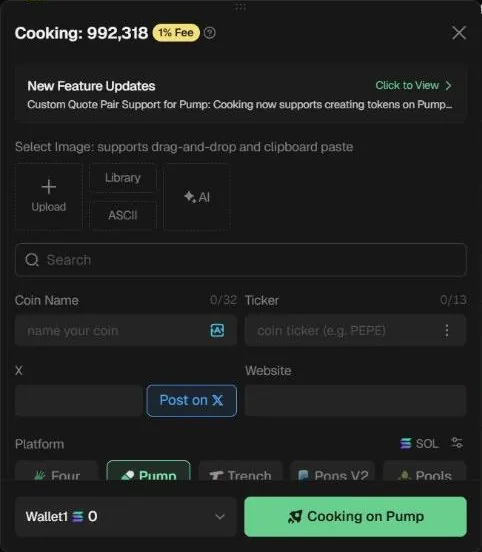
Create a token and you become the dev: other people will check your dev wallet holdings the same way you check them on Trenches.
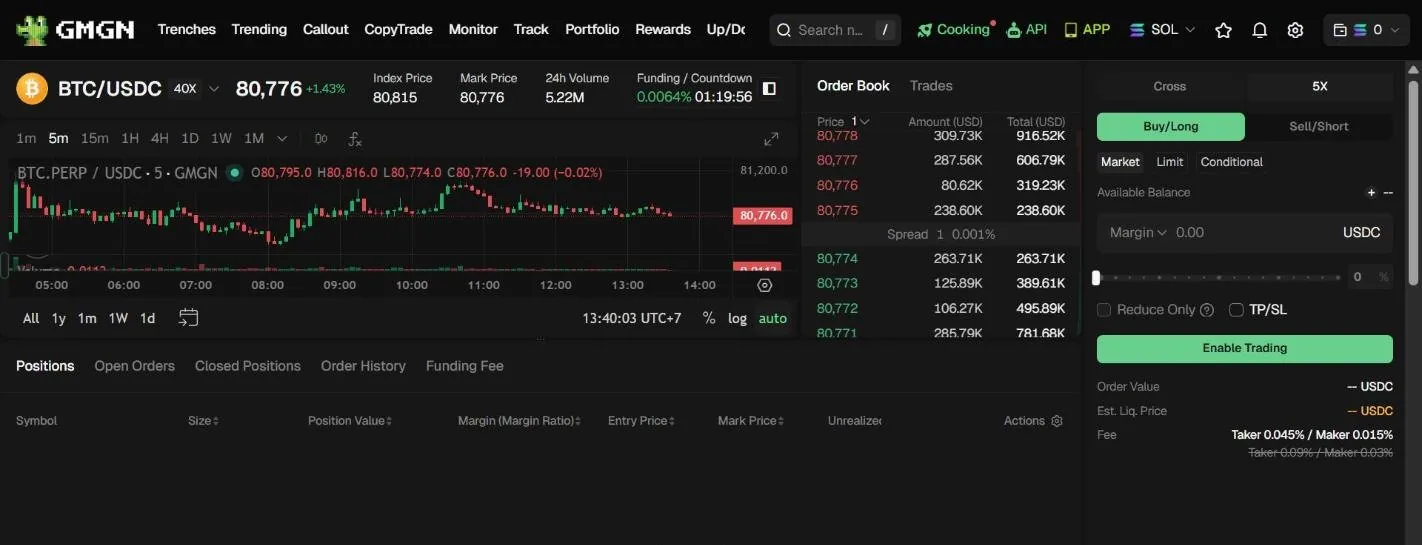
Perpetual (still in Beta) lets you open longs and shorts on perpetual contracts, for example BTC/USDC: margin in USDC, max leverage of 40x on BTC, with an order book, TP/SL and Market, Limit and Conditional orders. When the screenshot was taken (Oct 28, 2026), makers paid 0.015% and takers 0.045%: a promo rate at half the standard 0.03% and 0.09%, and it may change.
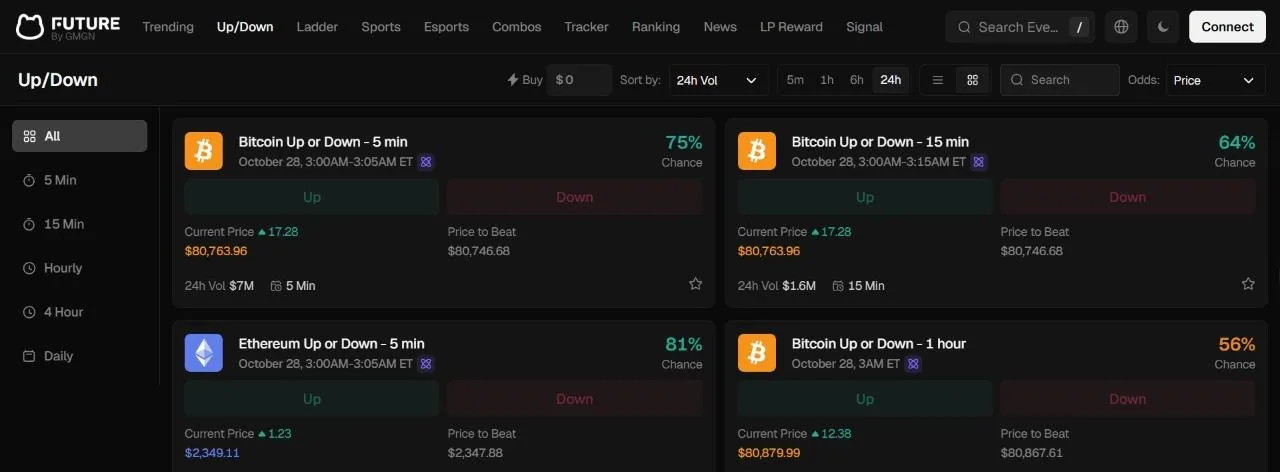
Up/Down takes you to Future (future.news), a prediction market built by GMGN: bet that the price of Bitcoin, Ethereum and others will go up (Up) or down (Down) over the next 1 day, 4 hours, 1 hour, 15 minutes or 5 minutes. Each market shows the probability the market is pricing in, the current price and the price threshold to beat. Future also offers sports and esports markets, plus two formats, Ladder and Combos.
Perps have leverage and Up/Down is a win-or-lose bet: the risk is very different from buying memecoins. We treat these as bonus features, not a reason to pick GMGN.
For people who build their own tools: API, skills and CLI
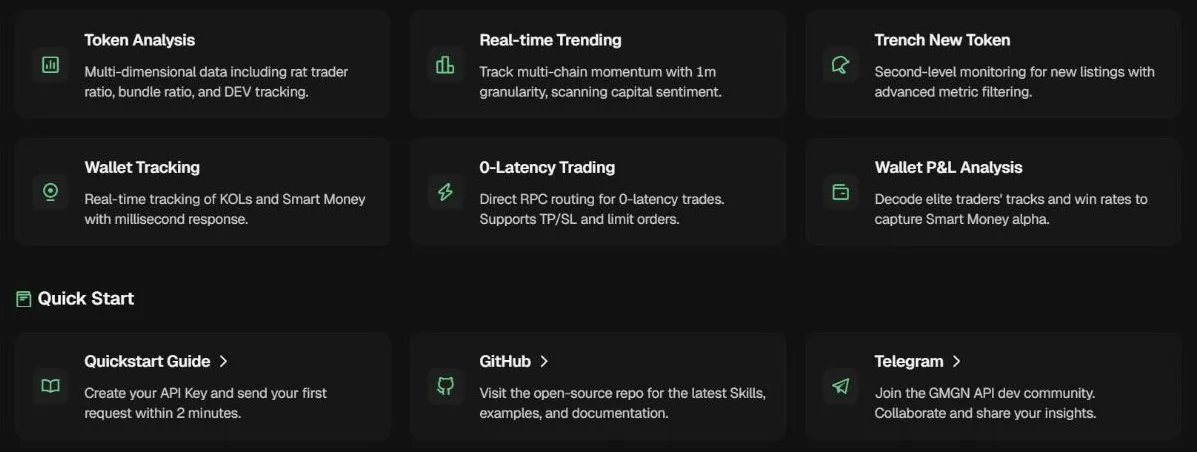
GMGN's API is meant for both developers and AI agents: pull token info, trending tokens, new tokens, track wallets and calculate each wallet's PnL; place quick buy and sell orders with TP/SL, or limit orders. AI agents get a set of skills installable with one command; if you write scripts, there's a command-line tool.
Each account is limited to 3 API keys, you need a balance of at least $100 to use the free tier, and API orders are currently available on Solana, Base and BNB Chain. Manual traders can skip this part.
1% fee each way and the rewards
GMGN charges 1% on every buy and every sell; their docs say there are no other charges. You also pay gas, the network priority fee and the launchpad fee (the platform where the token is issued); Pump.fun, for example, takes 1%.
A round trip, one buy and one sell, therefore costs about 2% of the order value, not counting gas and launchpad fees; small orders and copying heavily trading wallets will make this obvious. A few items have their own rates: the first Apple Pay purchase in the app is free, Cooking is 1%, and perps are charged as maker and taker as above. Compare fees with other bots in our fee ranking.
Rewards splits the bonuses into tabs. First is referral commission for inviting others: 10% of the fees they pay by default, and if you apply you may be considered for a higher rate. The other tabs: perps cashback, credits, free SOL, and rewards for token creators and for people who post calls on Callout.

Security: the October 2025 phishing attack and five things to do
In October 2025, GMGN was hit by a phishing attack through a third-party token page; GMGN then fully reimbursed everyone affected. That response is a plus, but the incident is also a reminder that the risk usually sits in the links you click and the account you use to log in.
- Nobody from GMGN asks for your keyGMGN never proactively asks for your private key; admins also won't DM you first.
- Ignore strange links in groupsDon't click ads or links inviting you to a "security verification" in a token's chat group.
- Only use the real gmgn.aiType gmgn.ai yourself; don't follow links other people send.
- Lock down TelegramWhoever takes over your Telegram can get into GMGN, since login goes through Telegram. Turn on two-step verification.
- Keep little in the bot walletGMGN's wallets sign transactions for you: only deposit the capital you plan to use, and withdraw profits to your personal wallet as you make them.
GemsRadar's take: strengths, weaknesses, who it's for
- Data right next to the buy buttonDev, insider, sniper and bundler metrics plus Token Audit sit right on the Trenches card and the token page.
- See who's really holding the tokenWallet tags and Monitor show which wallets are accumulating; Callout shows the caller's real position.
- Many entry points, many chainsWeb, app (with Apple Pay), Telegram; Solana, Ethereum, Tron, Base, BNB Chain and more.
- Automation of every kindCopy trading, SnipeX, Migrated Snipe, Limit, DCA, trailing TP/SL, multi-wallet trading at once.
- 1% fee each wayA buy then a sell costs about 2%, before gas and launchpad fees.
- A lot to learnMore than a dozen sections and plenty of settings panels; beginners can easily misconfigure a filter or forget to set a cap on copy orders.
- Uneven chain supportSnipeX is Solana only; API orders are on Base, BNB Chain and Solana; the web and app copy trade docs say different things.
- Telegram dependenceLose your Telegram and you lose access to GMGN, while the bot wallet signs orders for you.
- High risk one click awayPerps with up to 40x leverage and Up/Down bets are just a click away from memecoins.
- Good forPeople who trade memecoins every day, want to check tokens and wallets themselves before buying, follow KOLs and smart money, and need multiple chains and a mobile app.
- Think twice ifYou only need a simple copy bot, or you're just starting out and don't want to read through every setting. If you use it anyway, start with a small amount.
To put GMGN side by side with other bots on fees, chains and features, see our comparison table.
Open GMGN and test it in three steps
- Go to GMGNUse our link below; it costs you nothing extra.gmgn.ai
- Connect with TelegramChoose Connect then Connect Telegram; GMGN's official bot sends you a link, and clicking Login Website gets you in. On your first login, GMGN creates a wallet for you on each chain.
- Deposit a little and test firstSend a small amount of SOL to the Solana wallet you just got, try a few small orders on Trenches or a copy task with a low cap per order; only increase your capital once you understand the settings.
Through our referral link, at no extra cost.
Open GMGNScreenshots taken on November 23, 2026; the interface may change. Not investment advice: memecoins are high-risk, only use money you can afford to lose.