
What Banana Gun includes and who it suits
Sniping new tokens is what made Banana Gun's name. Under that name there are now three products:
- Telegram bot @BananaGun_botSince March 2026, the old bots have been merged into one: every chain and every buy and sell order sits in the same chat window.
- Banana ProA trading terminal in the browser, at pro.bananagun.io.
- Banana PredictBuy and sell on Polymarket's prediction markets, at predict.bananagun.io.
The homepage says both the bot and the web app run on Solana, Ethereum, Base, BNB Chain, HyperEVM, MegaETH, Stable and Robinhood. Arc was announced as an addition in July 2026. The Telegram bot also gained NEAR on Oct 1, 2026, with no fees for now, but it can only buy, sell and swap so far; sniping, copy trade, limit and DCA for NEAR will come later.
In our view, Banana Gun suits people who trade new tokens across many chains, especially those who hop between Solana and EVM chains. If Ethereum is your main chain, you can also compare other bots for Ethereum. The detailed strengths and weaknesses are in the review section near the end.
Telegram bot: menu, wallets and Settings
The fastest way to enter a trade is to paste the token into the chat: a contract address, a Pump.fun link or a DEX Screener link all work. The bot knows which chain the token is on and opens the Buy or Sell panel; if the token isn't tradable yet, the bot opens Sniper.
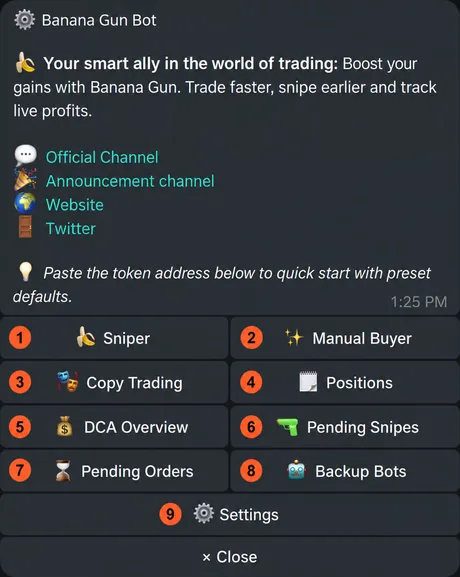
The /start command brings up the main menu. We group the buttons by job:
- Manual trading: Manual Buyer, Positions.
- For letting the bot run on its own: Sniper, Copy Trading, DCA Overview.
- Orders not yet filled: Pending Snipes, Pending Orders.
- System: Settings, Backup Bots.
Back goes one step back, Close closes the panel so the chat doesn't get long.
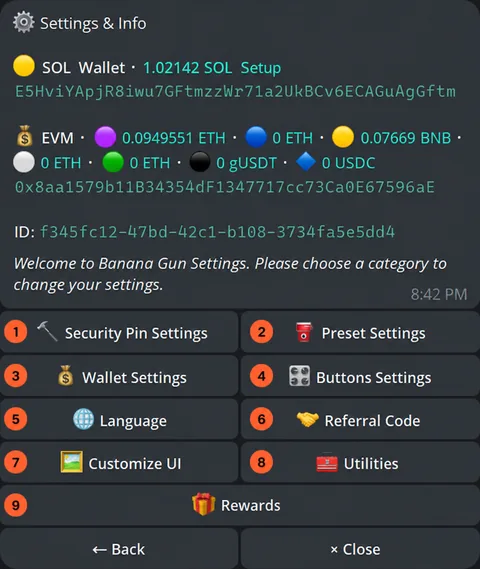
Wallets are created in Settings, under Wallet Settings, then Wallet Setup: choose EVM or SOL, tap Create Wallet to make a new wallet or Import Wallet to enter the private key of an existing one.
- Key shown only at creationAfter the wallet creation step, the bot never shows the private key again. Copy it somewhere safe right away; if you lose it, there's no way to recover it.
- One address, many balancesAn EVM wallet keeps a single address for all EVM chains, while funds are tracked per chain: a deposit on Base doesn't change your Ethereum balance.
- Transfer, bridge, renameWallet Settings also lets you move tokens between wallets, bridge to another chain, and rename or delete wallets.
The rest of Settings is stuff you usually set once: Security Pin, language, default buy and sell buttons, what info to display, referral code and Rewards. The Utilities section lets you claim Pump.fun cashback into your SOL wallet, and has Incinerator to close unused token accounts and get back the SOL locked up as rent.
Banana Pro: trading in the browser
Banana Pro (pro.bananagun.io) suits people who'd rather watch charts on a bigger screen than tap buttons in a chat. Login goes through Privy, with an X, Google or Telegram account, and you have to use the same method you used the first time, every time: signing in with Google the first time and X the next time creates a new account. Once you have an account, tap Generate Wallet (the new wallet's key is shown exactly once, so copy it right away) or import the wallet you already use in Phantom or Solflare.
The Trade page has no fixed layout; each block is a draggable widget: TradingView chart, buy/sell panel, positions, wallets, watchlist, snipe, limit, plus the three analysis widgets covered later. You can save multiple layouts, for example one for hunting new tokens and one for watching positions, and switch between them in seconds.
At first the web app only had Solana, then added Ethereum, Base, Arc, BNB, Stable and MegaETH; when we took the screenshots, the chain list also had HyperEVM and Robinhood. Data is synced between the web app and the Telegram bot.
Finding new tokens: The Trenches, Top Traders and Bubble Map
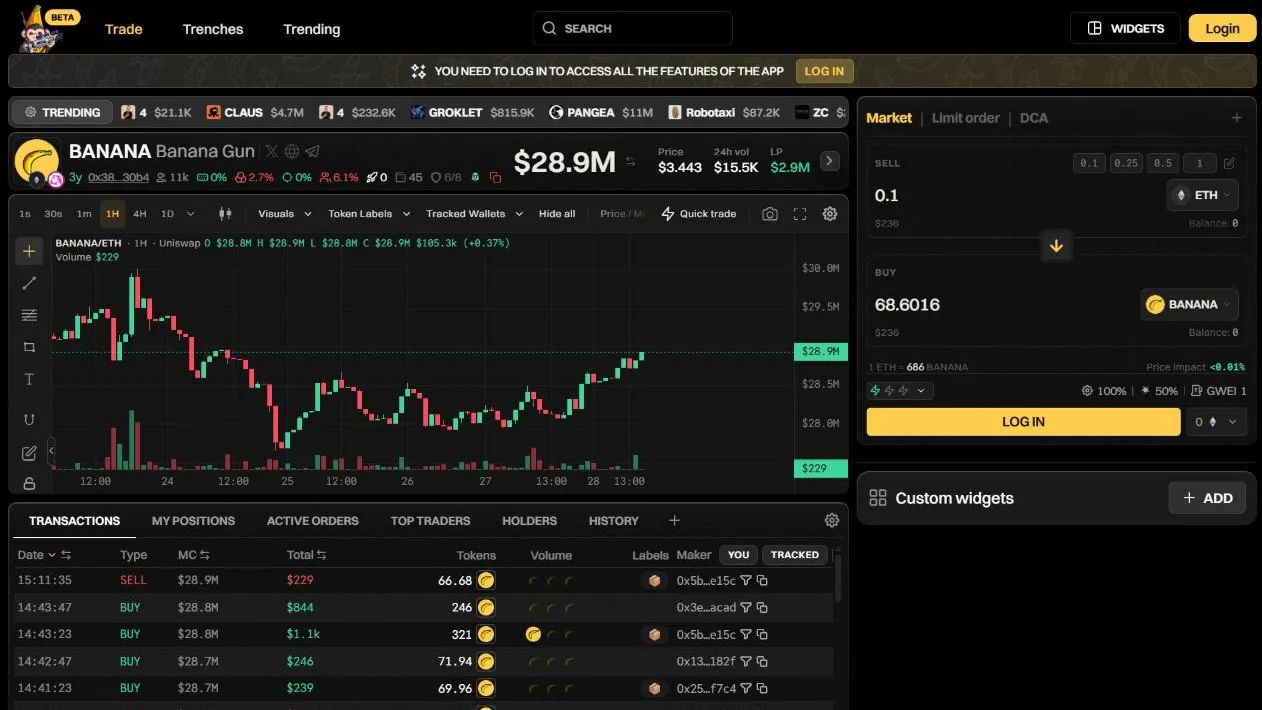
Banana Pro gathers tokens still on launchpads into a page called The Trenches, split into three columns by stage:
- New Deploys: tokens just created.
- Close to Migration: bonding curve almost full.
- New Pairs: tokens that just hit a DEX.
Each token card shows age, holder count, the percentage held by the dev and the top 10, bundler and sniper wallet stats, market cap and volume, plus a buy button right on the card. Filters can be set for the whole page or per column: launchpad, socials, bonding curve %, share of the token held by wallets you follow, number of buys and sells, liquidity, token age and many other criteria. If a column moves too fast, hover over it and it holds still so you can read.
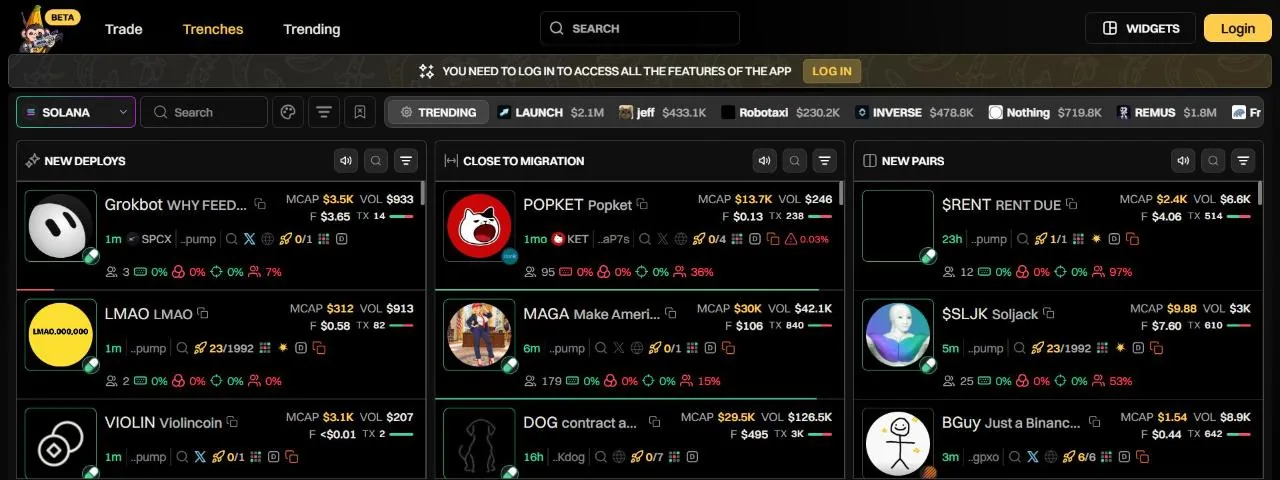
Once you have a token in sight, three widgets on the Trade page show who holds it:
- Bubble MapDraws clusters of linked wallets, so you can see which groups of wallets move together.
- Top HoldersThe wallets holding the most of that token.
- Top TradersThe 50 most profitable wallets on the token, tagged dev, bundler or sniper; it's also the place to find wallets to copy.
Manual trading: order panel, positions and three presets
Paste a token that's trading and the bot opens the Buy panel. The top shows the token name and DEX, price, market cap, liquidity, tax, the tip the bot suggests and your balance, plus links to open the token on Banana Pro, DEX Screener or DEXTools.
The bottom has buttons for choosing the wallet, preset, preset buy amounts, gas, slippage, Anti-MEV with MEV tip, and the currency to pay with; you also place a Buy Limit Order or Buy DCA from here. Besides the chain's native coin, you can pay with stablecoins, e.g. USDC, USDT, USD1; if it needs several swap steps, the bot handles them for you.
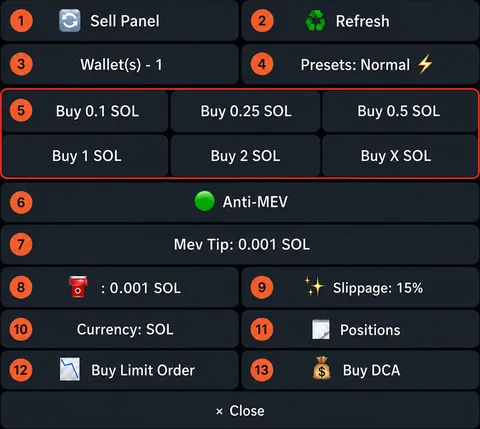
The Sell panel shows PnL and average entry price, sells by percentage, sells just the portion held in one wallet, and exports a PnL card. Positions gathers the tokens you hold by chain and by wallet, with a Watchlist, a button to hide tiny positions and a place to import the history of old positions.
On each chain you have three presets for trading:
- NormalThe lowest gas and tip, for when you're not in a rush.
- FastThe level between the other two presets.
- InsaneThe highest gas and tip, for when many people are racing into the same token.
Each preset stores its own gas, slippage, MEV tip, Anti-MEV status and max price impact. Editing these fields right on the Buy or Sell panel edits the selected preset too, so later orders follow the new config.
Sniping new tokens and the anti-rug layer
A snipe order sits waiting and buys the moment the token's pool is funded with liquidity, so you need the token address beforehand. One source is Banana Gun's Banana SOL Deployer channel, which posts newly deployed contracts; Banana Gun itself says most of them are scams, so you have to check them yourself.
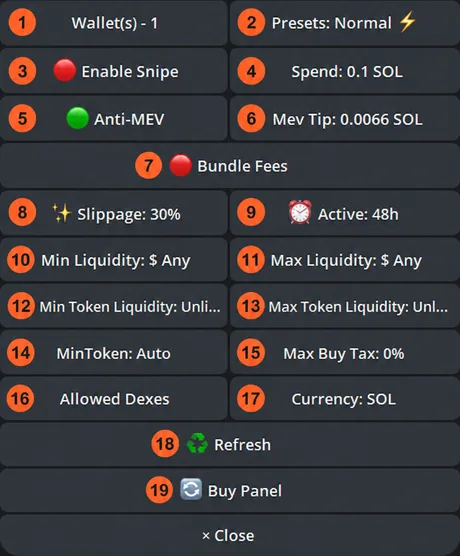
Open Sniper, or paste the address of a token that isn't trading yet, then set:
- The amount to put in (Spend) and the preset.
- Slippage, Anti-MEV and tip.
- Order timeout.
- Acceptable liquidity range, in SOL and in tokens.
- Minimum amount of tokens you must receive.
- Max buy tax, and the DEXs allowed for buying.
Tap Enable Snipe to activate. Unfilled orders sit in Pending Snipes; go there to review, edit or cancel.
Limit orders: buy low, take profit, stop loss and DCA
The orders below run on their own when the conditions you set are met, no need to sit and watch.
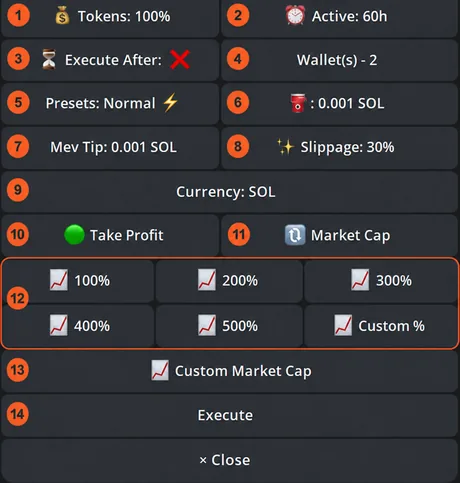
- Buy at a set priceBuy Limit buys when price or market cap hits the level you set; there are quick buttons from -10% and -20% down to -75%, or you can type your own number. Orders have an expiry, and Execute After makes the order wait a while before filling.
- Take profit, stop lossSell Limit comes in three types: Take Profit to lock in gains, Stop Loss to cut losses, and Trailing Stop Loss, whose stop level moves up automatically as the price rises. Each order sets what percentage of the tokens to sell, e.g. Take Profit sells 50% when market cap rises 100%.
- Split orders over timeDCA buys or sells: the total amount is split evenly and runs at intervals in minutes, hours or days over a preset period, with a price range, market cap and max tax limits.
- Tracking pending ordersPending Orders shows each order with its trigger level, time remaining, and the high and low since it was placed. Edit or cancel each order, or clear all the orders on a chain.
Copying other wallets on the bot and on the web
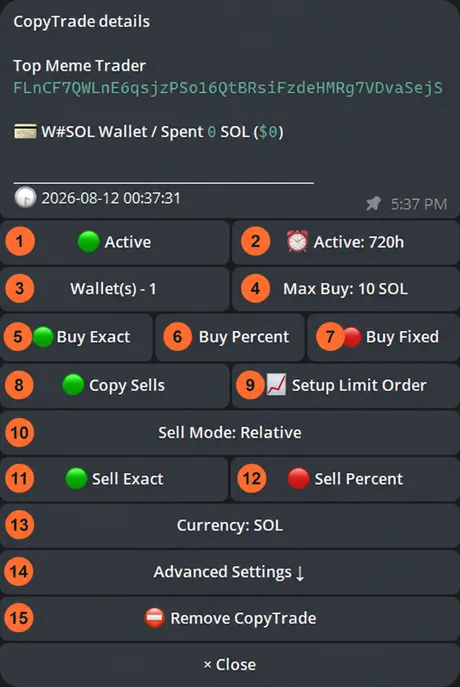
You can copy wallets on Solana and on EVM chains; the EVM side alone lacks the Anti-MEV button. On the bot, type /copytrade or open Copy Trading, choose New Copy Trade, paste the wallet to follow, then adjust four groups of settings:
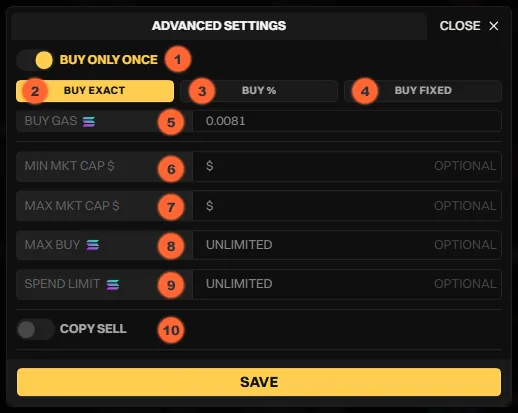
- How much to buy per tradeBuy Exact buys exactly the amount the source wallet spent, Buy Percent buys a set percentage, Buy Fixed a fixed amount; Max Buy is the cap per order. You also pick the wallet to trade from, the buy currency and how long the task runs.
- How to sellTurn on Copy Sells to sell along. Sell Exact sells the same proportion as the source wallet: if they sell 50%, you sell 50% of your share. Sell Percent sells only a fraction of that proportion. You can also attach take profit and stop loss through limit orders.
- Which trades to skipTax cap; token age and market cap, with both lower and upper bounds; minimum liquidity; skip source-wallet trades smaller than the amount you set; skip sponsored buys. Buy Only Once: if the source wallet enters a token several times you only buy the first time, and that token is then blocked for 7 days. Spending Limit caps the total amount the task is allowed to spend.
- Block listsBlocked Tokens filters out tokens you don't want to copy. Token Creator Filter filters by the wallet that created the token: allow or block individual devs. Pause All Copy Trades stops all tasks for a while.
On Banana Pro, the COPY TRADE widget has three modes:
- Simple: paste the wallet, set slippage, Max Buy, Spend Limit and run time.
- Advanced: adds Buy Only Once, a choice of buy type (Buy Fixed, Buy %, Buy Exact), lowest and highest market cap, and Copy Sell.
- Presets: save a set of settings to reuse.
Turn on LIMIT ORDER to attach take profit and stop loss to the task. All tasks are managed on the Copy Trade Overview page: pause, resume, edit each wallet, see the tokens bought and sold and the list of blocked tokens. In the Top Traders widget, hover over any wallet and a button to copy it appears.
Banana Predict: buying Yes or No on Polymarket
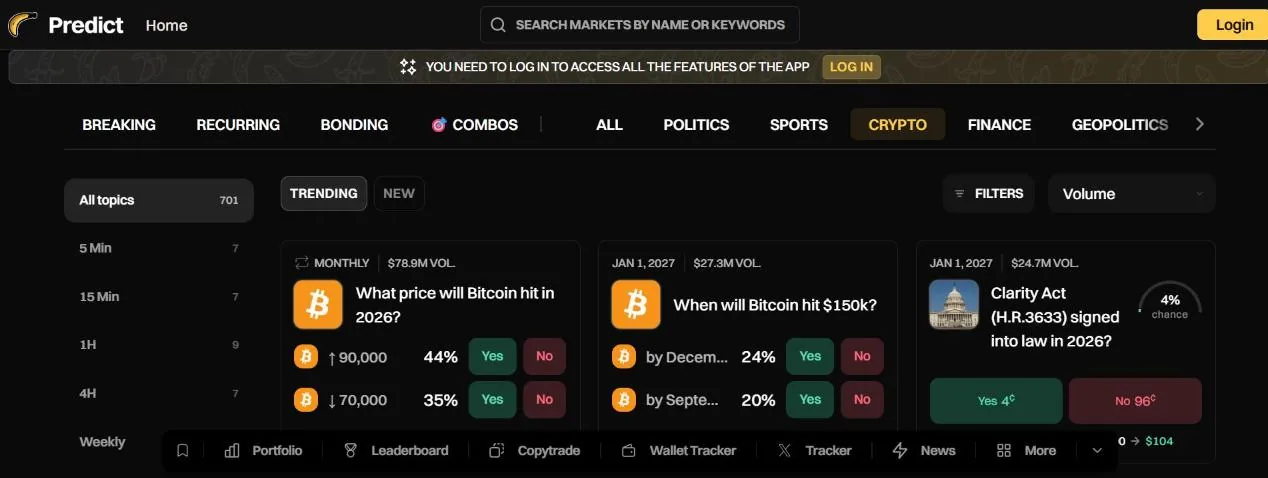
Since Jul 7, 2026, Banana Gun has added Banana Predict (predict.bananagun.io), a separate tool for trading Polymarket rather than for buying memecoins. Each market is a question about crypto, sports or other events; you buy the Yes or No side.
Besides the buy button, Predict has wallet tracking and wallet copying tools, a Leaderboard ranking top traders, and a place to follow X accounts along with news related to the market you have open.
Trading fees, cashback and referral commission
Fees per the homepage, at the time we checked: sniping 1%, manually placed buy and sell orders 0.5%, charged only on successful trades; NEAR is free for now. On top of the bot fee there's gas and MEV tip; a token that sets a tax charges that tax too. For example, a manual buy of $100 costs $0.50 in bot fees, while a snipe of the same amount costs $1. To compare with other bots, see the ranking by fees.
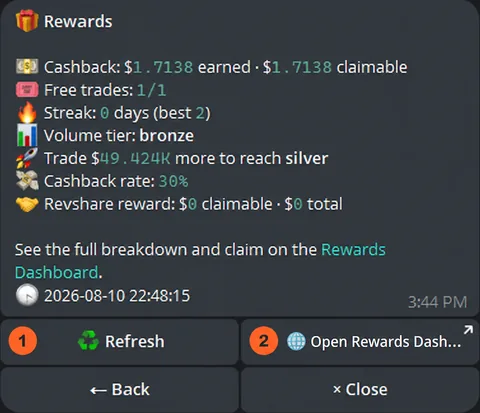
Since July 2026, fees are partly rebated based on all-time volume:
- Under $50,000: 15%.
- From $50,000 to $250,000: 20%.
- From $250,000 to $1 million: 25%.
- Over $1 million: 30%.
In the first month, new accounts are placed straight into the 30% tier. The rebate is valued in USD but paid out as BANANA tokens, on Ethereum; anyone who only trades Solana should factor that in.
Each month a number of trades are also fee-free, meaning a full 100% fee refund. Only regular orders worth $25 to $50,000 count; limit, copy trade and DCA aren't covered. Keeping a trading streak going for 7, 14 or 30 days adds 1, 3 or 6 extra free trades. Anyone holding 50 BANANA or more gets an extra holding bonus.
Referral commission is calculated on the fees of the friends you invite and decreases over time:
- First 30 days: 20% (10% fixed plus 10% bonus).
- From day 30 to day 90: 15% (10% plus 5%).
- After that: 10%, for life.
Referrers whose invitees generate more than $1 million in volume within 30 days get an extra 5–10%.
Keeping your wallet safe and the 2024 exploit
The bot holds the wallet for you, so most of the safety comes down to a few habits:
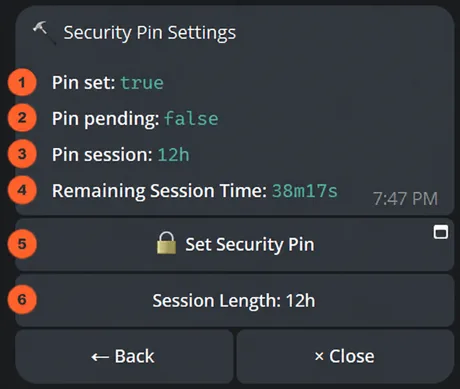
- Turn on Security PinWith a Pin, the bot locks itself when each session ends. Changing the Pin takes an 8-hour wait, and resetting a forgotten Pin takes 7 days; that way, even if an attacker gets into the bot, they can't change the Pin right away.
- Keep the private key outside the botThe key can only be retrieved when the wallet is created, and can't be exported afterward. Banana Gun staff will never ask for your key; anyone who does is a scammer.
- Lock down your web login accountThe Google, X or Telegram account you use to get into Banana Pro needs two-factor authentication. With Telegram, be careful when scanning a QR code to log in on an unfamiliar device.
- Only use the right linksThe homepage bananagun.io, the web app pro.bananagun.io, the bot @BananaGun_bot and the announcement channel t.me/bananagunannouncements. Any other link claiming to be Banana Gun should be treated with suspicion.
In September 2024, Banana Gun was exploited: the flaw was in the Telegram message oracle the bot uses, and 11 users had a total of about $3 million drained. Banana Gun paused the bot, fixed the bug, then added two measures: transfer orders must wait 2 hours before running, and two-factor authentication. The project promised full compensation from its own funds; when we reviewed it, we couldn't find any official confirmation that the compensation had been paid in full.
In our view, the lesson is that a bot wallet should only hold the capital you're actively trading with, with profits withdrawn to a separate wallet.
Our verdict: strengths, weaknesses and who it suits
Suits people who snipe and trade new tokens across many chains, especially those who hop between Solana and EVM chains and want to use both the bot and the web app on the same data; heavy traders also get a higher rebate. Doesn't suit people not yet used to holding their own private keys, people who need full features on NEAR right away, EVM copy traders who need Anti-MEV, and people who put safety above everything and are still wary of the 2024 incident.
- Many chains, one botSolana and EVM chains in the same chat, EVM wallets share one address, and the bot detects the chain when you paste a token.
- Sniper with many optionsFilter by liquidity, buy tax, DEX and minimum token amount; there's an anti-rug that tries to sell before the dev strikes.
- Fees have a way downManual orders at 0.5%, charged only on successful trades; 15–30% rebate by volume, plus monthly free trades.
- A barrier if an account is hijackedChanging the Pin takes an 8-hour wait and resetting it takes 7 days; since 2024, transfer orders must wait 2 hours.
- Lose the key, lose the walletThe bot doesn't show the key again, and the web app shows it only once.
- Has been exploitedAbout $3 million from 11 users in 2024; no confirmation yet that compensation is complete.
- Automated orders cost moreSnipes pay 1%, double the 0.5% of manual orders; limit, copy trade and DCA can't use free trades.
- Cashback in BANANAThe rebate comes back as BANANA on Ethereum, even if you only trade Solana.
- Uneven chain supportNEAR can only buy, sell and swap; EVM copy trade lacks Anti-MEV.
- Easy to mix up web loginChange your Banana Pro login method and you end up with a different account.
To put Banana Gun next to other bots on fees, chains and features, see the bot comparison table.
Getting started with Banana Gun in three steps
- Open Banana Gun with the link belowUsing this link costs you no extra fees.bananagun.io
- Create a wallet, save the keyIn the bot, open Wallet Setup (in Settings, under Wallet Settings), create a SOL or EVM wallet and copy the private key somewhere safe right away. On Banana Pro, log in and tap Generate Wallet.
- Deposit a little, set a Pin, test smallDeposit a small amount into the wallet (SOL, ETH or BNB depending on the chain), turn on Security Pin, then paste a token address and make one small test buy. The Pin should be in place before you run a sniper or copy trade.
Through our referral link, at no extra cost.
Open Banana GunScreenshots taken on November 16, 2026; the interface may change. Not investment advice: memecoins are high-risk, only use money you can afford to lose.