
What Maestro is: a veteran Telegram bot for 10+ chains
Maestro lives entirely inside Telegram: you chat with the @maestro bot, tap buttons or type commands, and never need to open another page. Few Telegram trading bots have been around longer, and the same menu works for Ethereum, BNB Chain, Solana, Base, TON, Tron and plenty of other chains.
In our view, it suits traders who work across several chains, especially Ethereum and BNB Chain, where Maestro has extra tools for hunting new tokens. If you only trade a few tokens on a single chain, you'll find it has too many buttons. Details are in the verdict at the end of the article.
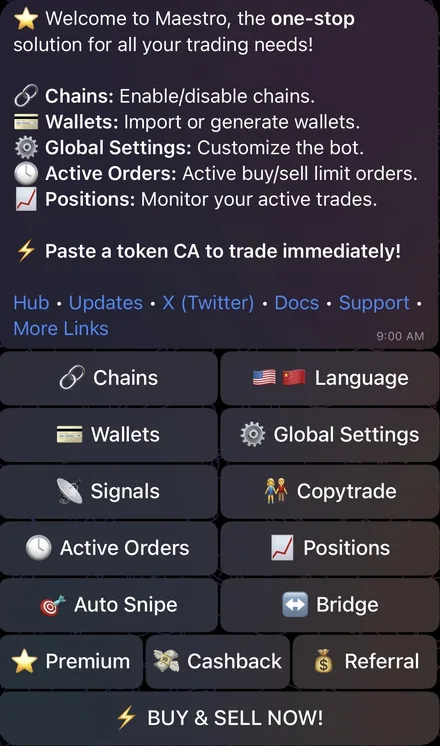
The first time you open the bot, tap Start and pass a short captcha so the bot can verify you; after that, /start always takes you back to the main menu. The menu buttons fall into four groups:
- Setup: Chains picks the chains you'll use, Wallets creates a new wallet or imports an existing one, Global Settings holds the general settings, Language changes the language (English and Chinese only).
- Automation: Signals, Copytrade and Auto Snipe.
- Tracking: Active Orders for pending orders, Positions for the tokens you hold.
- Money and rewards: Bridge, Premium, Cashback, Referral.
BUY & SELL NOW! is a shortcut on its own: the bot asks for the token address, and once you paste it you can trade right away.
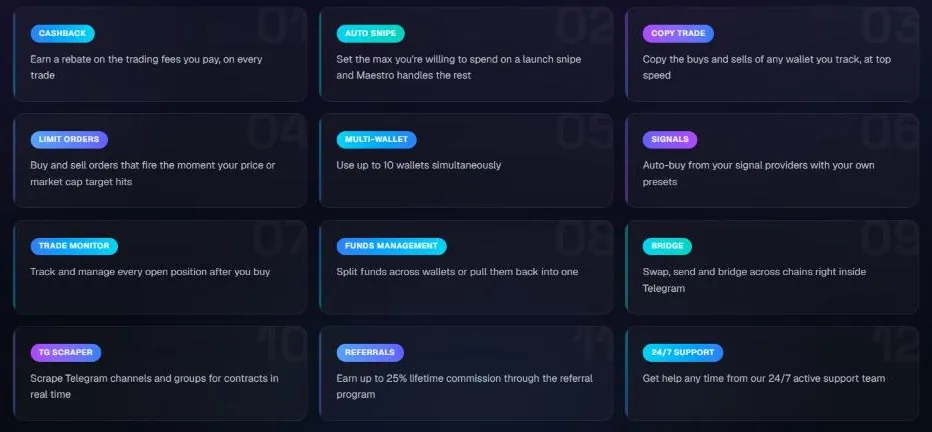
Maestro's homepage sums up the features in one table:
Funding up: enable chains, set up wallets, move money between chains
Maestro's documentation lists 12 chains: Arbitrum, Avalanche, Base, BNB Chain, Ethereum, HyperEVM, Monad, Robinhood Chain, Solana, Sonic, TON and Tron. The list grew longer in 2026: according to the bot's update channel, Arc and Stable were added in July, Ink in September and Elysium in November.
You don't need to enable them all: open Chains or type /chains, then switch each chain on or off as needed. Wallets and settings are separate per chain, so changing slippage for Solana has no effect on BNB Chain. The bot places orders on the DEXs and launchpads most used on each chain, such as Uniswap on Ethereum, or PancakeSwap and Four.meme on BNB Chain.
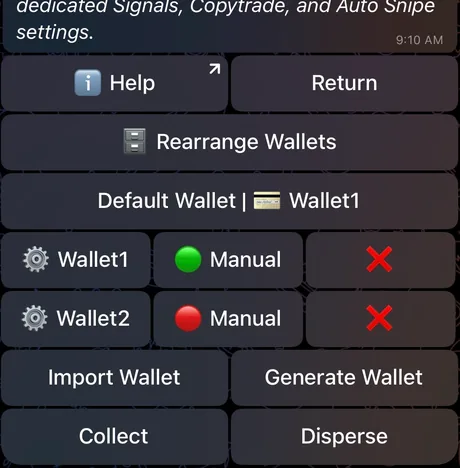
In Wallets, pick a chain, then tap Import Wallet to bring in an existing wallet, or Generate Wallet to have the bot create a new one. Maestro recommends the latter; don't import your main wallet. Each chain holds up to 8 wallets, 10 with Premium.
Wallets with Manual turned on join the order when you buy manually with several wallets; Default Wallet is the one automated orders use. Inside each wallet there are buttons to send coins and tokens elsewhere, rename it, and import that same wallet into another EVM chain. /disperse spreads one wallet's funds across several wallets, while /collect gathers the funds back into one wallet.
If your funds are on the wrong chain, you can move them right inside the bot, in one of three ways:
- /bridge (also callable with /relay or the Bridge button in the menu): runs on Relay, the default route, and it's fast.
- /debridge: goes through deBridge, used when you need to move stablecoins or other large assets, not just a chain's native coin.
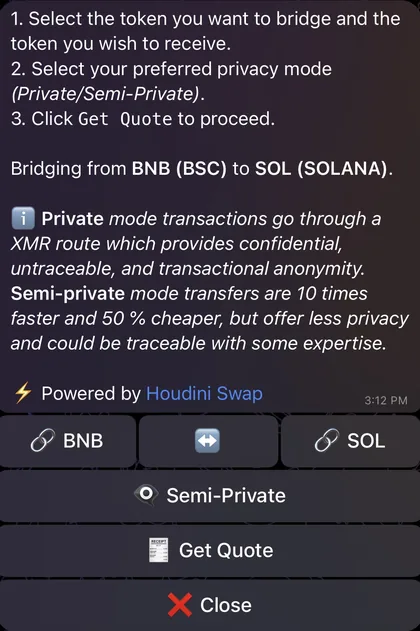
- /private: goes through Houdini Swap. Funds go into a one-time deposit address, so nobody can link the sending wallet to the receiving wallet on-chain. Choose Private for more privacy, Semi-Private for faster and cheaper.
Every route shows you the fee, the quote and the minimum amount you'll receive before asking you to confirm.
Global Settings: the switches to set before your first trade
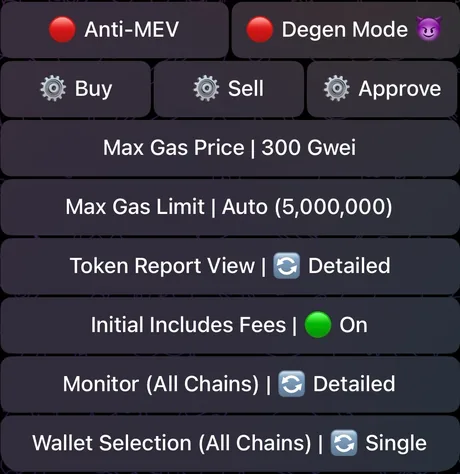
Open Global Settings before you trade: the switches here decide whether the bot blocks or lets through risky orders, and how easily other bots can get in front of your trades.
- Anti-MEVOn Ethereum, the anti-MEV layer is always on: the bot sends orders through a private relay, so others can't see them in the mempool. On Solana it's up to you; when enabled, orders are routed through NextBlock, Temporal or Jito, so they're harder to sandwich.
- Degen ModeBy default, the bot won't automatically buy tokens flagged as honeypot, blacklist or thin liquidity. Degen Mode removes this block; only turn it on if you can stomach that risk.
- Buy and SellPreset amounts on the buttons, gas, fixed slippage or Smart Slippage (the bot calculates it from the token's tax), a warning when an order moves the price by more than 20%, and a confirmation step before every manual order.
- Auto BuySignals and copytrade can only buy when Allow Auto Buy is on. Turn off Duplicate Buy if you don't want the bot to buy more of a token you already hold.
Checking a token: what Token Report shows and what it blocks
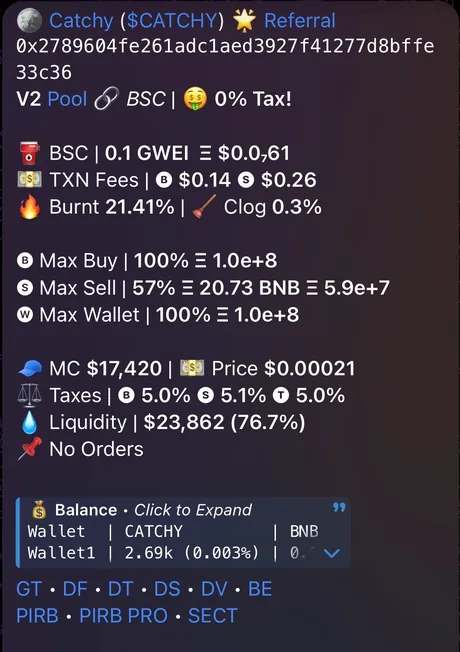
To check a token quickly, just paste its contract address into the chat. Maestro replies with a Token Report containing:
- price, market cap, liquidity;
- tax on buy, sell and transfer (on EVM chains);
- the maximum buy allowed per order and per wallet;
- estimated gas and the share of supply that has been burned;
- the current balance in each of your wallets.
If you're not ready to buy, tap Track and the bot will watch the token for you. The trading buttons at the bottom of the report are covered in the next section.
Manual trading, tracking positions and placing limit orders
Below the data section of Token Report are the trading buttons. To buy, choose by the amount of coin you spend or by the number of tokens you want to receive; Ape Max buys exactly the maximum the token allows in one order. To sell, choose a percentage, or Sell All to sell that token in every wallet. There's also Multi Buy (several wallets buy together), Buy Limit and Sell Limit (limit orders), and Snipe (for tokens not yet live); EVM chains get two extra buttons, Approve and Revoke.
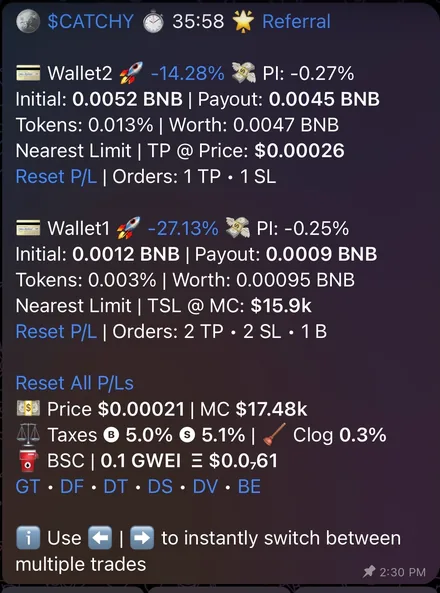
Every buy, whether you tap it yourself or the bot enters automatically, opens a Trade Monitor. This screen is split by wallet: each wallet shows its profit and loss percentage, the price impact if you sold now (PI), the capital put in (Initial), the money you'd get back if you sold right away (Payout) and the nearest limit order. The quick-sell buttons have four levels, 25, 50, 75 and 100%, plus Sell Initials to take out your capital and Sell All to sell everything.
Trade Monitors have a limit: each lasts 36 hours, 96 hours with Premium; you can keep 10 at a time, 30 with Premium. All the tokens you've bought, split by wallet, are in Positions. After you sell, the bot makes you a PnL card. Since June 2026, video is the default format for this card; if you prefer a still image, change it in the settings.
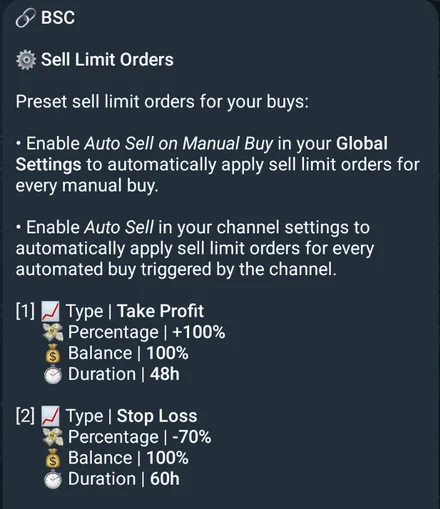
- Sell LimitThree types: Take Profit sets a profit level (a positive number), Stop Loss sets a loss level (a negative number), and Trailing Stop Loss moves the stop-loss level up as the price rises and never moves it down. You choose what percentage of your tokens to sell and how long the order waits, up to 168 hours, which is 7 days.
- Buy LimitA pending buy order that tracks price or market cap. The trigger level can be entered as a specific number or as a percentage from the current value, set above or below, and one order can apply to several wallets.
- Auto-attach after manual buysGo to Sell Settings, set a stop-loss and take-profit ladder, then switch Auto Sell on Manual Buy on. From then on, every manual buy gets this set of orders attached by the bot.
- View and edit pending ordersType /orders to open Active Orders: a list of pending orders on one chain, where you can review, edit or delete each one. The regular version holds 60 orders, Premium 120.
Auto Snipe: queue up before a token goes live
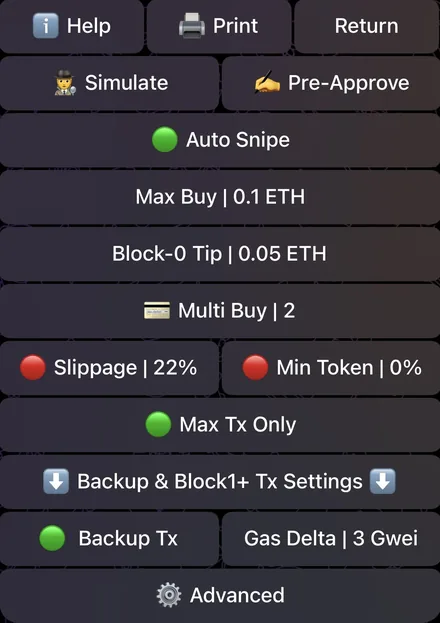
Auto Snipe is available on four chains: Solana, Base, BNB Chain and Ethereum. The first way goes through the menu: open Auto Snipe, choose Add Snipe, paste the token address. The second way is faster: paste the address of a token that isn't live yet straight into the chat, and Token Report gets an extra row of buttons for sniping. Each snipe is set up separately: how much to spend, how much tip, slippage, anti-MEV, which wallets to use. Once it's set up, flip the Auto Snipe switch to green and the snipe starts waiting.
On EVM chains, the bot also detects the real launch transaction on its own, avoids the first few blocks where buyers are easily blacklisted or hit with high tax, lets you set the highest tax you'll accept, and adjusts your buy to fit the token's limits. Ethereum also has Block-0 Tip: Maestro users' orders are bundled together, whoever pays a higher tip gets a better position, and if the bundle can't land in the block, there's a backup order.
Signals: buy off call channels, messages and Scraper
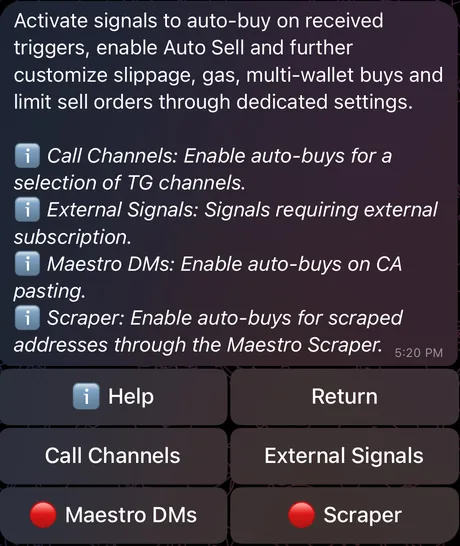
The idea behind Signals is simple: whenever a new token address shows up in a source you've chosen, the bot buys using your preset settings. There are four types of source:
- Call Channels: Telegram channels dedicated to calling tokens, with a search box; the channel followed by the most Maestro users is at the top.
- External Signals: signals supplied by third parties, which you need to sign up for with them yourself.
- Maestro DMs: any address you send the bot in chat is bought right away, handy for tokens that launch without warning.
- Scraper: a desktop app that reads channels for you, introduced in the note below.
Each source has its own settings panel, laid out like copytrade: amount, slippage, gas, multiple wallets, filters and Auto Sell. If you only want to watch for now, choose Track Only so the bot sends a Token Report without buying. The bot ignores call posts that don't include a token address, and posts where the address was edited in too late.
Copytrade: follow another wallet on Solana and EVM chains
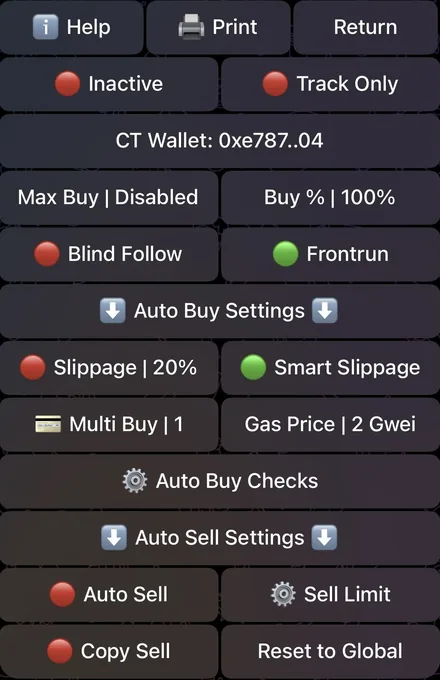
Add the wallet you want to copy with the Add Wallet button in the Copytrade menu (remember to choose the chain first), then give the wallet a name and paste its address. Copytrade runs on Solana and every EVM chain, and you can follow 5 wallets per chain, 12 with Premium. A newly added wallet doesn't run right away: open its settings by tapping its name, set the buy amount, then tap Inactive so the button switches to Active.
- How much to buyMax Buy is the cap spent per order. Buy % is based on the source wallet's order size and goes up to 1,000%, meaning you can go in ten times bigger than they do. Choose Track Only if you just want notifications without buying.
- Selling along with themWith Copy Sell, the sell ratio follows the source wallet: whatever percentage of their token holding they sell, the bot sells exactly that percentage of yours, including tokens you bought yourself outside the copy. Auto Sell adds your own take-profit and stop-loss levels and can run at the same time as Copy Sell.
- Filtering tradesAuto Buy Checks sets upper and lower ranges for market cap and liquidity, plus the highest buy tax and sell tax on EVM chains. If the source wallet's trade falls outside these ranges, the bot doesn't follow it.
- Getting in ahead of the source walletOn BNB Chain and Ethereum, the bot can read the source wallet's order while it's still waiting in the mempool. This gives it an option to set higher gas and put your order ahead of the original (frontrun).
The real cost: 1% fee, cashback, referrals and Premium
Maestro takes 1% on every buy and every sell that fills, whether you tapped the order or the bot placed it; transferring coins or tokens elsewhere usually costs no fee. How it's collected differs by chain:
- On Solana, the 1% is deducted within the transaction itself.
- On the other chains, the bot accrues the fee and collects it once it reaches a minimum threshold, deducting it from your wallet with the most funds on that chain. So when you see a wallet send coins by itself to the fee address that Maestro publishes, that's the accrued fee coming due, not a hacked wallet.
On top of the bot's fee, every order also costs gas and tip, plus token tax if the token has one.
Cashback returns part of the 1% fee. The bot calculates it automatically, with no sign-up. The rebate rate follows your volume tier: Diamond gets 30%, Gold 25%, Silver 20%, Bronze 15%. The /cashback command shows your rebate balance on each chain; once it passes the minimum you can withdraw, and the network fee for the withdrawal is deducted from the amount you receive.
The bot has three more places to earn extras. /rewards is where you claim limited-time reward drops; miss the deadline and you can't claim them back. Campaigns collects promotional programs, for example a cashback tier upgrade or free Premium. /competition shows which trading contest is currently running.
On referrals: anyone who joins the bot through your link earns you 25% of the fees that person pays, for life. Every token also has a quick-buy link you can share; if the person who taps this link was already referred by someone else, the 25% is split in half. Commission isn't paid out automatically: you have to set a Fee Wallet as the receiving wallet and then withdraw.
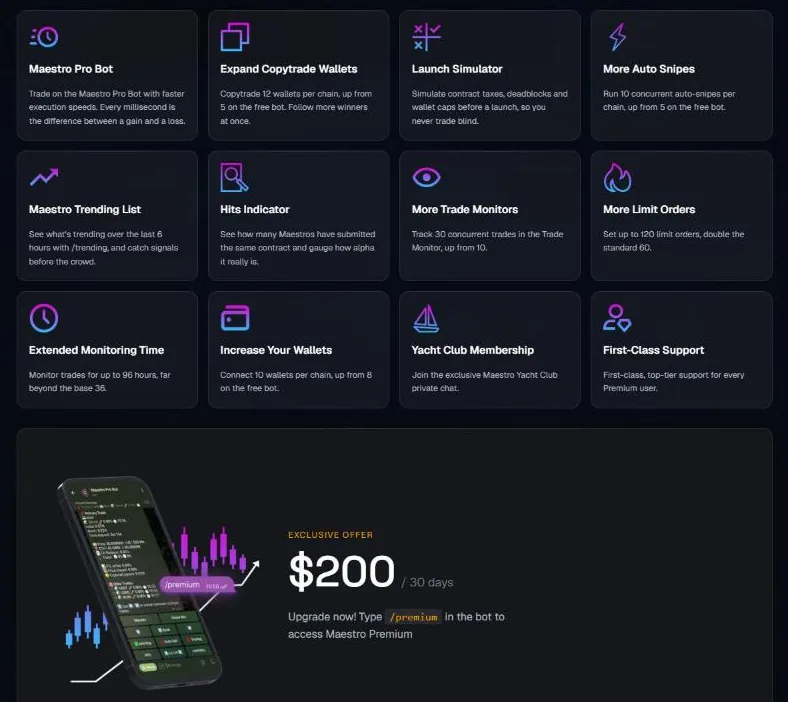
The Premium plan costs $200 a month and you subscribe right inside the bot with the /premium command. In return, you get into the private Maestro Yacht Club group, priority support, Maestro Pro Bot (a faster version), Launch Simulator, a 6-hour trending token board, and the Hits metric, which shows how many Maestro users have pasted that token's address into the bot. The limits are raised as well:
- Wallets per chain8 on the regular version, 10 with Premium.
- Copytrade wallets per chain5 on the regular version, 12 with Premium.
- Snipes running at once5 on the regular version, 10 with Premium, counted per chain.
- Trade Monitor10 on the regular version, each lasting 36 hours; 30 with Premium, each lasting 96 hours.
- Limit orders60 on the regular version, 120 with Premium.
In our view, $200 a month is only worth considering if you actually hit the limits above, or need Launch Simulator for sniping. If you only place a few orders a week, the regular version is enough.
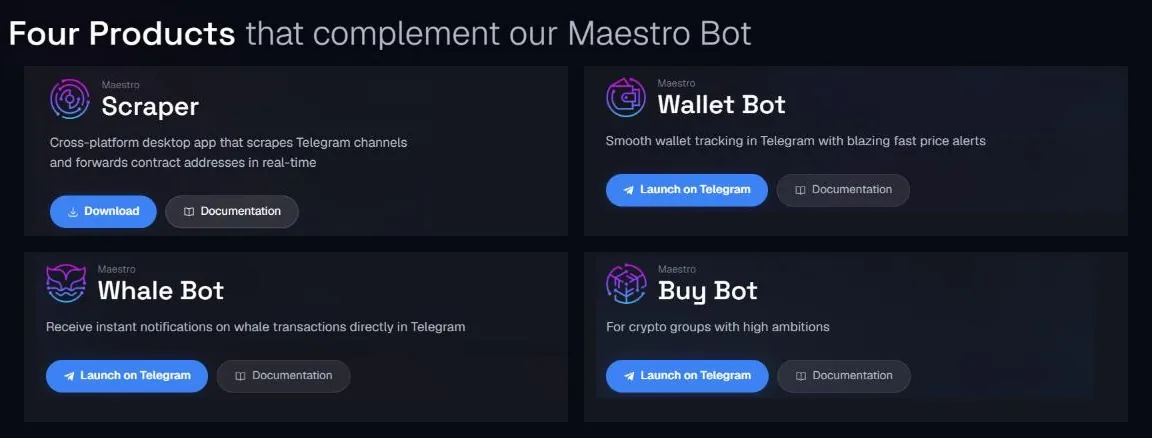
Wallet Bot, Whale Bot, Buy Bot: three free bots from the same team
Besides the trading bot, Maestro makes three other Telegram bots, and all three are free:
- Maestro Wallet Bot: a quick view of balances and prices for ETH, Arbitrum and BNB Chain wallets. From the trading bot, tap My Wallet Tracker to jump to this bot.
- Maestro Whale Bot: alerts you when a big wallet on a list you choose makes a large trade.
- Maestro Buy Bot: a bot for a token's community group, posting every buy, every sell and the price action in the group; it's free for one or two tokens.
Security: habits to keep and the 2023 Router 2 exploit
Maestro holds that the biggest danger comes from the user's side: their Telegram account and what they tap. So we recommend keeping these five habits:
- Lock Telegram with two layersYour Telegram account should have 2-step verification. The bot lives inside Telegram, so whoever takes over the account can reach your wallets.
- Keys on paper onlyStore your recovery phrase and private key on paper, then delete the messages containing them in your chat with the bot. Never send these two things to anyone.
- Separate wallet, just enough fundsUse a newly generated bot wallet, don't import your main wallet, and only deposit the amount you plan to trade with.
- Right bot, right linkOnly talk to @maestro, or @MaestroProBot if you use Premium; get links from maestrobots.com, not from anywhere else.
- Touch the risky switches as little as possibleBlind Follow and Degen Mode both remove the protection against scam tokens; the less you turn them on, the better.
On security history: an attacker exploited Router 2, Maestro's own contract on Ethereum, on Oct 24, 2023, taking users' tokens worth about 280 ETH. Maestro closed the hole after about 30 minutes. They then paid out of pocket, about 610 ETH, to buy back tokens for those who lost them or to pay in ETH; every affected wallet was made whole. Maestro also states that users' private keys are encrypted with AES.
In our view, how Maestro handled it is a plus. But the incident is also a reminder that contract risk is real, even with a long-running bot: only keep in your bot wallet the amount you're actively using.
Our verdict: strengths, weaknesses, who it suits
Suits traders who work across several chains and want everything in one Telegram bot, especially people hunting new tokens on Ethereum and BNB Chain: there you get mempool frontrunning when copying, dangerous-block avoidance and tax limits when sniping, and Ethereum adds Block-0 Tip. People who follow call channels can also make use of Signals and Scraper. If you're choosing a bot for Ethereum, see bots on Ethereum.
Doesn't suit beginners who only need to trade a few tokens: the menu has lots of buttons, the bot only offers English and Chinese, and a few switches such as Degen Mode and Blind Follow can cost you money if turned on by mistake. Anyone who only trades on Solana won't use part of its strengths (mempool frontrunning, Block-0 Tip, token tax checks); see bots on Solana too.
- Many chains in one botMore than ten chains, wallets and settings separate per chain, cross-chain transfers right in the chat, including a private route.
- Blocks bad tokens by defaultAutomated orders won't buy tokens flagged as honeypot, blacklist, thin liquidity or high tax, unless you turn on Degen Mode yourself.
- All three kinds of automationCopytrade, Signals and Auto Snipe, each with filters, multi-wallet support and Auto Sell attachments.
- Detailed limit ordersTake profit, stop loss, trailing, buy limits by price or market cap, and a cost basis that already includes gas and tip.
- Has made users whole beforeIn the 2023 Router 2 incident, Maestro paid out of its own pocket to cover every wallet that lost funds.
- Automatic fee rebateCashback returns 15 to 30% of fees depending on tier, with no sign-up.
- 1% fee both waysBuying costs 1%, selling costs 1%, not counting gas, tip and token tax. On chains other than Solana, the fee accumulates and is collected once from the wallet with the most funds, so people who don't know this can easily think the wallet was hacked.
- A lot sits behind Premium$200 a month to get Launch Simulator, Pro Bot, Hits and higher limits. The regular version stops at 5 copy wallets, 5 snipes and a 36-hour Trade Monitor.
- English and Chinese onlyOnly English and Chinese; everything is buttons and commands in the chat, and people used to a web screen with charts will need time to get used to it.
- Switches that can cost youDegen Mode, Blind Follow, and Copy Sell also selling tokens you bought yourself outside the copy: turning them on before you understand them can easily lose you money.
- Contract was exploited onceRouter 2 in 2023 lost about 280 ETH worth of users' tokens, even though everyone was made whole afterward.
To put Maestro next to other bots on fees, chains and features, see the comparison table.
Your first three steps with Maestro
- Open the @maestro botTap the link below to open the bot. Signing up through this link doesn't cost you any extra fees.maestrobots.com
- Pick your chains, create a new walletTap Start, get past the captcha, type /chains and enable the chains you'll use. Then go to Wallets to create a new wallet and copy the private key onto paper.
- Try it with a small amountDeposit a little native coin into the wallet, for example SOL for Solana, ETH for Ethereum, BNB for BNB Chain. Paste a token address, make a small test buy and attach a take profit and stop loss right away. Only turn on copytrade or Signals once you're comfortable.
Through our referral link, at no extra cost.
Open MaestroScreenshots taken on November 23, 2026; the interface may change. Not investment advice: memecoins are high-risk, only use money you can afford to lose.