
What Moonshot is and who it's for
Moonshot is not a Telegram bot, and it's not a browser-based trading terminal. It's a phone app for iOS and Android, live since 2024, built for people new to memecoins: no existing wallet needed, you pick a coin and swipe to buy.
Depositing, buying, selling and withdrawing all happen inside the app. The moonshot.com site is mostly there to introduce the product, send you to the app download, and give every verified coin a public price page anyone can view.
The focus is Solana memecoins, plus tokenized stocks (xStocks), leverage contracts up to 250x and Robinhood Chain coins. The app also lets you launch your own memecoin, buy random coin packs and pull Pokémon cards from a claw machine. There are five tabs at the bottom of the screen:
- HomeCoin search bar and four boards: Top Gainers, Trending, New, Top Market Caps.
- CreateCoins users have launched on Moonshot, and the button to launch your own.
- PacksMemecoin packs that open at random, with a collectible card attached; only available to users in the US.
- RewardsReferral commission, bonus funds, and reward events run by Moonshot.
- HoldingsThe cash, coins and leverage positions you hold; deposits, withdrawals and sends also start here.
If you're choosing between several apps, see bots with a mobile app.
Which coins show up in the app: Blockaid, the verified badge and the Official mark
The search bar on the Home tab takes a coin name, ticker or contract address. But not every coin can be found: each coin has to pass an automated safety check run by Blockaid. A coin that fails doesn't appear in the app and can't be traded.
- TrendingRanked by an algorithm that favors coins with large, organic volume. Even unverified coins can show up here, with an orange warning label.
- VerifiedNeeds four things: passing the safety check, a strong community, enough 24-hour volume, and a market cap above a minimum (starting at $1M).
- OfficialThe blue check means a known individual, brand or company is behind the coin. It speaks to origin, not to quality.
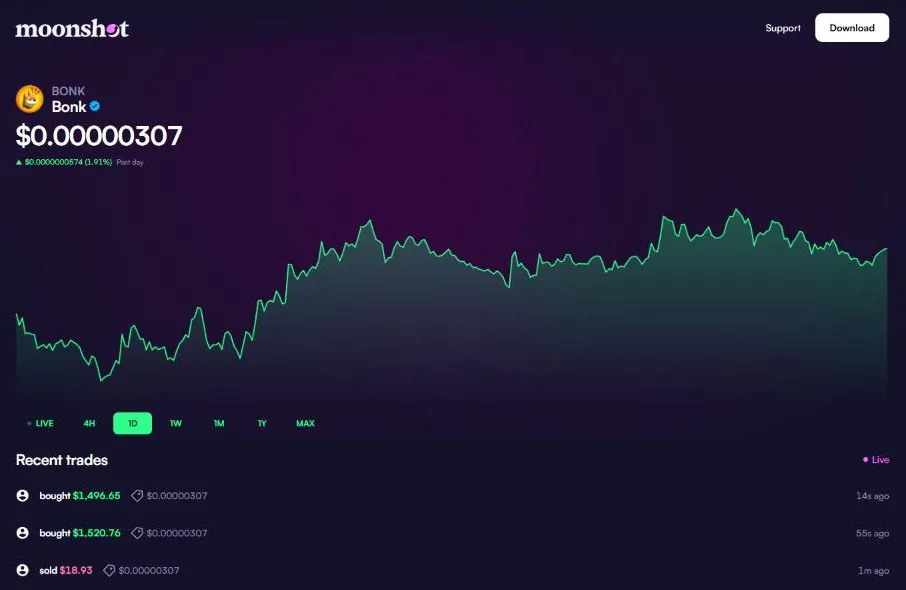
Placing orders: Jupiter finds the price, you just swipe
To buy, open the coin page, tap Buy, choose whether to pay in USDC or SOL, enter an amount and swipe Swipe to buy. To sell, tap Sell, choose the coin you want to receive, enter an amount or quick-tap MAX or one of the three presets 25%, 50%, 75%, then swipe.
Moonshot itself doesn't match orders like an exchange. Orders go through Jupiter, which routes them across multiple DEXs to find a better price. Before you swipe, you see three numbers: Moonshot's fee, the network fee, and how far your order moves the price (price impact).
For slippage, the app adjusts the default level automatically based on volatility. To set your own, tap the settings button in the top-left corner and pick a level from 0.5% to 20%.
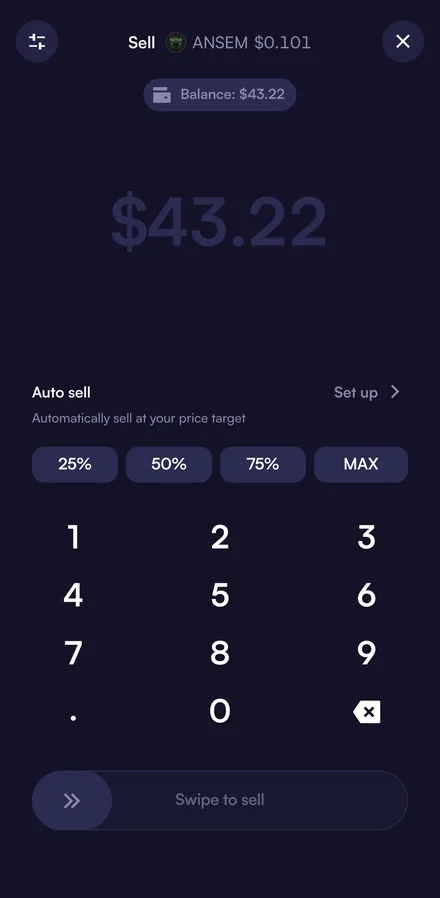
Auto Sell: set a take-profit level in advance, the app sells when price hits it
Auto Sell sells for you when a coin reaches the profit level you set, so you don't have to watch the price all day. Open a coin you hold, tap Sell, find the Auto sell section and tap Set up. Choose how much to sell, pick the profit level to take (+25%, +50%, +100%, or Custom to type your own), review and swipe.
When the price reaches that level, the entire chosen portion is swapped to USDC and you get a notification.
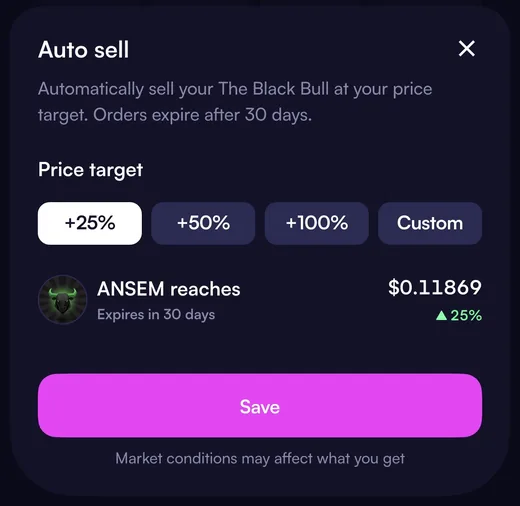
- One order per coin, minimum value $1, valid for 30 days. Placing an order costs no gas.
- You can change the take-profit level or cancel the order any time: go back to the coin page, or open Activity in Holdings, where your activity history is kept.
- The order doesn't lock your coins: while it waits, you can sell by hand or transfer them as usual.
Perpetual contracts: 250x leverage on SOL, ETH, BTC
Leverage on Moonshot comes as perpetual contracts. If you think the price will go up, pick Buy to go long; if you think it will go down, pick Sell to go short, then enter an amount or adjust leverage with the slider. SOL, ETH and BTC can go up to 250x. For now, opening a position only works with market orders. To close, go to Holdings > Leverage and tap the position.
- Open and close feesOrders from $5 to $100 pay 0.20%, with a minimum charge of $0.25. Orders above $100 pay 0.10%. On top of that there's a borrow fee, compounded hourly, charged when you adjust or close the position.
- Margin thresholdsMargin drops below 50%: the app warns you. Below 25%: danger zone. Down to 0%: the app liquidates the position automatically.
- Blocked regionsThe US, UK, Canada and some other places can't use it. Getting around it with a VPN violates the terms.
Not just Solana memecoins: xStocks and Robinhood Chain
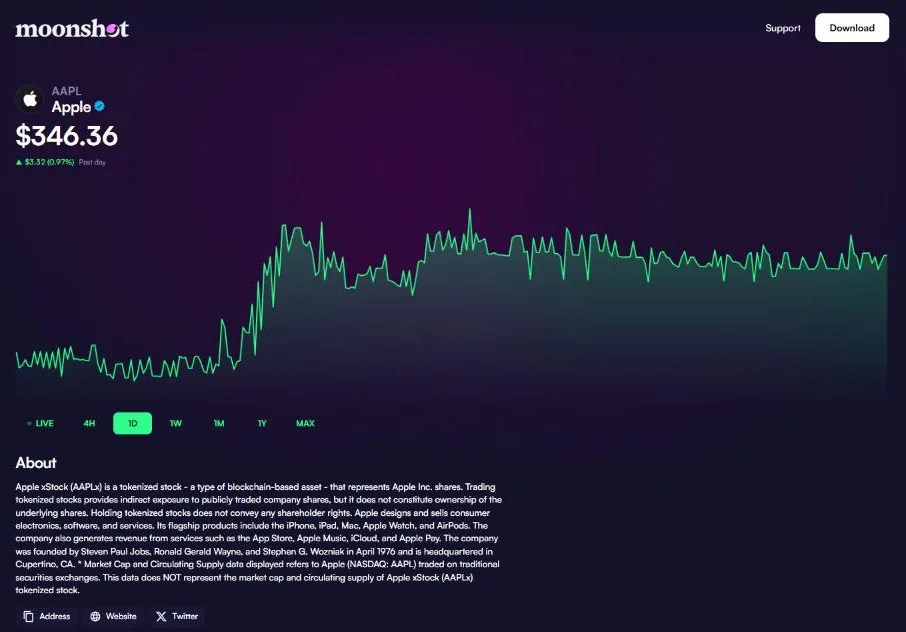
Moonshot also offers xStocks, tokenized stocks issued by Backed: Apple (AAPLx), Tesla (TSLAx), Nvidia (NVDAx), plus GOOGLx, METAx, MSTRx, COINx, CRCLx and two funds, SPYx and QQQx. Each token is backed 1:1 by a real share, so the price tracks the stock price closely. You can trade at any hour (24/7) and buy fractions, no need to afford a whole share.
Orders fill through Jupiter. The token lands in your wallet like any coin, and you can transfer it or take it into DeFi. One thing to understand: you only get the price movement. xStocks holders don't have shareholder rights: no voting, no direct dividends. On Nov 20, 2026, Moonshot added a tokenized Anthropic stock issued by Backpack Securities (not a Backed xStock). It trades on iOS and Android, is only for eligible users in certain regions, and also tracks the price of the underlying stock; it is not equity and carries no shareholder rights.
Moonshot is built on Solana, but the app has added coins from Robinhood Chain: a layer 2 network built by Robinhood, running on Ethereum with Arbitrum technology, officially live since Jul 1, 2026.
Moonshot says Robinhood Chain coins are traded right in the app just like Solana coins, with no manual bridging and no transfer fees. Auto Sell, however, doesn't support this group of coins yet.
Launch your own memecoin in the app for $10
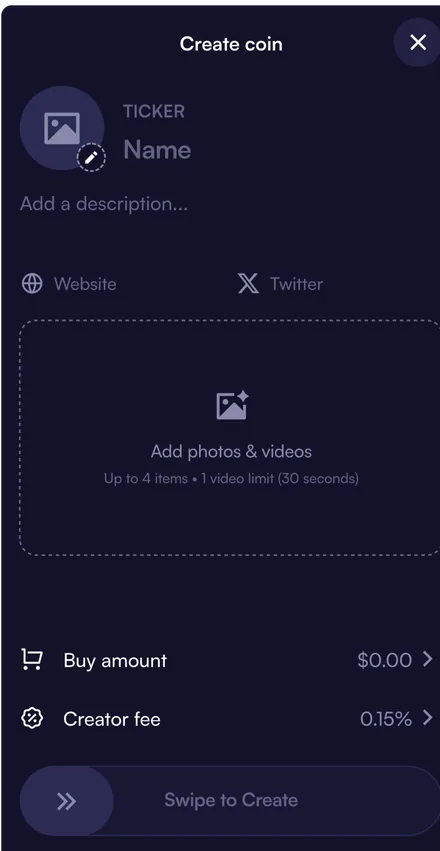
The Create tab lists coins users have launched on Moonshot under New, Active, Trending, Top and Yours (your coins). To launch your own, tap Create and fill in the ticker, name, image and description. Optional extras: a link to your X account, a website, and up to 4 images or videos (video is limited to 1, at 30 seconds).
The last step: choose how much you buy at the moment the coin is born, choose the share of fees that goes to the creator, then swipe Swipe to Create. Each launch costs $10 and can only be paid in USDC.
- Creators share the feesEvery trade of a coin created on Moonshot pays 0.5% while it's still on the bonding curve, and 0.3% once it has graduated. The creator gets up to half of that: 0.25% in the early stage, up to 0.15% afterwards, paid out hourly once the pending amount passes $1.
- The $1M milestoneA coin graduates when its market cap hits $1M: it leaves the bonding curve, moves to a full liquidity pool (Meteora DBC) and gets a purple Created on Moonshot badge.
In our view, $10 is a low price to experiment. But the creator's reward comes from trading fees, so if nobody trades the coin, that reward is zero.
Random coin packs and the Pokémon card claw machine
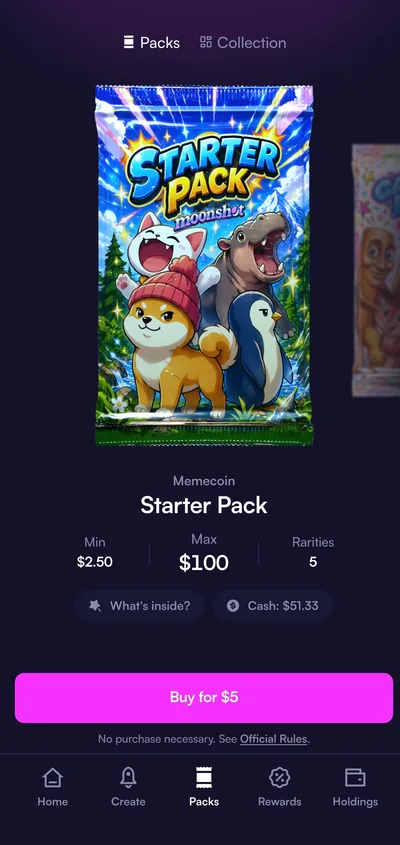
Packs sells memecoins in bundles. Buy a pack and open it, and the app rolls a random rarity, from Common to Mythical, then hands you the amount of coins matching that rarity, along with a collectible card tied to those coins. Sell or transfer some of the coins away and the card is gone. There are 7 pack types, each with its own odds table. Only users in the US can buy, and some states are still excluded.
Collect simulates a claw machine, but what you grab is a real graded Pokémon card. Collector Crypt supplies the cards and keeps them in storage. After a pull, you have 3 days to choose: sell it back right away (the buyback rate is currently no lower than 85% of the card's insured value), keep the card, or pay a fee to have it shipped to your home.
Your wallet: created at signup, exportable to Phantom
Signing up only needs an email: enter the address, type the one-time code Moonshot sends to your inbox, and finally enable Touch ID or Face ID. No existing wallet needed, and no recovery phrase to copy down yet.
At the same time, the app creates an embedded wallet for you on each chain through Turnkey, a partner using MPC technology. Moonshot classes this wallet as self-custody: transactions only go through when you approve them with a passkey, and the keys aren't in Moonshot's hands. The flip side is that if something goes wrong, Moonshot can't freeze the wallet or recover your funds either.
- Export Secret phraseIn Settings > Export keys, the app shows your wallet address and lets you export the Secret phrase, which works in another wallet such as Phantom.
- Choose notificationsGo to Settings > Notifications to choose which alerts you want, such as a notice that an Auto Sell order has filled.
- Send coinsSend to any Solana wallet address, or send straight to another Moonshot user by username.
In our view, being able to export the Secret phrase is the key point: if you want to leave Moonshot, you reopen your wallet elsewhere without waiting for anyone's permission.
Getting money in and out: cards, exchange accounts, coins from other chains
Deposits start at Holdings > Deposit. The app only shows methods available in your country: pick one, choose to receive USDC or SOL, enter the amount and swipe.
For fiat, deposits go through one of the partners Binance, Coinbase, MoonPay, Revolut, Robinhood. Payment methods vary by partner and where you live: Apple Pay, PayPal, Venmo, cards, bank transfer. If you have an account on a partner exchange, you can deposit straight from there.
If you already hold crypto, send it straight to your Moonshot wallet on the Solana network. Coins on other chains like ETH, BTC, USDT, BNB can also be deposited through Cross-chain deposits, and the app converts them to SOL or USDC automatically. A plain swap costs about 0.1%; if it needs a bridge, about 0.25%.
Withdraw at Holdings > Withdraw: to a card or bank account through MoonPay, Coinbase or Robinhood, or send coins to another Solana wallet. Every deposit and withdrawal partner charges its own fee.
How much Moonshot charges, and what referrers get
Moonshot's trading fee depends on order size: orders of $100 and up pay 1%, orders from $2 to $100 pay 2.5% with a minimum of about $0.99. You also pay the network fee and a routing fee to third parties; the app lists each item before you confirm. Moonshot doesn't charge for sending coins. When you deposit or withdraw through MoonPay, Coinbase and other partners, the fees are theirs.
An example: buying $500 total with ten $50 orders costs $12.50 in Moonshot fees; batching into two $250 orders costs just $5. If you often place lots of small orders, take a look at low-fee bots to compare.
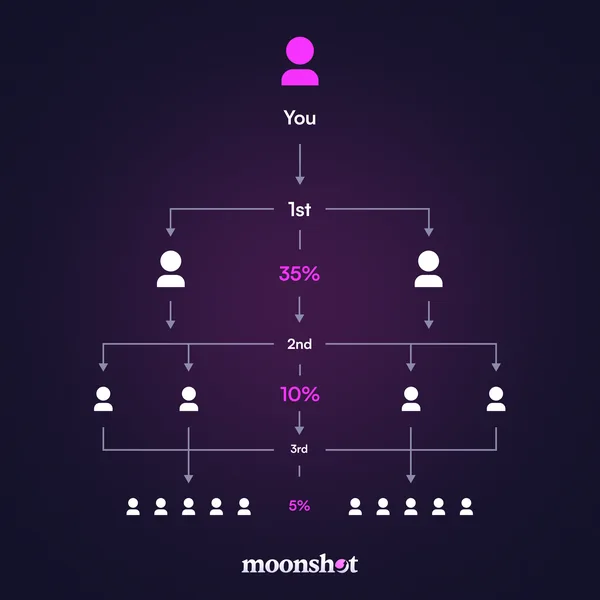
The Rewards tab holds the three-tier referral commission. People you invite directly bring you 35% of the trading fees they pay, people they invite in turn bring 10%, and the third tier is 5%. Payouts arrive in USDC and follow Moonshot's terms.
There's also a program that gives memecoins to both sides. Conditions: the invitee is in the US or Singapore, signs up with your link on iOS, deposits fiat, and the program still has slots left. Beyond that, the invitee pays fees like everyone else, with no discount.
Keeping your money safe: the scams Moonshot has warned about
When we checked on Oct 28, 2026, there were no reports of Moonshot being hacked or users losing funds. Because the wallet is self-custody, most of the safekeeping falls on your side. Moonshot advises:
- Recovery phrase, login codeKeep them to yourself, don't send them to anyone, don't enter them on any website. Real Moonshot support will never ask you for these.
- Emails with linksMoonshot doesn't send login emails, and doesn't send emails with links. Treat any such email as a scam and don't click.
- Strange giveaways and airdropsOn social media there are fake "giveaways" asking you to send money, supposedly to "verify your wallet". Unknown coins that suddenly appear in your wallet and lead you to a page outside the app are a trap too.
- Network and addressDeposits, withdrawals and sends must all use the Solana network, except when depositing through Cross-chain deposits. Check the address carefully: once a transaction is sent, it can't be reversed.
Our verdict: where Moonshot is strong, where it's weak and who it suits
Good for newcomers to memecoins who are comfortable on a phone, want to deposit by card or Apple Pay and don't want to deal with a wallet yet. Also good for anyone who wants tokenized stocks or leverage in the same app, if they're in an allowed region. Not good for people who often split their capital into many small orders, people who need an automatic stop loss, people who want to trade on a computer or through a Telegram bot, and people in the US, Canada or the UK who plan to use leverage or xStocks.
- Fast startEmail, one-time code, Face ID and you're done; card, Apple Pay, PayPal or an exchange account can all fund it, depending on region.
- Coin filter from the startCoins must pass Blockaid to appear; unverified coins that reach Trending carry an orange label.
- See fees before you swipeFees and price impact are shown clearly before you confirm an order.
- A lot in one appSolana memecoins, Robinhood Chain coins, xStocks, leverage, launching your own coins.
- Self-custody wallet you can take with youAccording to Moonshot, only you approve transactions; the Secret phrase can be exported to Phantom. No hack reports as of Oct 28, 2026.
- Expensive for small orders2.5% on orders under $100, not counting network and routing fees; invitees get no discount either.
- Auto Sell doesn't cut lossesTake profit only, sells at the market price, not yet usable for SOL and Robinhood Chain coins.
- Region limitsSignup depends on the app store; xStocks and leverage are closed in the US, Canada, UK; Packs is US only.
- Trading only in the appThe website is mostly for introduction and viewing prices; leverage currently opens with market orders only.
- Some gambling involvedPacks and Collect are lottery-style games, and most Collect pulls lose money.
To put Moonshot next to other bots on fees, chains and usability, see the bot comparison table.
Try Moonshot with a small amount
- Install Moonshot through our linkThe link below leads to Moonshot. Signing up through this link doesn't cost you any extra fees.moonshot.com
- Create an account, back up the Secret phraseEnter your email, type the one-time code, enable Touch ID or Face ID. Then open Settings > Export keys and save the recovery phrase somewhere only you know.
- Deposit a little, try one orderDeposit via Apple Pay or card, or send USDC or SOL over the Solana network. Try one small order, then set an Auto Sell on it to get familiar. Orders under $100 pay a 2.5% fee, so don't split your capital into too many small orders.
Through our referral link, at no extra cost.
Open MoonshotScreenshots taken on November 23, 2026; the interface may change. Not investment advice: memecoins are high-risk, only use money you can afford to lose.