
What Axiom is, which chains it runs on and who it fits
Axiom is a trading terminal that opens in your browser at axiom.trade. Once you sign up you get a wallet inside it, so one place holds your funds, trades memecoins, follows other people's wallets, reads posts from X and opens perps positions through Hyperliquid. In our classification, Axiom falls under web trading bots.
Axiom started out Solana-only. The chains that came later were BNB Chain in October 2025 (upgraded to BNB V2 from September 2026), Ethereum in May 2026, Robinhood Chain in July 2026, then Base, Ink and Arc, all added in September 2026. HyperEVM was also already in the app's chain selector when we checked. Most of the features described below use Solana as the example, since it's Axiom's native chain.
In short, Axiom is for people who pick their own tokens and press their own buttons. It gives you a lot of data and several fast ways into a trade, but it doesn't trade for you. A quick map of the main parts:
- Find tokensPulse for freshly launched tokens, Discover for tokens that already have money flowing in.
- Check before you buyTrader Scan and Bundle Checker on the token page, plus the Atlas Maps wallet map.
- Enter and exitMarket, Limit, Instant Trade, hotkeys, and Migration Actions for the moment a token lands on a DEX.
- Follow othersTrackers for wallets and X accounts, Vision for the KOL leaderboard.
- Beyond spotPerpetuals, Prediction Markets, Yield and SOL staking.
Finding tokens: Pulse for brand-new launches, Discover for hot tokens
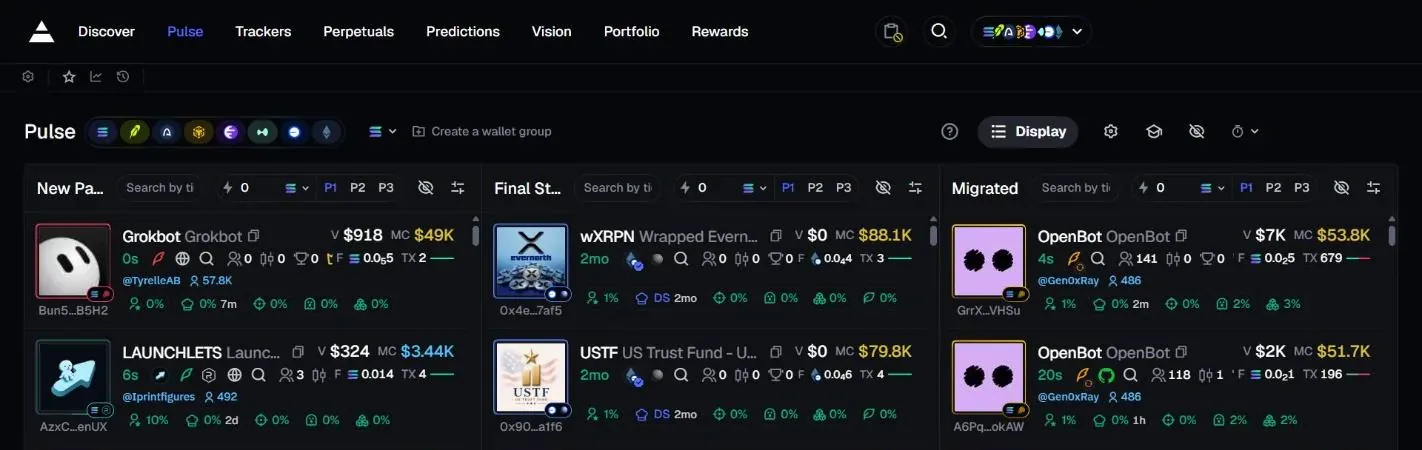
Pulse splits tokens into three columns by lifecycle. The New Pairs column holds tokens just created on a launchpad such as Pump.fun. The Final Stretch column is tokens whose bonding curve is almost full and about to move to a DEX. The Migrated column holds tokens that have already moved to a DEX pool, with the newest migration on top. Spot a token you like and tap the lightning-bolt icon right on its card to buy straight away, no need to open the detail page.
Each column has its own filters. You set thresholds for token age, the percentage held by the top 10 holders, the share the dev is holding, the share held by sniper wallets, insider wallets and bundle-style accumulation wallets, the number of holders and the number of Pro Traders. On top of that you get market cap, liquidity, volume, number of buys and number of sells. Since July 2026, Pulse is also tied to Wallet Tracker: the moment a wallet you follow buys a token, Pulse shows it.
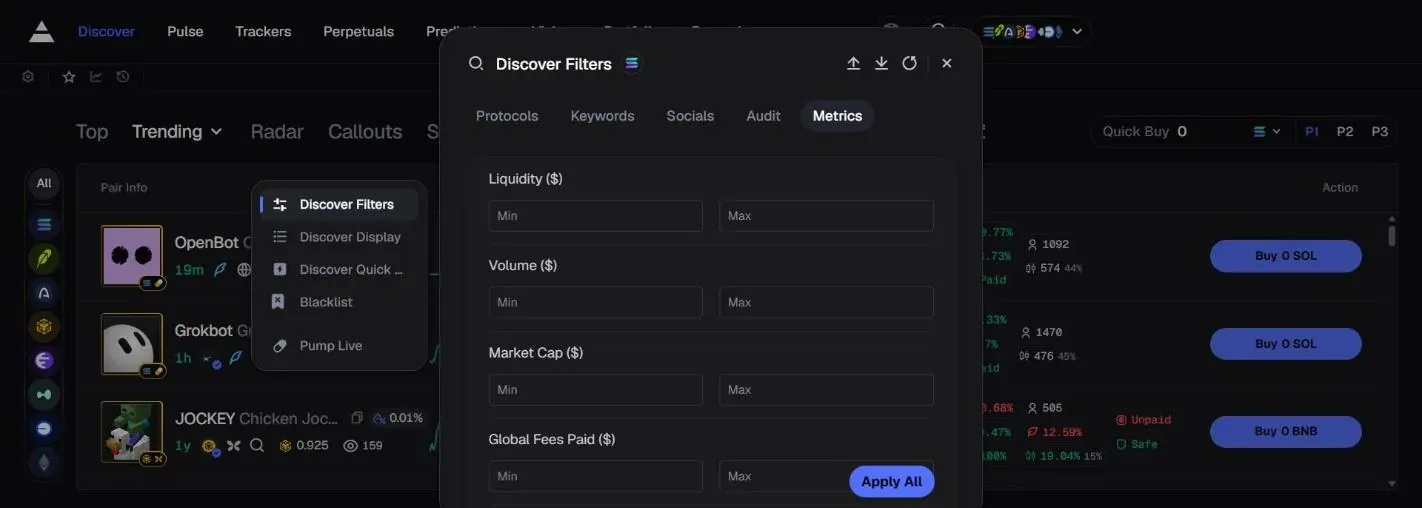
Discover is for tokens that already trade. When we took the screenshots, this page had five tabs. Trending ranks by trading activity over 1m, 5m, 30m, 1h or 24h, your choice. Callouts collects calls made in many places, alongside a Top callers table covering 30 days. The other three tabs are Top, Radar and Streamers.
In Discover Filters, you set thresholds for market cap, liquidity, volume, number of trades and the top 10 holders' share, and you can filter by DEX Paid, meaning projects that paid a DEX to get the token listed. For tokens you want to revisit, tap the star next to the name to add them to your Watchlist; that list opens with the star in the top corner. Right in the search box is OG Mode, a filter that surfaces the oldest tokens with the biggest market caps, the kind that tend to get pumped again for another round. Next to it is a Pump Only button.
Vetting a token before you buy: Trader Scan, Bundle Checker, Atlas Maps
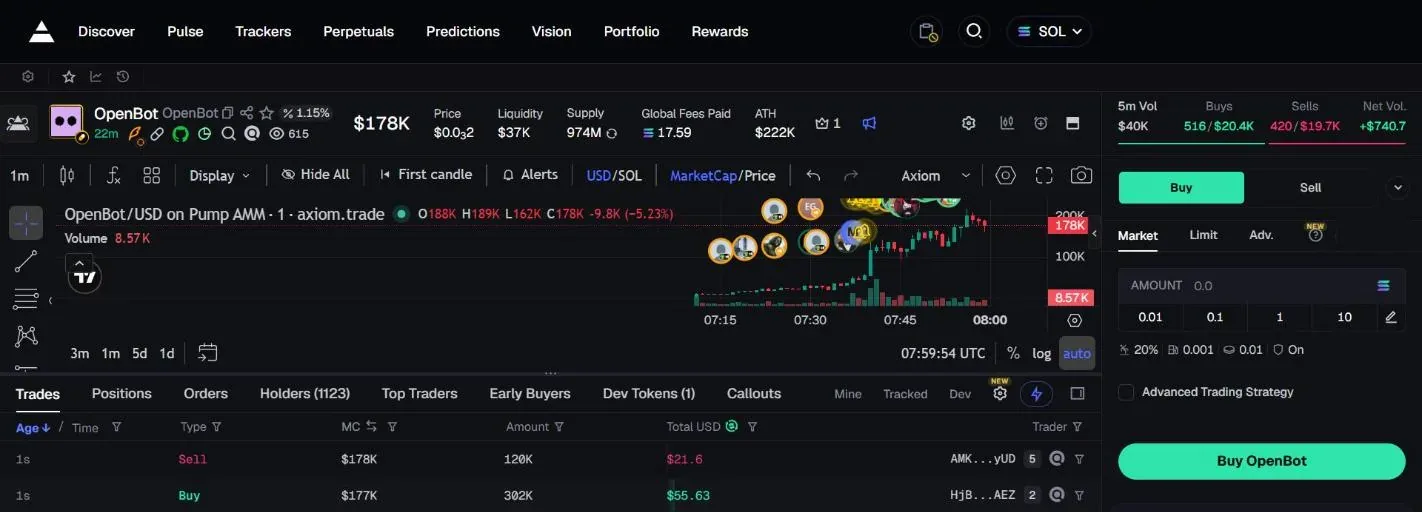
Open any token and you land on its detail page. The TradingView chart takes the middle, the buy/sell panel sits in the right column, and below are filled trades and the holder list.
The part most worth reading is Trader Scan, built into the trade history panel. For each wallet that has traded this token, you see how much it bought, how much it sold, how much it still holds, how much profit it has taken and how long it has held. Read a few big wallets and you can guess which group is accumulating and which is dumping.
Bundle Checker flags when 4 or more buys land in the same block. The tool scans the token's whole trading history, not just the launch phase. Axiom also admits no method catches 100%. Atlas Maps arrived in May 2026, a wallet map sourced from InsightX.
Placing orders: Market, Limit, Instant Trade and the fee and MEV settings
The order panel has two familiar order types. Market fills immediately at the current price. Limit waits for price to reach the level you choose before filling; adjust that level with the slider in the panel, or grab the price line on the chart and drag it to where you want.
For faster entries, use Instant Trade, a small floating panel beside the chart. The buy button shows a preset SOL amount, the sell buttons show 10%, 25%, 50% and 100%, and each order takes a single click. You can save three configurations, called P1, P2 and P3, and switch between them as needed. Turn on hotkeys and orders go out by keyboard: press Space combined with the key you've assigned.
When the market is swinging and you want to sit out, click the wallet button, choose Swap and convert to USDC without leaving Axiom.
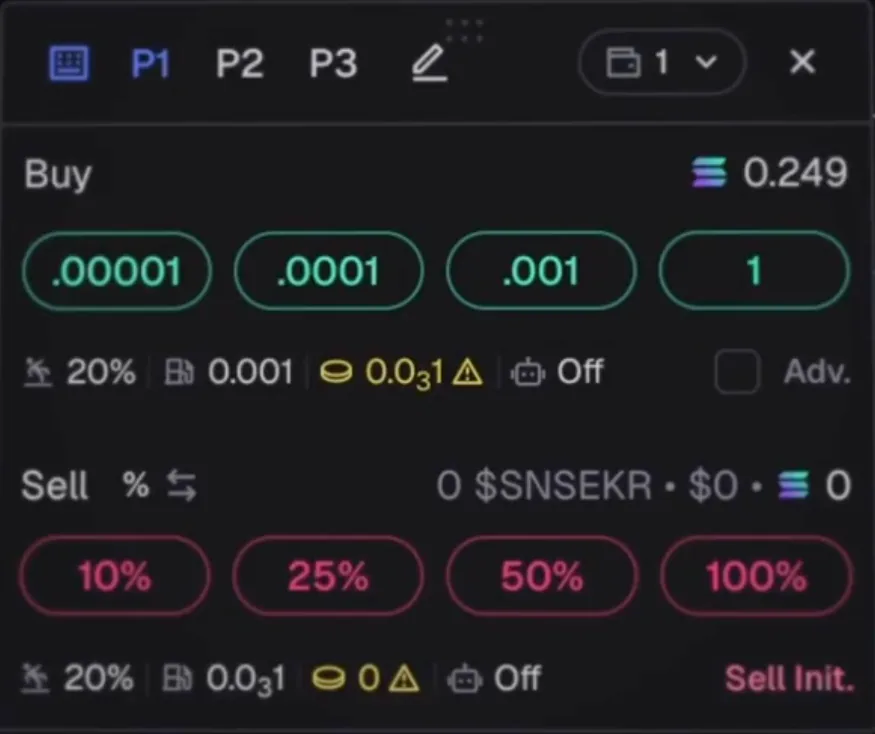
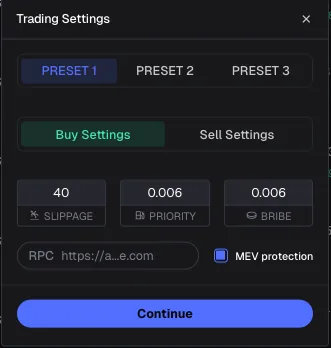
Each order also comes with a few parameters that decide how fast it fills and how safe it is. They live in Trading Settings:
- SlippageThe biggest price deviation you'll accept. On a violently moving token, widen it so the order doesn't fail. With MEV protection off, keep this low, or other bots will sandwich your order.
- Priority fee and bribeTwo extras you pay so your order is processed sooner: a priority fee for validators and a bribe. Both default to 0.001 SOL each; Axiom calculates a suggested level based on network congestion.
- Off, Reduced or SecureOff sends the order with no protection at all. Reduced routes the order through Jito, which lowers the risk but doesn't remove it. Secure waits for a validator from a trusted group to take its turn before sending: slower than the other two modes but the lowest risk, and Axiom recommends it.
- Presets split buys and sellsA preset holds two separate sets of parameters, one for buys and one for sells. When the market changes pace you switch presets instead of editing each field again.
Catching the migration: Sniper Buy and Sniper Sell
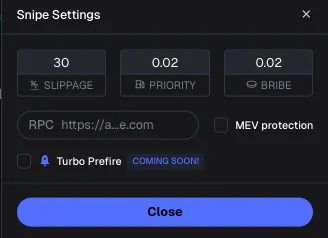
To buy at the exact moment a token leaves Pump.fun, Axiom has Migration Actions built in, so you don't need an extra external sniper bot.
The buy side is called Sniper Buy. You preset slippage, priority and bribe specifically for the snipe order, hit Snipe and wait. When the token completes its bonding curve on Pump.fun and moves to a DEX pool, Axiom fills the buy right away, through a node Axiom runs itself.
To exit the same way, use Sniper Sell: open Sell, click Advanced, go to Migration and fill in the sell order; it fires the instant the token migrates. This is for when you realize you bought a copycat token by mistake and want out as soon as it hits the DEX.
Following good wallets and posts on X: Trackers and Twitter Monitor
Everything related to tracking lives in the Trackers section. Wallet Tracker can follow any address. Add a wallet with the Add Wallet button: attach an emoji, give it a name that's easy to remember, then paste the address. If you already have a list of wallets you follow on BullX or another platform, the import button lets you bring over the whole list in one go.
Trades from the wallets you've added show up on the chart and on Pulse right away. That way, when a KOL or smart money wallet has just bought, you see it immediately, and you also know how many wallets are piling into the same token.
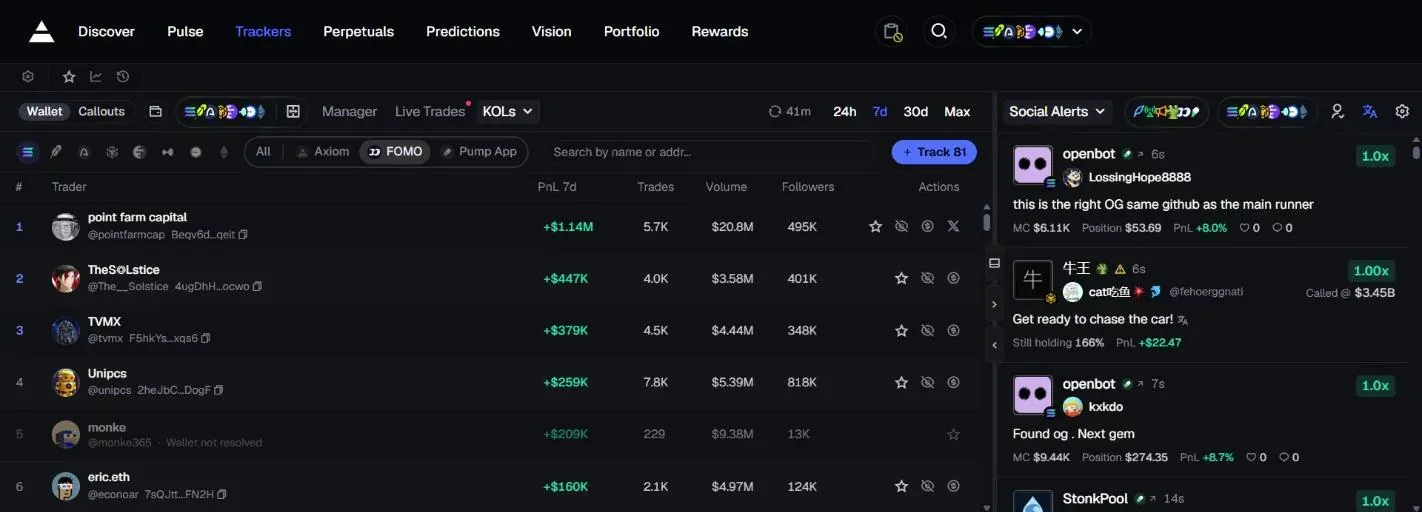
When we looked, Trackers was split into the following tabs. Manager holds the wallets you've added. Live Trades shows the latest trades from those same wallets. There are also Transfers and Monitor. KOLs gathers KOL wallets into a table with volume, trade count and PnL, each row with its own follow button. The right-hand column is for Social Alerts: calls that were posted, shown alongside the position the poster holds and whether they're up or down.
Also in Trackers is Twitter Monitor, a real-time tracker for X accounts that matter to crypto, with no need to subscribe to another paid service. It's free once your total trading volume on Axiom reaches 5 SOL or more. You add the accounts to follow yourself, and you also set which notification types you want.
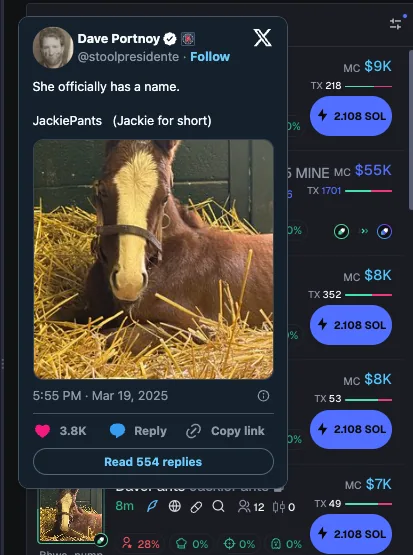
On Pulse, any token with a link to an X post shows a Twitter Preview: the post's content pops up right on the card, no need to switch to X. Note that the preview only works with post links; if the token only links a profile page, there's no preview.
Vision, Lobbies and Communities: Axiom's community side
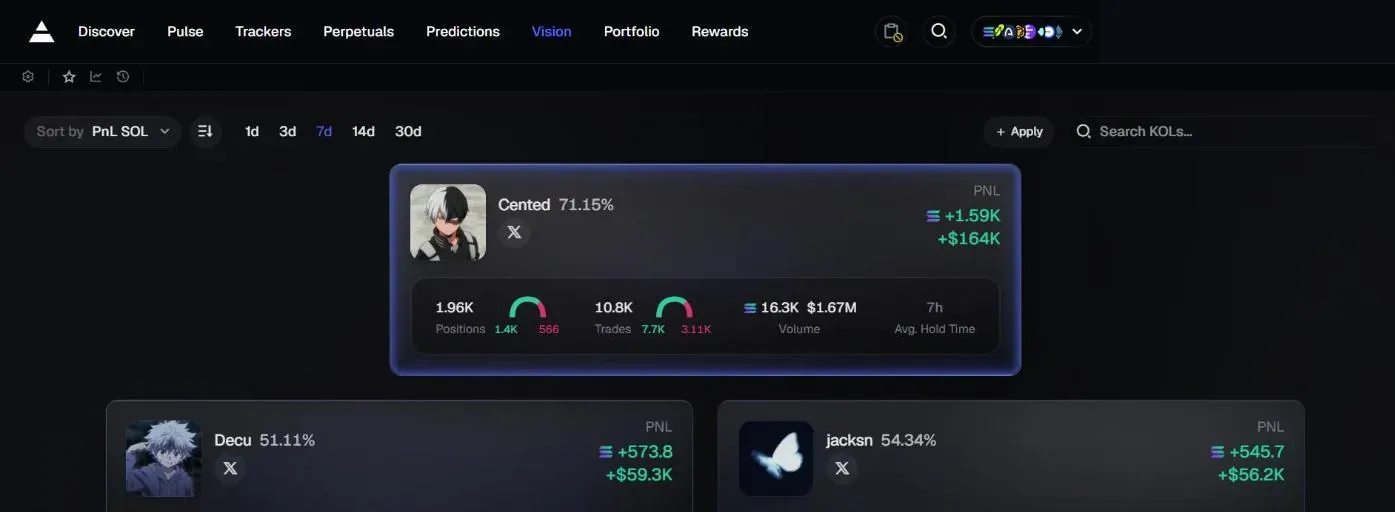
Vision has its own spot in the main menu. Axiom launched it in late July 2025, with the goal of helping users trace the wallets of KOLs and insiders. When we looked, Vision ranked KOLs by trading performance: the top three appear as three large cards, with the other KOLs listed below in the Traders table.
Next to each KOL's name and X link you get PnL in both SOL and USD, win rate, number of winning positions, number of losing positions, number of buys, number of sells, volume, and the average time each trade was held. The time frame switches between 1d, 3d, 7d, 14d and 30d. Sort by reorders the table by volume, PnL, hold time, number of wins or losses, or number of buys or sells. To find a specific person, type the name in the Search KOLs box.
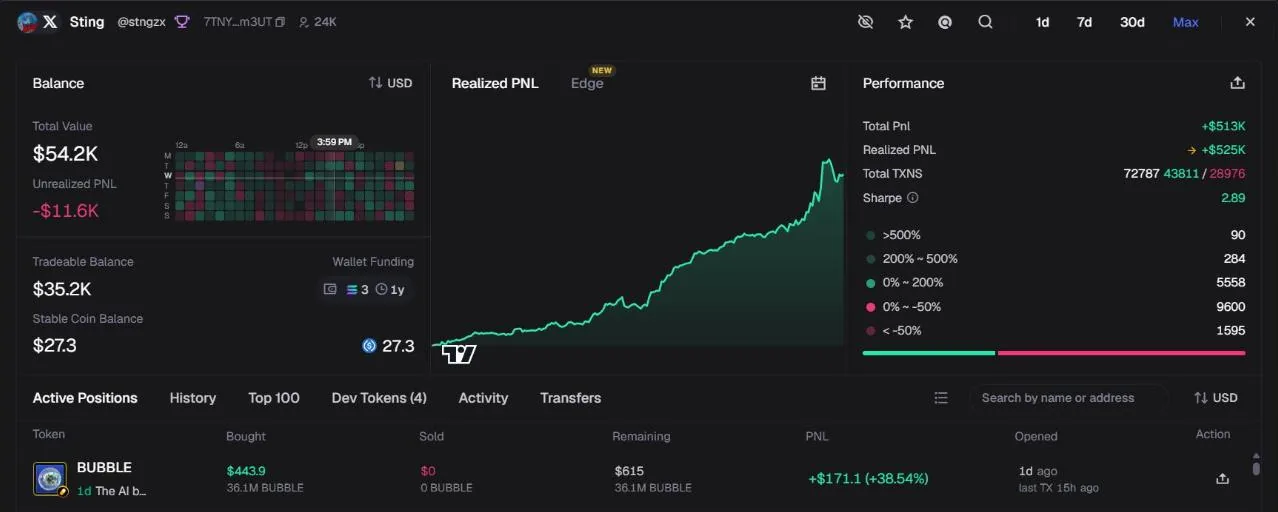
Every row in the table is clickable and leads to that person's wallet profile. The profile has the current balance, a realized profit curve over time, trade stats split by profit bracket, open positions, the full trade history, the list of tokens launched by this wallet (Dev Tokens) and transfers. Three buttons sit at the top of the profile: a star to add the wallet to the group you follow, a toggle for showing this KOL in the trade bubbles that appear on the chart, and a button that opens the wallet on Solscan.
If you want your own wallet to appear on the board, click Apply and the Add KOL form appears: pick a wallet, fill in your X account (required), and there are fields for Twitch, Kick or Discord.
Besides Vision, Axiom has two more places to trade with other people. Lobbies, available since December 2025, let you and your friends join one room and trade together right inside Axiom. Communities, available since May 2026, is where traders swap calls inside Axiom, instead of dragging each other over to a Telegram or Discord group.
Multiple wallets, private trading and tracking PnL in Portfolio
- Multi-walletOne panel gathers all the Solana wallets you have, showing the balance, pending orders and latest trades for each one. Switch to another wallet without logging out.
- Wallet labelsName wallets by purpose: one for short scalps, one for long-term holds, one just for memecoins.
- Spread your funds across walletsAxiom's reasoning: if one wallet runs into trouble, the others aren't dragged down, and outsiders have a harder time tracing your trades.
- Private tradingVanish was integrated in November 2025 and Husher in August 2026, both for more discreet trading.
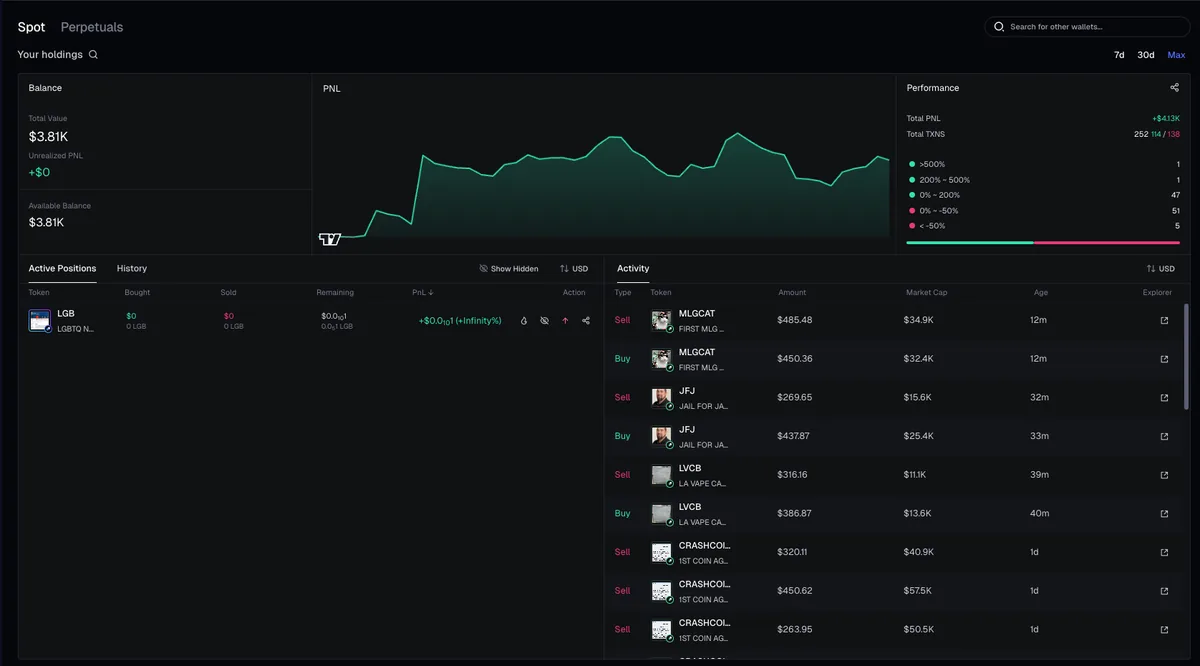
When you need a summary, open Portfolio. The Spot and Perpetuals sections stand separate here, so you can see whether your profit comes from memecoins or perps. Spot shows total asset value, the free balance available to use, unrealized PnL and a PnL curve you can set to 7 days, 30 days or all time. Below that are trade counts by profit bracket, the positions you're holding, then the trade history, each row with a link to Solscan.
The Perpetuals section shows account value and each open position: entry price, liquidation price, mark price, margin and TP/SL levels. To view another wallet's portfolio, use Portfolio's search box. Axiom shipped Portfolio V2 in late August 2026.
Beyond memecoins: Hyperliquid perps, Prediction Markets, Yield and staking
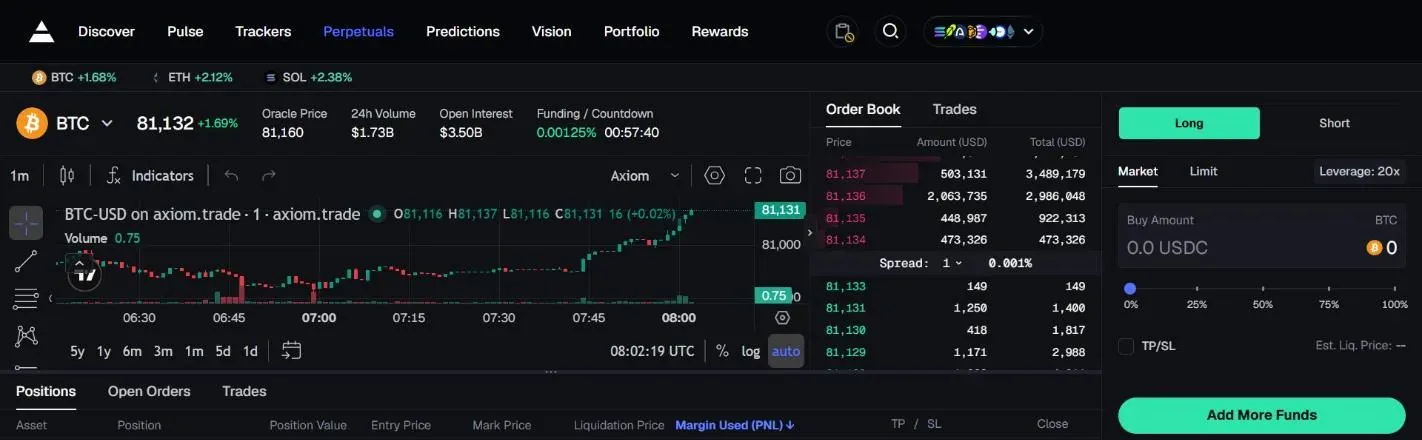
The Perpetuals section runs on Hyperliquid. To open a position, you pick a trading pair, choose Long or Short, type the amount of USDC to enter with, choose leverage (per the docs, up to 50x), then press the Long or Short button to confirm. After that you track it in Positions (open positions), Open Orders (pending orders) and Trades (filled orders).
Perps capital is USDC on Hyperliquid. To fund it, press the SOL – USDC button at the top right, choose Swap and swap SOL for USDC on Hyperliquid. To withdraw, reverse that; the USDC reaches your Solana wallet after about 5 minutes. On fees, Axiom's docs list 0.01% per perps trade, not counting the maker and taker fees Hyperliquid charges separately.
On Jun 12, 2026, Axiom added Prediction Markets: you put money on the outcomes of upcoming events, right in your Axiom account.
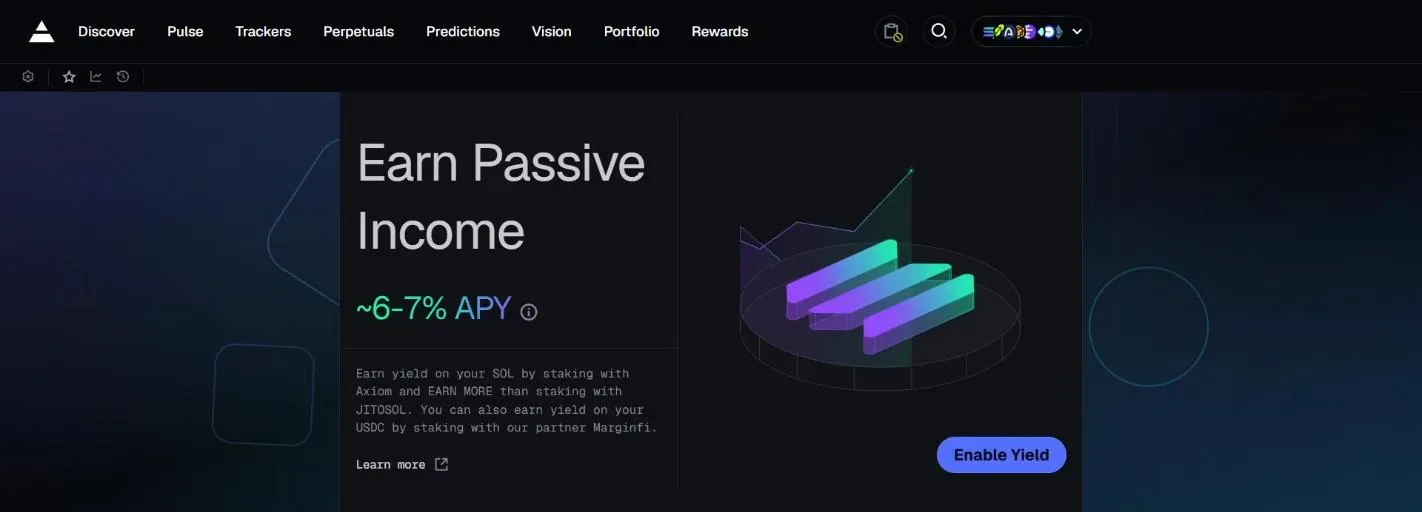
Idle money can earn too. Yield moves your unused SOL or USDC to Marginfi, Axiom's partner, and you can withdraw anytime. When we took the screenshots, the Yield page showed an APY of about 6 to 7% for SOL staked through Axiom; this figure moves with the market.
To stake SOL there are two routes. The first is delegating straight to Axiom's validator: 0% commission, you get the full staking rewards and the MEV too, and you can find this validator in the stake section of Phantom or Ledger. The second is staking on the web to get axiSOL, a liquid staking token; in return, axiSOL keeps 5% of the yield and charges 0.1% each time you withdraw.
Real fees, cashback by tier and the referral program
Axiom's base fee is 1% per order, on buys and sells alike. It drops as your cashback tier rises, down to 0.75% at the lowest. Accounts created through an invite link get another 10% off fees. On top of Axiom's share, each order also costs network fees (priority, bribe), and the launchpad where the token launched may charge its own fee.
The mechanism behind the discount is cashback: after each order, Axiom sends you back some SOL from the fee it collected, more or less depending on your tier. Your tier rises with your total trading volume. The lowest is Wood, with 0.05% cashback, so the effective fee is 0.95%. Next come Bronze, Silver, Gold, Platinum, Diamond, and at the top Champion, with 0.25% cashback and an effective fee of 0.75%. Alongside that, every order you place and every person you invite earns extra points, with a separate points leaderboard.
Per the docs, cashback and referral commission are calculated on three chains: Solana, Ethereum and BNB Chain. To put this fee next to other bots, see our comparison table.
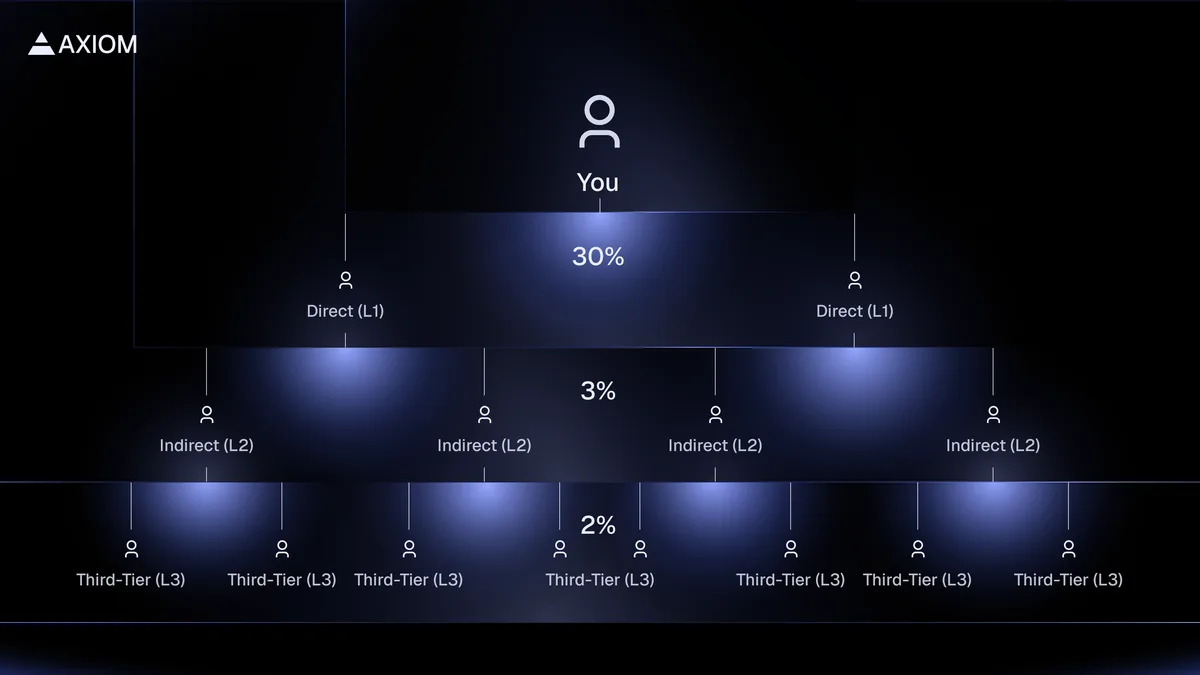
The referral program pays across three levels with no cap. You get 30% of the net fees Axiom collects from the people you invited yourself, 3% from the people they invite in turn, and 2% at the third level. The invited side gets 10% off trading fees.
Safety: non-custodial wallet, support channel and the February 2026 wallet lookups
Wallets on Axiom are non-custodial, built on Turnkey infrastructure: Axiom doesn't hold funds for you, so keeping the recovery phrase is on you. Here are the points we think are worth remembering:
- Recovery phraseAxiom gives you this phrase when you sign up, and you can view it again in Settings. Use it to restore this wallet in another app such as Phantom, so you can always access your own funds. Never send it to anyone.
- Tickets on Discord onlyThe only support channel is opening a ticket on the official Discord. Ignore anyone who DMs you claiming to be support; Axiom also advises blocking DMs from server members.
- Set buys to SecureChoose Secure as the MEV mode for buys. If you've turned MEV protection off, don't leave slippage high.
- The February 2026 wallet lookupsIn February 2026, ZachXBT accused an Axiom employee of using an internal tool, meant for supporting customers, to look up users' wallets. Axiom responded on Feb 26, 2026, admitting a team member had abused the tool; access was revoked and the investigation is ongoing. There have been no reports of users losing funds; what was exposed was wallet information.
- Keep only working capital in the trading walletThis wallet signs orders for you, so only deposit the amount you plan to trade with. Once you're in profit, move it back to a wallet of your own.
In our view, this case hasn't been seen to cause lost funds, but it shows that an insider was able to look up customer wallets. Anyone who values privacy should use a separate wallet for trading, apart from the one holding their main assets, and consider the private trading options above.
Our verdict: where Axiom is strong, where it's weak, who it fits
Wrapping up the sections above, Axiom is strongest at finding new tokens on Solana and getting into trades fast by hand, with plenty of data to check before you buy. The weak points are that it doesn't trade for you, there's quite a lot to learn, and it once exposed wallet information from the inside.
What we think Axiom does well:
- Enough data to pick tokensPulse filters by dev, sniper, insider and bundle; Trader Scan, Bundle Checker and Atlas Maps to check the wallets around a token. You rarely need to open outside tools.
- Fast entriesInstant Trade, hotkeys, three presets P1 to P3, and Sniper Buy running through its own node at migration.
- Fees fall with volumeFrom 1% down to 0.75% via SOL cashback, plus an extra 10% off when you join through an invite link.
- You hold your own walletNon-custodial wallet, and the recovery phrase can be imported into Phantom.
- One account, many areasSpot, perps, Prediction Markets, Yield, staking and many chains in one place.
Things to weigh:
- No auto copy tradingSignals from Trackers and Vision are only for your own decisions; anyone who wants a copy trade bot has to look elsewhere.
- February 2026 wallet data exposureAn employee once looked up customer wallets with the company's support tool. There are no reports of lost funds so far, but it's a mark against privacy.
- A lot to learnThree Pulse columns, five Discover tabs, three MEV modes, priority fee and bribe. A newcomer who gets the settings wrong can easily lose money to fees or get sandwiched.
- Support only via DiscordNo channel besides tickets, so it's easy to run into fake support accounts sending DMs.
- Cashback unclear on newer chainsThe docs only mention cashback and commission on Ethereum, Solana and BNB Chain; nothing is listed for Base, Ink, Arc, Robinhood Chain or HyperEVM.
Who it fits and who it doesn't:
- FitsManual memecoin traders on the web, mainly on Solana, who like hunting tokens from the bonding curve stage and make their own call when they see a good wallet or an X account speak up. People who also want perps or to park SOL for yield in the same account won't have to hop between places as much.
- Doesn't fitPeople who want a bot to auto-copy other wallets, newcomers not yet comfortable with slippage, bribes and MEV, and people who put privacy first after the February 2026 case.
Opening an Axiom account and making your first deposit
There are two ways to get money into your Axiom wallet. The first: send SOL to the wallet address Axiom shows you. The second is for people who don't have SOL yet: click the arrow button at the top right, go to Deposit, then pick Buy, and buy SOL with Coinbase. Within a $500 weekly limit, no KYC is required.
- Go to Axiom through our linkYou pay nothing extra; on the contrary, you get 10% off trading fees.axiom.trade
- Create an accountClick Sign up and choose one of three ways: email (Axiom sends a one-time code to your inbox for you to enter), a Google account, or a Phantom wallet. Set a password, then copy down the recovery phrase Axiom gives you and store it somewhere safe.
- Deposit a little, set MEV, test smallDeposit SOL using either method above, switch the MEV mode to Secure, then practice on Pulse or Discover with a small amount. Only raise your capital once you're comfortable.
Through our referral link, at no extra cost.
Open AxiomScreenshots taken on November 16, 2026; the interface may change. Not investment advice: memecoins are high-risk, only use money you can afford to lose.