
What is MevX: one account, three ways to use it, six chains
The core of MevX is the mevx.io web app, a terminal for discovering, vetting and trading memecoins. The same account works on the Telegram bot and the Chrome extension, and you can trade on six chains: Solana, Base, Ethereum, BNB Chain, Monad, Robinhood Chain.
- mevx.io web appMost of the tools in this review live here: Discover, PvP Zone, token page, Copy Trade, Sniper, AFK Trade, Signal, Swap.
- Telegram botThe two official bots are @mevx and @MevxTradingBot. Switch chains with /selectchain; paste a token address into the chat and the bot sends back a chart preview. The bot also has a PNL Calendar (profit and loss by day, week or month), and you receive referral commission right in the chat.
- MevX ExtensionA Chrome extension that injects three kinds of buttons (Buy/Sell, Snipe, Trade on MevX) into the sites you already use: X, Discord Web, Telegram Web, Solscan, Dextools, DEX Screener, Pump.fun, GMGN, BullX Neo, Photon. Scrolling X and hit a tweet with a token address, Solana or EVM, you can trade straight from the panel that appears under the tweet.
In our view, MevX fits web-based traders who use many chains and want to hand some of the work to the machine: copy trade, sniping, automated orders.
Token discovery: Trending, New Pairs, Meme Zone and Degen Zone
Opening mevx.io takes you straight to Discover; switch chains from the bar at the top of the page.
- Trending: pairs that are drawing attention, with volume, number of trades, liquidity, market cap and pool age.
- New Pairs: newly created pairs, with safety checks built in. Solana alone has a filter for pairs against tokenized stocks like NVDAx and TSLAx.
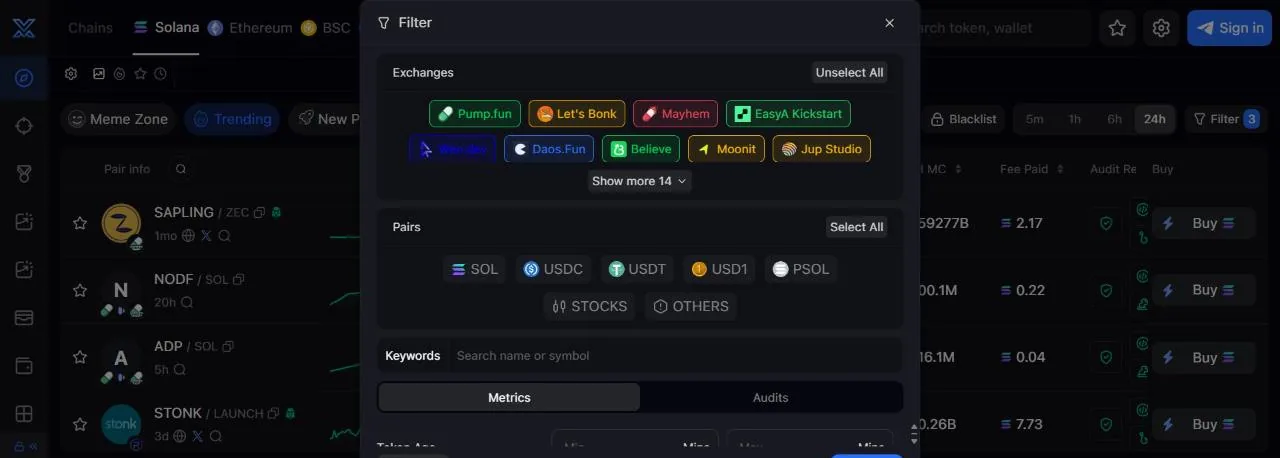
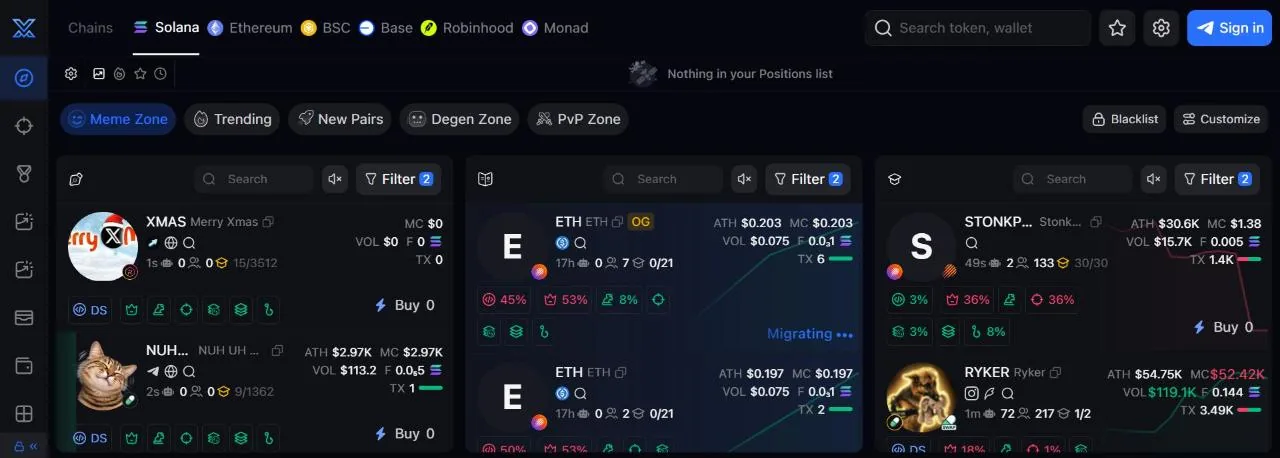
Meme Zone sorts tokens still on a launchpad into three columns by lifecycle: freshly launched in New Creations, bonding curve nearly full in About to Graduate, already moved to a DEX in Graduated. Filters cover the launchpad (Bags, Let's Bonk, Pump.fun, LaunchLab, Boop.fun…), token age, how full the bonding curve is, whether the dev is still holding or has dumped everything, and the share held by the top 10 holders. If you want to watch a chart while keeping an eye on new tokens, shrink Meme Zone into a Side Panel, a small panel that sits alongside.
Degen Zone only shows tokens whose volume has spiked in a short window on Solana, Base and BNB Chain, and MevX itself labels this area high risk. Auto Buy here automatically buys the tokens on the list; you set TP/SL, tip and priority fee in advance, then choose whether to turn on anti-MEV. In our view, only enable it on a separate wallet with a small balance, money you're ready to lose.
PvP Zone: picking between memecoins that share one name
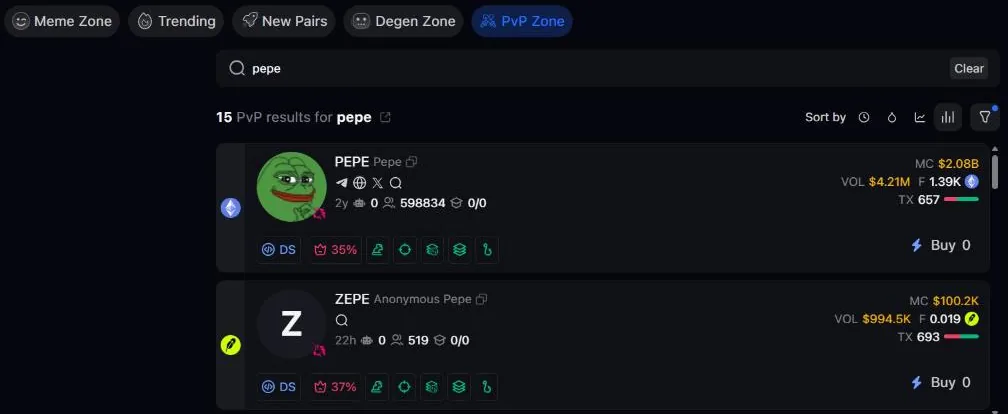
A trending narrative often brings a whole batch of tokens with the same name or ticker fighting over the same money; traders call this PvP. Since December 2025, Discover has a fifth tab for this: PvP Zone (mevx.io/?tab=pvp). It gathers same-name tokens across all chains into one list with live data, so you can compare volume, holder count and momentum, then pick the one that's leading.
The Search Token Name or Ticker box takes a name or ticker, and every matching token shows up. We tried typing pepe and got tokens on Solana, Ethereum and even Robinhood Chain. Each card shows the chain (via icon), token age, holder count, MC for market cap, VOL for volume, F for total trading fees generated, the number of trades with a bar splitting buys and sells, a label with the % held by the top 10 holders, plus a Buy button to enter right away.
- Change the orderSort by orders results by Volume, MC, Liquidity or Age.
- Narrow the listPick a chain; show only tokens that have Migrated to a DEX; Hide low liquid (on by default) hides tokens with thin liquidity.
- Open as a floating panelThe search panel at the top of the page also holds PvP Zone as a tab, and the bottom bar has its own button for it. Click that button and PvP Zone becomes a floating panel, so you can compare tokens without leaving the page you're on.
According to MevX, since Jan 6, 2026, opening PvP Zone or the search box shows the 10 keywords users searched most in the last 24 hours. When we tried it while logged out, that suggestion box was empty, and we had to type to get results.
Following the money: Signal, Wallet Tracker, KOL Tracker
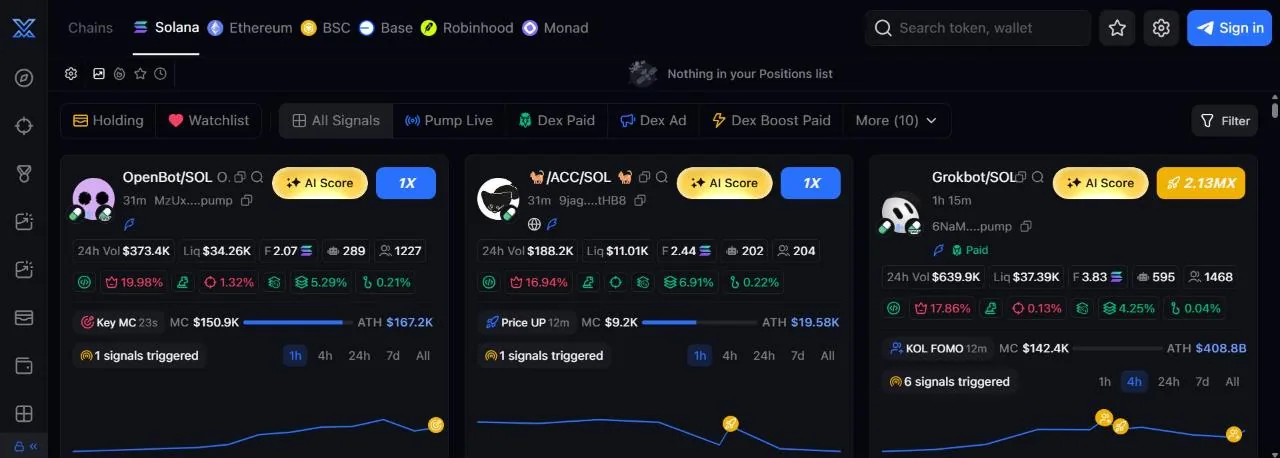
Signal (mevx.io/signal) is a page that surfaces tokens that just hit a notable event: Smart Money buying in, several KOLs buying the same token, tokens called by groups, someone buying a DEX Screener ad, a token going Pump Live or just landing on a DEX… Each token has an AI-generated score and a quick buy button.
An anti-rug filter is on by default and only lets through tokens that pass everything: LP burned, mint and freeze both disabled, more than 150 holders, top 10 holding under 40%, and 24-hour volume above a set minimum.
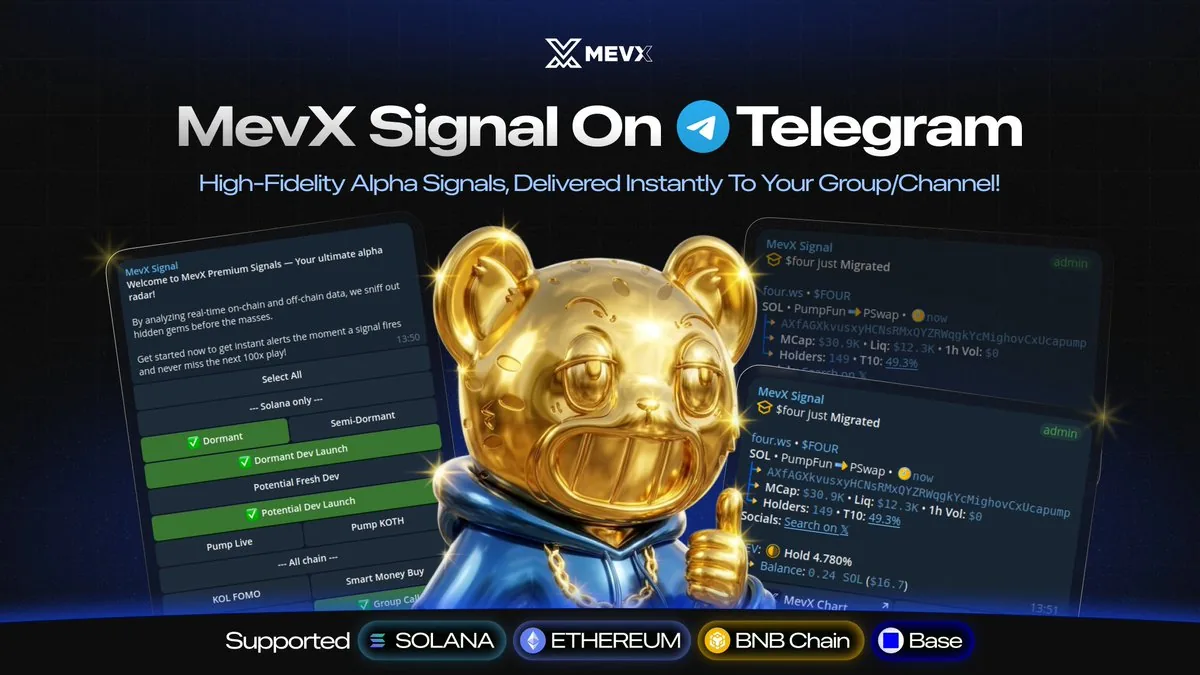
Telegram group admins can invite the @mevxsignalssbot bot so the group receives signals (Solana, Base, BNB Chain, Ethereum); every signal comes with the group owner's referral link already attached.
Wallet Tracker lets you watch other wallets' trades as they happen, split into three tabs. Live Trading shows trades from wallets you've added, from Smart Money wallets and from the Top PNL board. Holdings shows which tokens those wallets are holding and at what cost basis. Alerts handles notifications. Filters cover token age, market cap, volume and trade type: buy, sell or transfer. The @MevxTrackerBot bot accepts /watch, /list, /remove, /export to send notifications through Telegram.
KOL Tracker follows up to 10 accounts at once. Accounts come from two built-in lists, KOLs and Master Traders, or accounts you enter yourself. New posts, replies, reposts, bio changes and, most importantly, the moment they mention a token address all land in one place.
Reading a token and a wallet closely before you buy
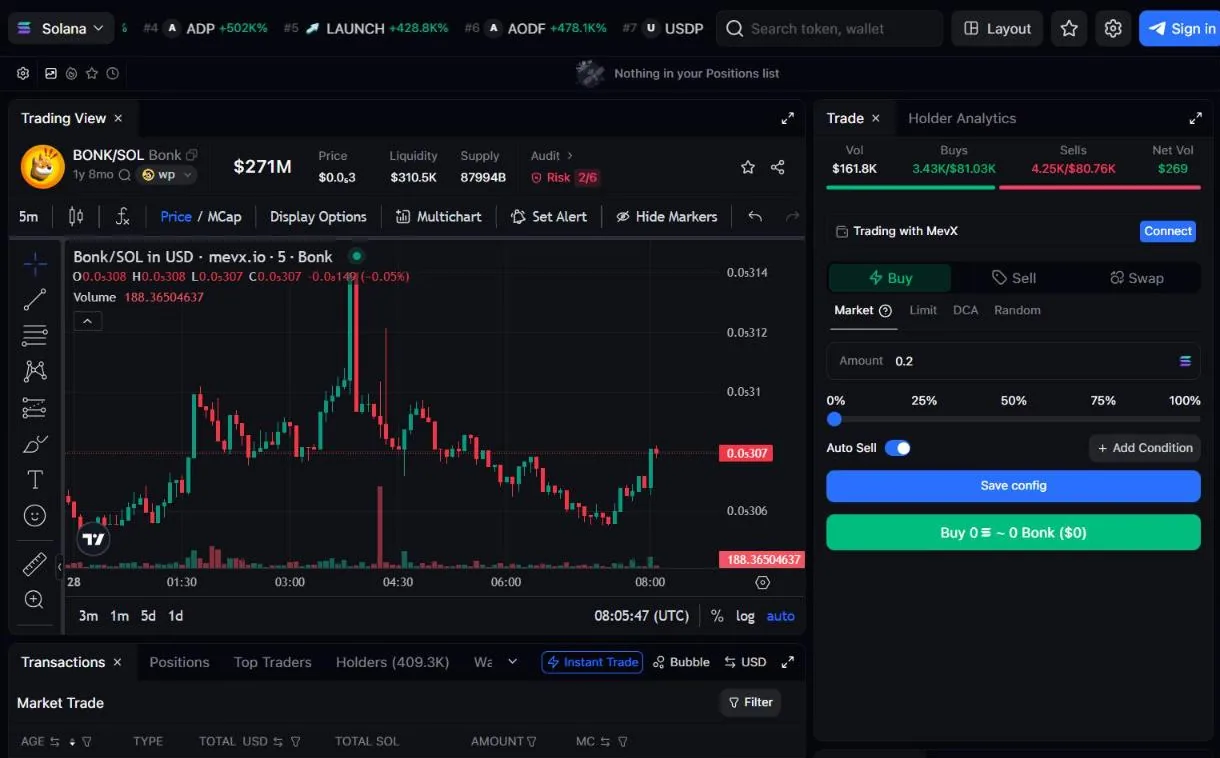
A token page has the chart, trade history, holder data and the Buy/Sell panel in the right column. The holder section is where we think your time is best spent:
- Wallet mapThe Holder Maps button draws a wallet map; you choose whether to use BubbleMaps, InsightX or CabalSpy.
- Whale cost basisThe average cost basis of the top 50 holders, plus an analysis of the groups of big wallets sitting on the supply.
- Token locks, fee recipientsToken lock status via Streamflow; for Pump.fun tokens you can also see which wallet is collecting the fees.
To watch many tokens at once, turn on Multi Chart: the screen splits into up to 10 chart cells, and you can trade and place limit orders from every one. The Oct 28, 2026 update added Dynamic Pairs for tokens with several pools: the pool list appears right under the token name so you can switch, including meme/stablecoin and meme/meme pairs.
For wallets, the matching tool is Portfolio. Open any wallet to see its profit and loss, ROI, balance, results on each token it has traded, open positions, the tokens that wallet itself created and related wallets. If you find a wallet worth following, click Watchlist, Alert or Copy Trade right there.
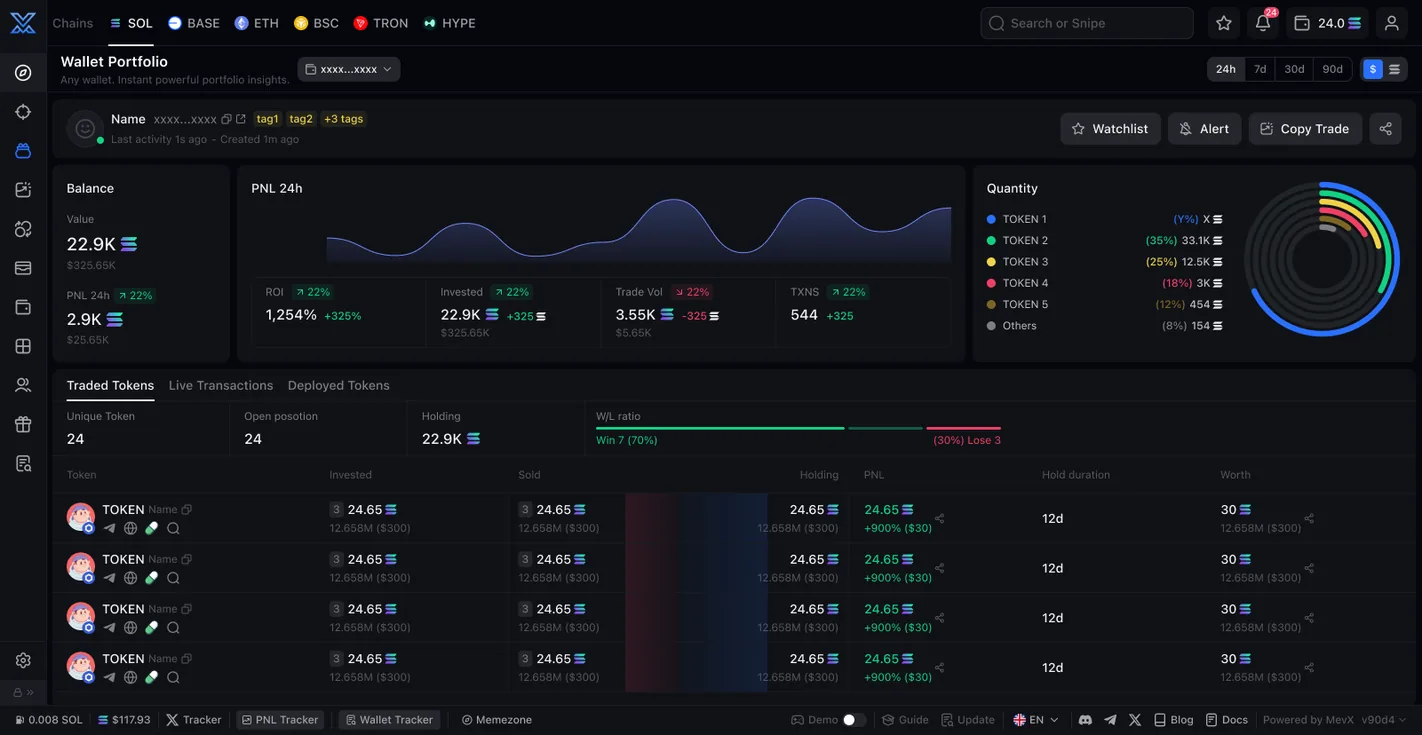
Put together, you have enough data to answer two questions on your own before every trade: who is holding this token, and whether the wallet you plan to follow is actually profitable.
Placing orders by hand: preset buttons, Instant Trade and custom fees
The Buy/Sell panel uses ready-made buttons: buy with amounts you set in advance, sell by percentage of what you hold. The Sell Initials button sells just enough to recover your initial investment and lets the rest ride. For even more speed, use Instant Trade: a preset panel sitting right on the chart, one click and the order goes out, with no confirmation step.
Fees and slippage are in Settings → Trade, set per chain: every chain has three presets for tip, slippage and priority fee, plus an Anti-MEV toggle. Anti-MEV blocks sandwich bots, at the cost of more failed transactions.
Solana also has an Auto preset, i.e. Auto Mode. MevX handles slippage and fees (tip, priority fee) itself; your only job is to set Max Fee, a cap on tip plus priority fee combined.
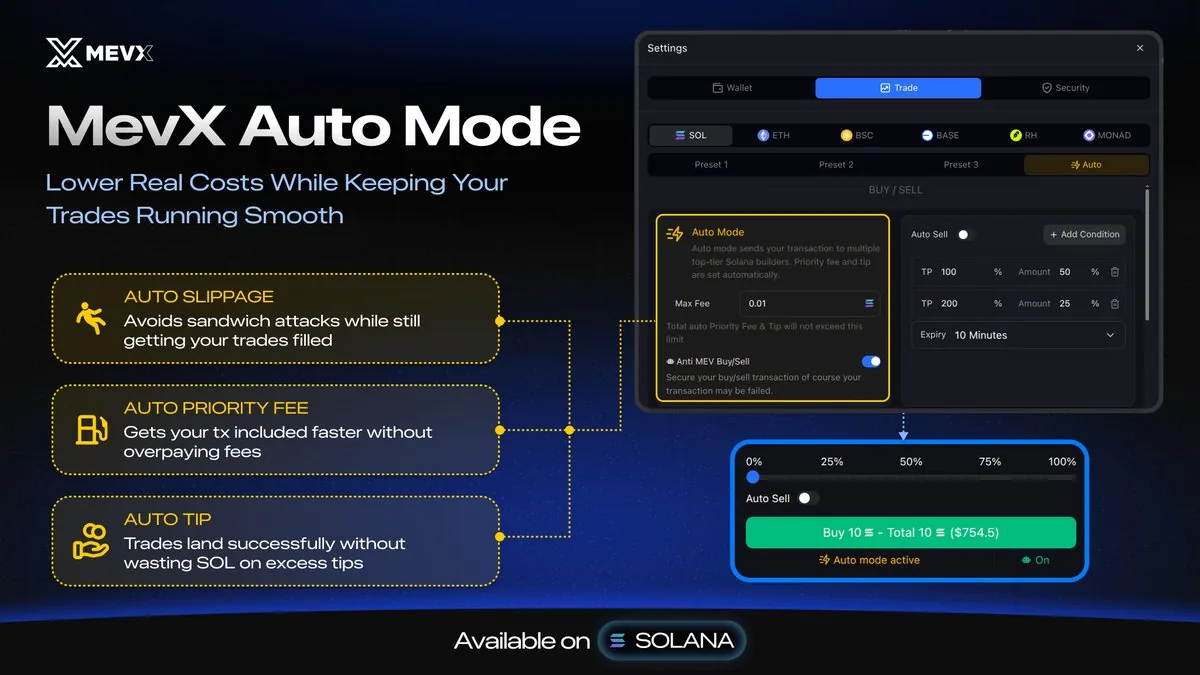
New traders on Solana should start with Auto Mode: one less thing to guess, while Max Fee keeps fees under the level you accept. If orders keep failing, check the Anti-MEV toggle first.
Pending orders: scaling in, take profit, stop loss, trailing
If you don't sit watching charts all day, you need orders that fill on their own. MevX has the types memecoin traders use most:
- Limit by price or market capBuy or sell when a token hits a price level, or a market cap level in USD. The order sits on the chart; to edit it, drag it to the new level.
- DCA scale-inOne amount is split into at least 2 orders, spaced out in minutes, hours or days. You can add a market cap range: if the token is outside that range, the order doesn't fill.
- TP/SL attached to a buyTurn on Auto TP/SL before you click buy; as soon as the order fills, take profit and stop loss levels in % are already set.
- Trailing stop lossTrailing Stop Loss moves the stop up with the price peak, always staying a set % below the peak, called the Trailing Delta. The order has an expiry, and you can make it wait until the token reaches a certain market cap before it activates.
- Exit on dev sellDev Sell sells for you when the dev dumps everything, or when the dev sells more than a % you choose.
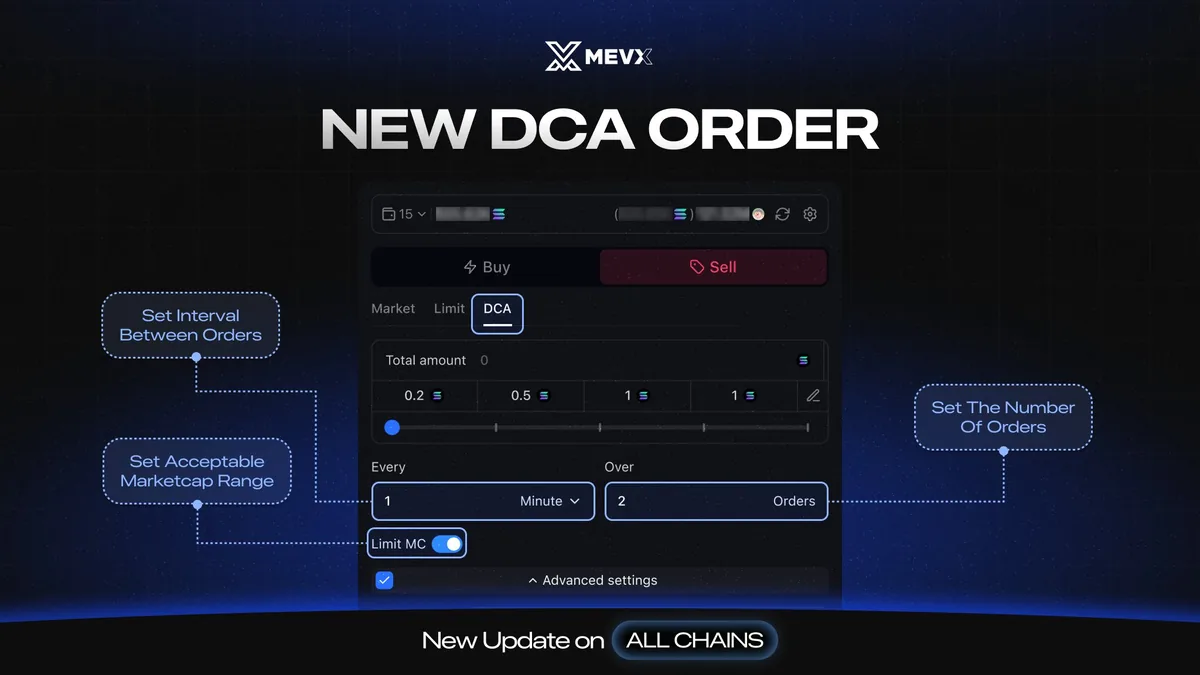
The two orders we found most worth trying are DCA with a market cap range, which helps you avoid chasing after the price has already run, and Dev Sell, which reacts for you when the dev pulls out.
Running multiple wallets and moving funds between chains
Wallets are managed in Settings → Wallet, with a separate list for each chain. Here you can import an existing wallet with its private key, or generate new wallets in batches of 1, 5 or 10. There are tools to spread SOL or tokens across many wallets at once, consolidate SOL from your wallets into one, and convert between SOL and WSOL.
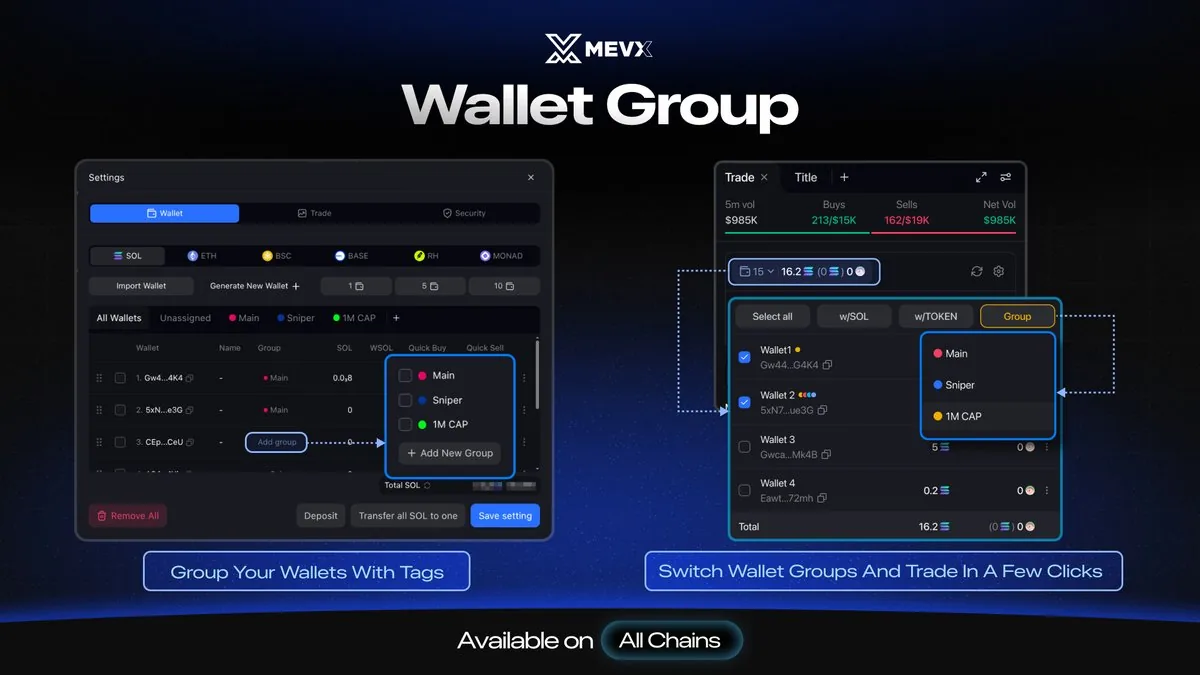
Since Aug 4, 2026, Wallet Group lets you put wallets into named groups, such as Main or Sniper. When you enter a trade on a token page, you pick a whole group instead of ticking wallets one by one. Multi-Wallet Mode views the portfolio of several wallets as one, buys or sells a token across all those wallets in a single click, and exports a combined PnL card.
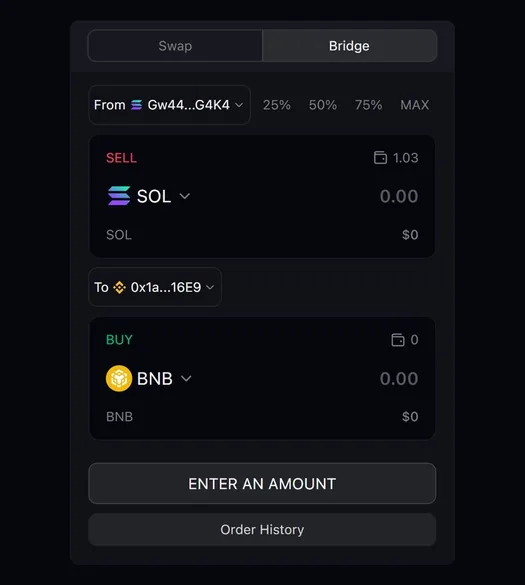
If your funds are on one chain and the token you want is on another, use the Bridge tab in Swap (mevx.io/swap). You fill in the sending side (chain, wallet), the receiving side (chain, wallet), the type of token you want to receive (the chain's native coin, a stablecoin, or any token by pasting its address), then enter the amount. MevX picks the route itself and shows the expected amount received, fees and wait time up front. Since Sep 25, 2026, MevX uses Relay for both bridges and swaps between two different chains. The bridge for Robinhood Chain opened on Jul 23, 2026.
Copy trade on MevX: choosing a source wallet, buy and sell modes, safeguards
Creating a copy task takes four things: open Copy Trade from the menu, choose one of your wallets to run it, enter the source wallet address, then name the task. The source wallet can be an address you found yourself, or one from the Top Degens board, where MevX ranks KOL wallets, whales and smart money. On Oct 20, 2026, MevX added another way: the FOMO tab takes a username from fomo.family, with no wallet address needed.
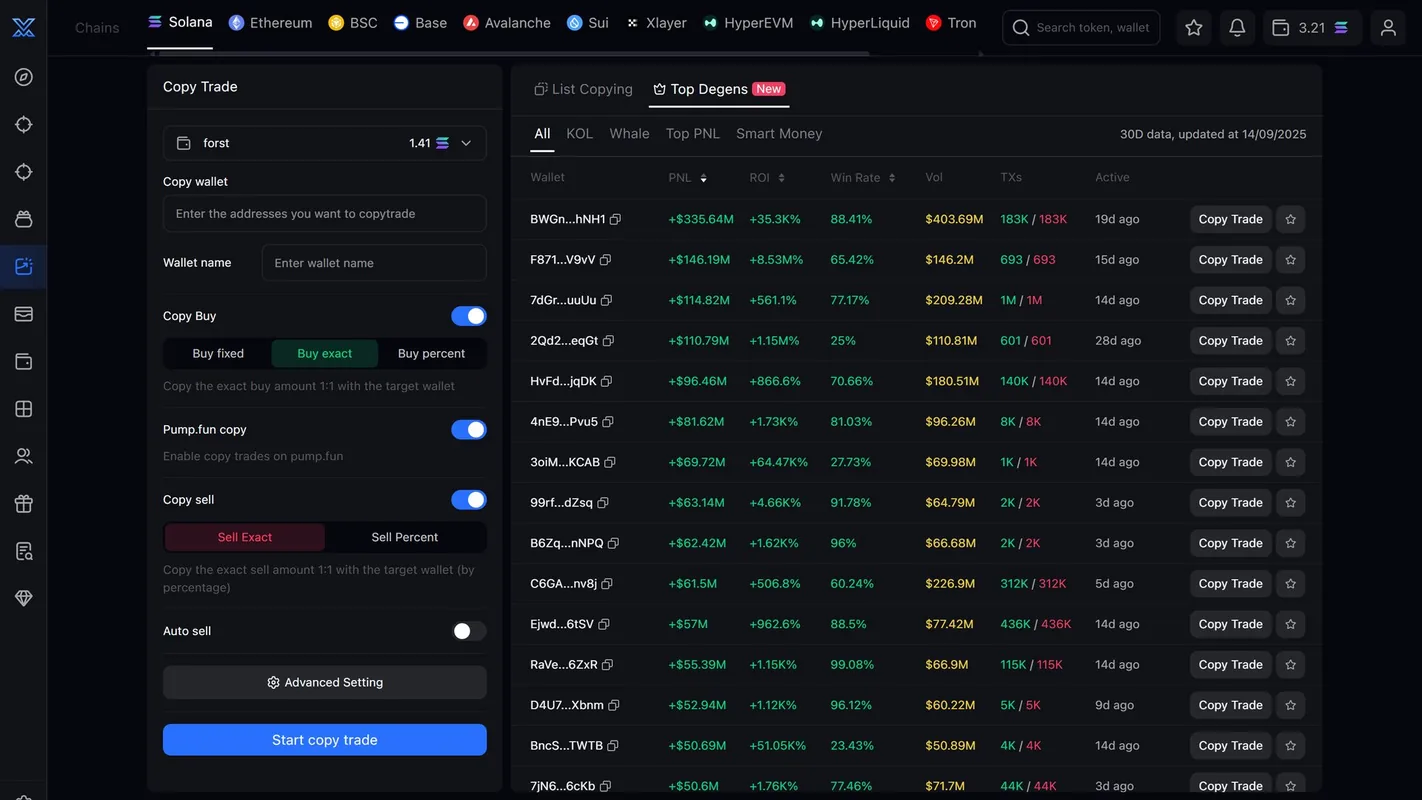
- How much to buy each timeThere are three ways to size it. Buy Fixed: every trade uses a fixed amount, never above Max Buy. Buy Exact: spend exactly what the source wallet spent. Buy Percent: buy a % of the source wallet's trade. Source wallet trades made on Pump.fun are only copied when you turn on Pump.fun Copy.
- When to sell, how much to sellSell Exact sells at the same proportion as the source wallet: if they sell 30%, you sell 30% too. Sell Percent lets you set your own %. Auto Sell adds take profit and stop loss levels (in %) and an expiry.
- Safety railsSpending Limit caps the money going into each token; there's also a minimum liquidity threshold and a market cap range with a floor and a ceiling. Buy Only Once blocks re-buying: within 7 days, each token can only be bought once. Copy Trade Protect filters tokens by mint authority, freeze authority and holder % and also blocks tokens that have already rugged.
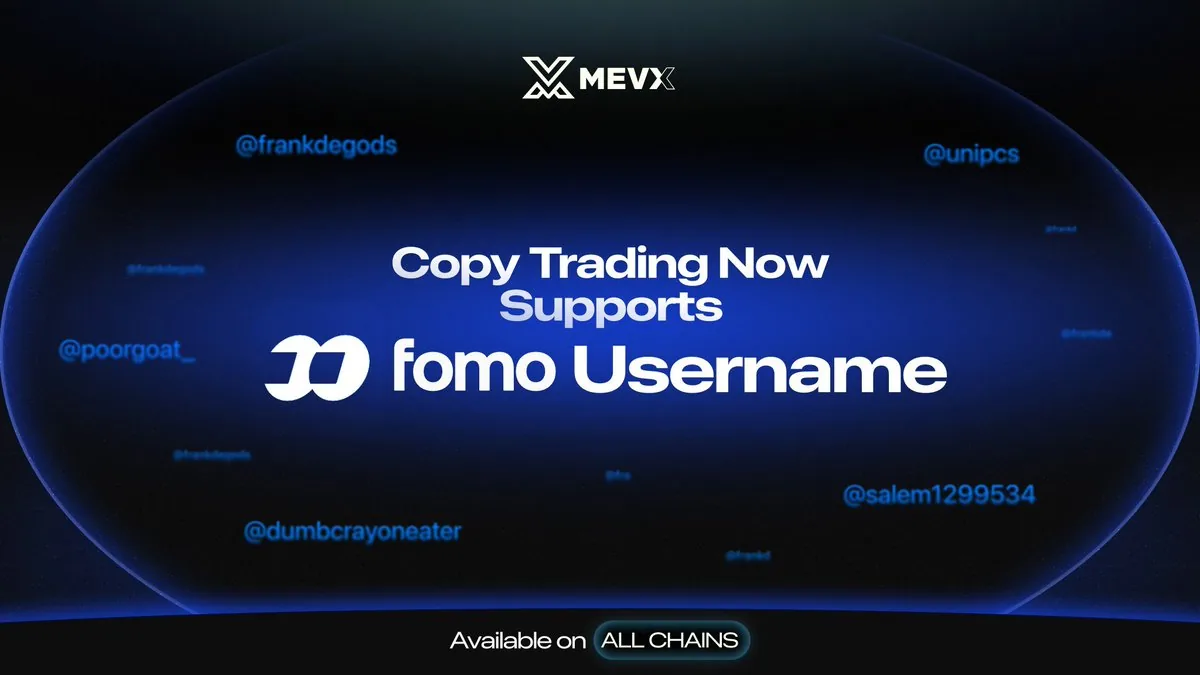
The copy trade section is quite complete: three ways to size buys, two ways to sell plus Auto Sell, and several filter layers. One catch: every copy trade runs after the source wallet's trade, so your results won't match theirs exactly; keep Spending Limit low for the first few days. To see MevX next to other copy bots, check the list of copy trade bots.
Letting the bot work for you: Sniper, Selling Sniper and AFK Trade
The Sniper panel manages snipe orders across seven platforms: Pump.fun, PumpSwap, Boop.fun, Moonshot, LaunchLab, Meteora and Raydium. There are two modes. Targeted waits for a specific target: a dev wallet, a ticker, or a token address. Mass scans broadly and buys every new token on the platforms you tick, except tokens that match keywords on your block list. If you only want in at the moment a token leaves the launchpad for a DEX, turn on Launchpad Migrations Only.
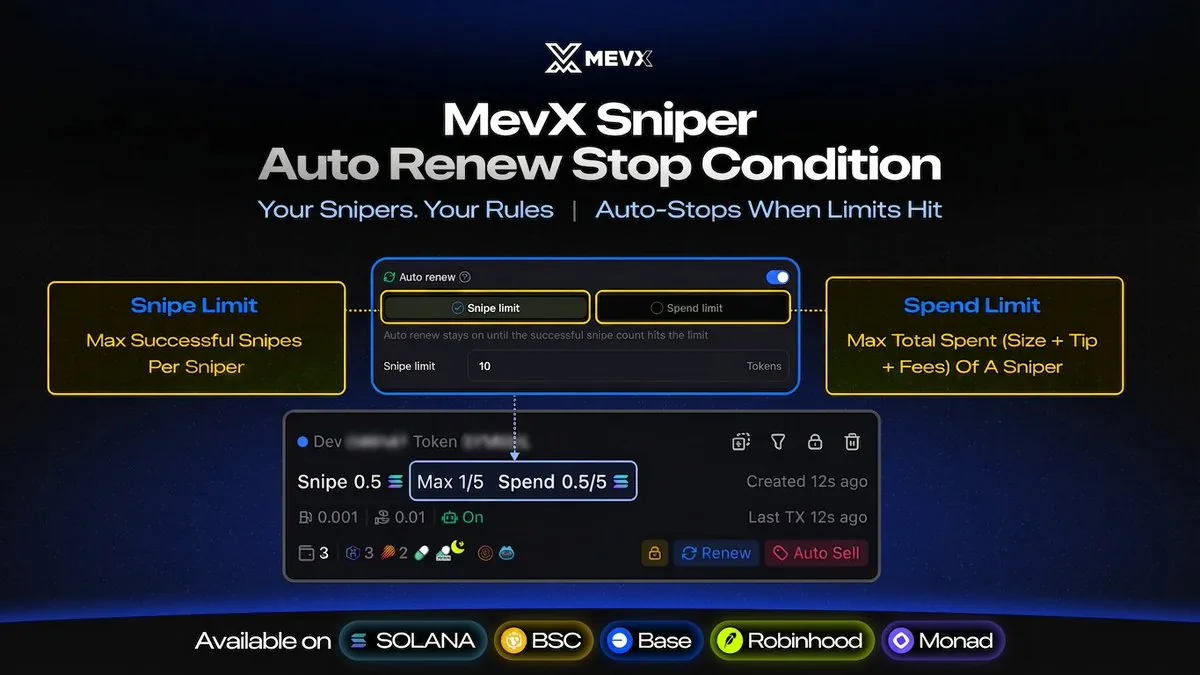
Each snipe order has its own amount, slippage, priority fee, tip and anti-MEV setting. Auto Sell attaches TP/SL as soon as the snipe fills. Auto Renew makes the order rerun after each round, stopping only when it hits one of two limits: the number of snipes, or the total amount spent. On Telegram, type /sniper, or create orders quickly with /newsniper targeted and /newsniper mass.
On May 27, 2026, MevX launched AFK Trade at mevx.io/afk-trade, its deepest automation tool. You build an If → Then flow from four types of blocks: Trigger decides when the flow starts, Filter holds the conditions a token must meet, Watcher keeps the flow waiting until a condition becomes true, Action is the buy or sell order. The flow keeps running after you turn your computer off.
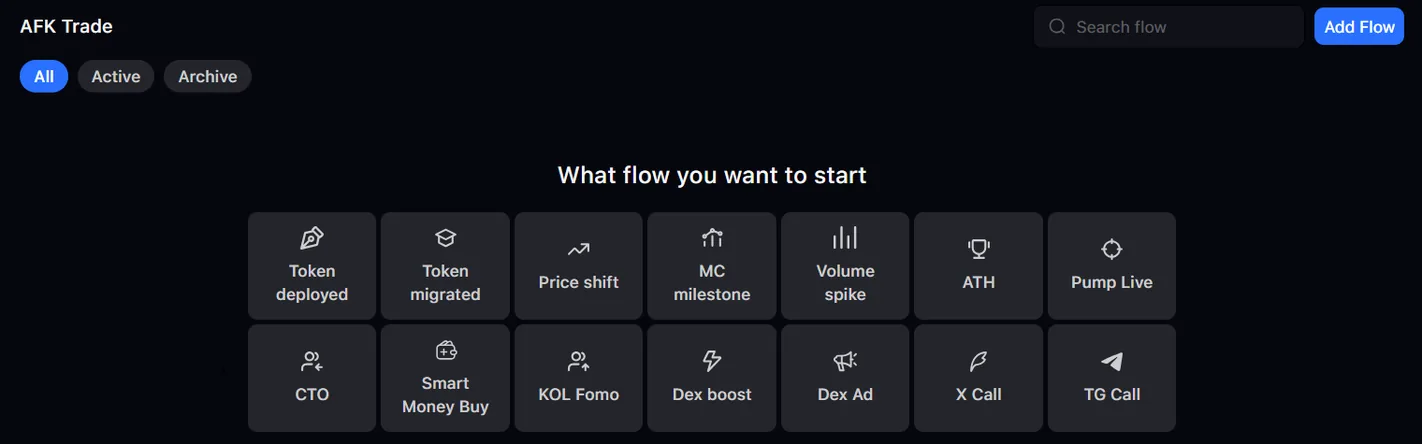
- When it startsA trigger can be a token event: just created, just landed on a DEX, hit a market cap level, broke a previous high, price or volume spiking within 5 minutes, got a CTO, is Pump Live. It can also be someone else's action: Smart Money or a KOL entering a trade, someone running an ad or boosting a token on DEX Screener, a Telegram channel or X account posting a token address. With several triggers attached, any one of them is enough.
- What the token must meetAll conditions must be satisfied at once. You choose from basic info (name, ticker, platform), market metrics (market cap, volume, liquidity, number of snipers, number of holders) and holding structure (share held by the dev, insiders, bundlers, snipers, top 10…).
- What to do when it passesBuy on one wallet or several, optionally with TP/SL and a trailing stop. Sell orders are sized as a % of the tokens the flow just bought.
AFK Trade is powerful but easy to misconfigure: a Filter that's too loose paired with a trigger like newly created token means the flow can keep buying nonstop. Test with small amounts and always attach TP/SL in the Action step.
Five account tiers decide your fees, cashback and commission
MevX fees are tied to account tier, and the fee level is the same on every chain. There are five tiers, going from Beginner through Silver, Gold, Platinum up to Diamond, and each tier changes three numbers:
- Fee per trade0.9% at Beginner, dropping with each tier down to 0.7% at Diamond.
- CashbackRefunds from 6% to 35% of the fees you paid; the higher the tier, the bigger the rebate.
- Commission from people you inviteFor people you invite directly (level 1), commission goes from 17% up to 25%.
Both cashback and commission are paid in USDC, and you claim them whenever you like. One easy-to-forget point: MevX's docs say referral commission left unclaimed for more than 1 month gets reset, so anyone with users coming through their link should claim regularly.
Points to level up come from trading, from people you refer, and from Challenges, which are daily, weekly and seasonal missions. Each Race also awards points to the team with the highest volume. Tiers aren't permanent: every 30 days MevX reviews them, and anyone short on points gets demoted.
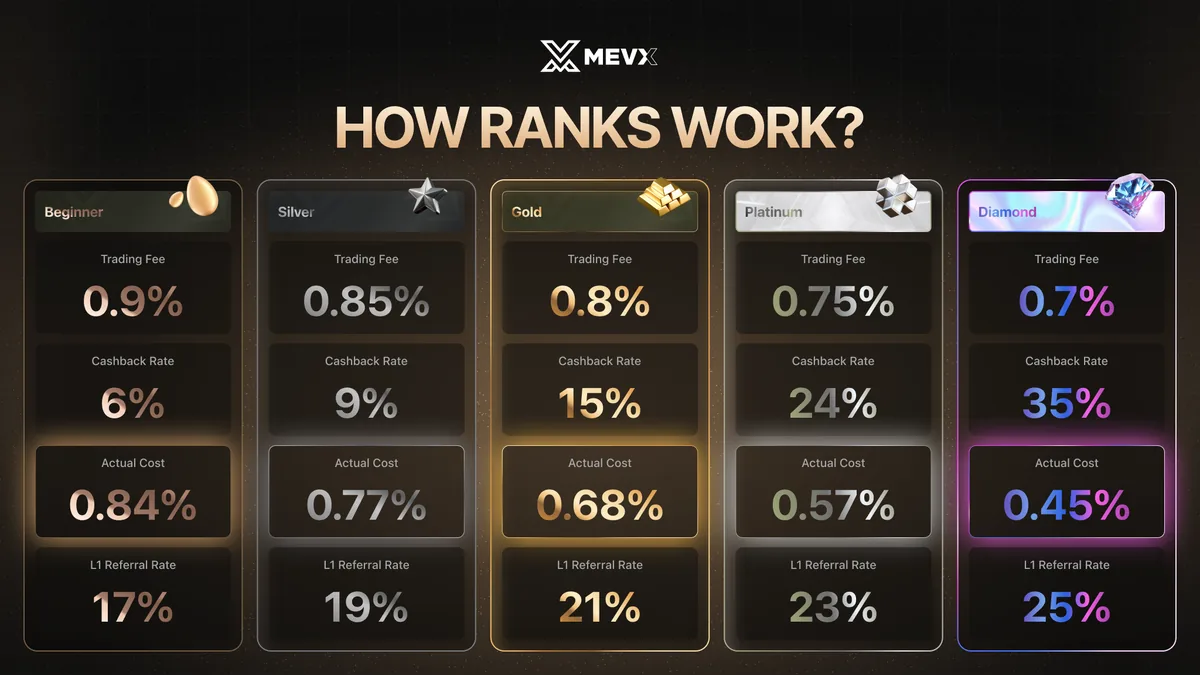
On top of the fee you pay MevX, every trade also costs network fees, plus the tip and priority fee that you set or that Auto Mode picks for you. Here's the effective cost at both ends of the table: a 0.9% fee with a 6% rebate leaves about 0.85% per trade; a 0.7% fee with a 35% rebate leaves about 0.46%. To compare with other bots, see the low-fee bots group.
Keeping your wallet safe and the October 2025 API incident
- Private key shown only onceAccounts created through Google or Telegram get a trading wallet from MevX, and that wallet's private key is shown exactly once. Copy it down, store it somewhere safe, and never send it to anyone.
- Turn on 2FA, use the whitelistGo to Security and turn on two-factor authentication with Google Authenticator. From then on, withdrawing to a wallet that isn't on the whitelist, or editing the whitelist itself, requires a 2FA code. Keep the backup codes safe too.
- Logging in with a walletWhen you log in with Phantom, MetaMask, Rabby or OKX Wallet, your main wallet is used only to sign in, while trades run on a separate secondary wallet that MevX creates, so your main wallet's private key never has to be handed over.
- Right site, right botOnly use mevx.io and only the two bots @mevx and @MevxTradingBot. On the team side, MevX has completed KYC with Assure DeFi.
On the incident: on Oct 25, 2025, MevX announced it had patched a vulnerability in a transfer API supplied by a third party. They promised to reimburse 100% to anyone affected within 24 hours, published the list of affected wallets and opened a form to request refunds. The image posted with the announcement says the wallets on the list had been fully refunded. MevX did not disclose how much was lost.
MevX then said Verichains was auditing them, and that affected wallets would trade fee-free for two weeks, from Nov 1 to 15, 2025. We couldn't verify the refunds on-chain ourselves, because MevX gave no link to any refund transaction.
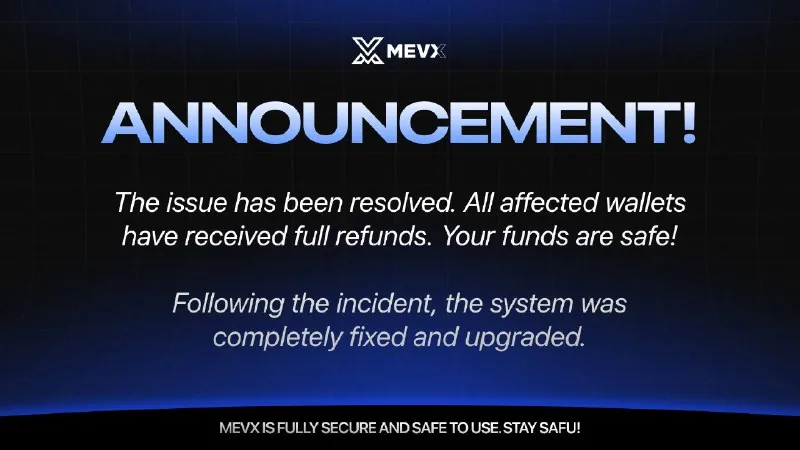
The handling has some plus points: publishing the wallet list, promising full reimbursement within a day, waiving fees for affected wallets, and an audit from Verichains. The minus is that two things outsiders could use to check for themselves are missing: the loss figure and the on-chain refund transactions.
GemsRadar verdict: strengths, weaknesses, who it suits
- Broad, yet one accountSix chains, three ways in (web, Telegram, Extension); everything from token discovery and holder checks to bridging is built in, with no need to open other tools.
- Multi-layer automationCopy trade with three ways to size buys and several filter layers, Sniper with two modes and Auto Renew, Auto Buy in Degen Zone, AFK Trade that runs even when you shut your computer off.
- Pending orders built for memecoinsLimit by market cap, DCA with a market cap range, trailing stop, Dev Sell, plus buying and selling across wallet groups.
- Fees drop with tier, with room to practiceFees down to 0.7% at the top tier, cashback up to 35% of fees, and Demo Mode to practice with virtual funds first.
- Newcomers pay the highest rateThe Beginner tier pays 0.9%. Getting down to 0.7% takes accumulating points, and every 30 days your tier gets reviewed; fall short on points and you drop.
- Commission has a claim deadlineReferral commission left unclaimed for more than 1 month gets reset.
- A lot to learnEvery tool has its own settings: presets, Anti-MEV, Auto Mode that exists only on Solana, the Filter and Watcher in AFK Trade. Newcomers can easily miss a field.
- Docs mixed with outdated infoSeven chains were dropped on Jul 18, 2026, while older docs may not have been updated to match.
- Incident not fully verifiedThe October 2025 API vulnerability has no loss figure and no refund transaction links to cross-check.
Suits traders who work mainly on the web, trade on a few chains among Solana, BNB Chain, Ethereum, Base, Monad or Robinhood Chain, and want to hand part of the work to the machine: copy trade, sniping, AFK rules. People running many wallets benefit from Wallet Group and Multi-Wallet Mode; Telegram group owners also get a signal bot with their own referral link pre-attached.
Doesn't suit people who want something truly simple, a few clicks and done: many MevX tools only pay off when you're willing to tune each setting. If that's you, open the bot comparison table before choosing.
Getting started with MevX: create an account, back up your key, start small
- Go to mevx.ioOpen MevX through the GemsRadar referral link below. Going through this link, you don't pay any extra fees.mevx.io
- Create an account, store your private keyClick Connect Telegram and then the Log in button the bot sends back; or use Google, or connect a wallet. A trading wallet is created automatically, and its private key appears only once: copy it down right away, then turn on 2FA in the Security section.
- Deposit a little, test smallDeposit ETH, BNB or SOL into the wallet, making sure to pick the right network. Practice first with Demo Mode, or make one small buy, set up one small copy wallet, and only then increase your funds.
Through our referral link, at no extra cost.
Open MevXScreenshots taken on November 16, 2026; the interface may change. Not investment advice: memecoins are high-risk, only use money you can afford to lose.